
October 21, 2026

An AI skill that turns technical concepts into interactive isometric SVG, WebGL, and 3D illustrations.
MITClaude CodeText InputImage OutputCode Output
npx skills add wheresryan22/anatomy -g -a claude-code/anatomy explain how a token bucket rate limiter works, interactiveProduct facts
- Type
- AI Skill & Agent
- Category
- AI & Machine Learning › Prompt Engineering & Skill Management
- Pricing
- Open source
- Platforms
- Claude Code
- License
- MIT
- Launched
- Oct 21, 2026
- Listed
- Oct 21, 2026
- Website
- github.com
Overview
Anatomy is an open-source Agent Skill for generating detailed, interactive isometric illustrations that explain real-world machines or complex systems. Originally built for Claude Code, it also works with Antigravity, OpenCode, Codex, and MiniMax Code.
Core Concept
When asked to explain a technical concept, Anatomy visualizes it as a physical object. For example, it might represent cache-key skipping of unchanged work as a pin tumbler lock, or a single GPU context serving multiple canvases as a gantry plotter. The resulting illustrations consist of dozens of finely shaded parts, placed inside cards with titles, hints, and live readouts, supporting mouse and keyboard interaction.
Output Types
- SVG: The core format. Draws solid isometric parts with four-tone shading, rendered back-to-front. Can be output as standalone HTML pages, inline-styled
.svgfiles, or React/Next.js components. - SVG + WebGL: Used for effects lines can't draw (fire, exhaust, water ripples, caustics, lighting). WebGL shaders run in a canvas sandwiched between two SVG layers, sharing the same isometric camera. The SVG portion still displays correctly even without WebGL.
- 3D (beta): Supports true 3D rotating parts, such as turning dials or bending fingers. Moving parts are reprojected and shaded every frame while the rest stays static.
Technical Details
Written in JavaScript and open-sourced under the MIT license. No API keys required, no third-party packages—only Node.js built-in modules. All illustrations offer light and dark themes, with light as the default design baseline. Every example page can be experienced by opening the .html file directly in a browser.
Key features
- Concept Visualization: Transforms abstract technical concepts into interactive mechanical or system models grounded in physical logic.
- Pure SVG Output: Generates isometric SVG illustrations with four-tone shading, exportable as HTML, SVG files, or React components.
- WebGL Effects: Renders visuals hard to achieve in SVG—fire, water, lighting—via WebGL shaders.
- 3D Animated Parts: Beta feature supporting real 3D motion like dial rotation or part detachment, reprojected and shaded per frame.
- Multi-Agent Compatibility: Works with Claude Code, Antigravity, OpenCode, Codex, and MiniMax Code.
- Zero External Dependencies: Uses only Node.js built-in modules—no extra npm packages or API keys needed.
- Light & Dark Themes: All generated illustrations support switching between light and dark themes.
- Interaction & Animation: Generated graphics support mouse hover, drag, and keyboard controls with eased animations.
- Self-Validation: Automatically zooms in to inspect every joint, ensuring graphic data matches the underlying model driving the parts.
Releases
Notify me Initial · Anatomy
Q&A
- How do I install Anatomy?AI-generated
- Install it via the `npx skills add` command. For example, to install for Claude Code: `npx skills add wheresryan22/anatomy -g -a claude-code`. The CLI will prompt you to select a target agent, or you can specify one directly with the `-a` flag.
- How do I use it after installation?AI-generated
- In Claude Code, Antigravity, OpenCode, or MiniMax Code, type `/anatomy` followed by your description, e.g., `/anatomy explain how a token bucket rate limiter works, interactive`. In Codex, use the `$anatomy` command.
- Do I need to configure an API key?AI-generated
- No. Anatomy requires no API keys and no `npm install` dependencies—it uses only Node.js built-in modules.
- Which output formats are supported?AI-generated
- Three formats: pure SVG (exportable as HTML, `.svg` files, or React/Next.js components), SVG combined with WebGL (for rendering effects), and 3D mode (Beta, supporting true 3D rotation of parts).
- What are the runtime requirements?AI-generated
- Node.js version 20.10 or higher is required. The project has no third-party dependencies.
Bookmark
Screenshots & demo
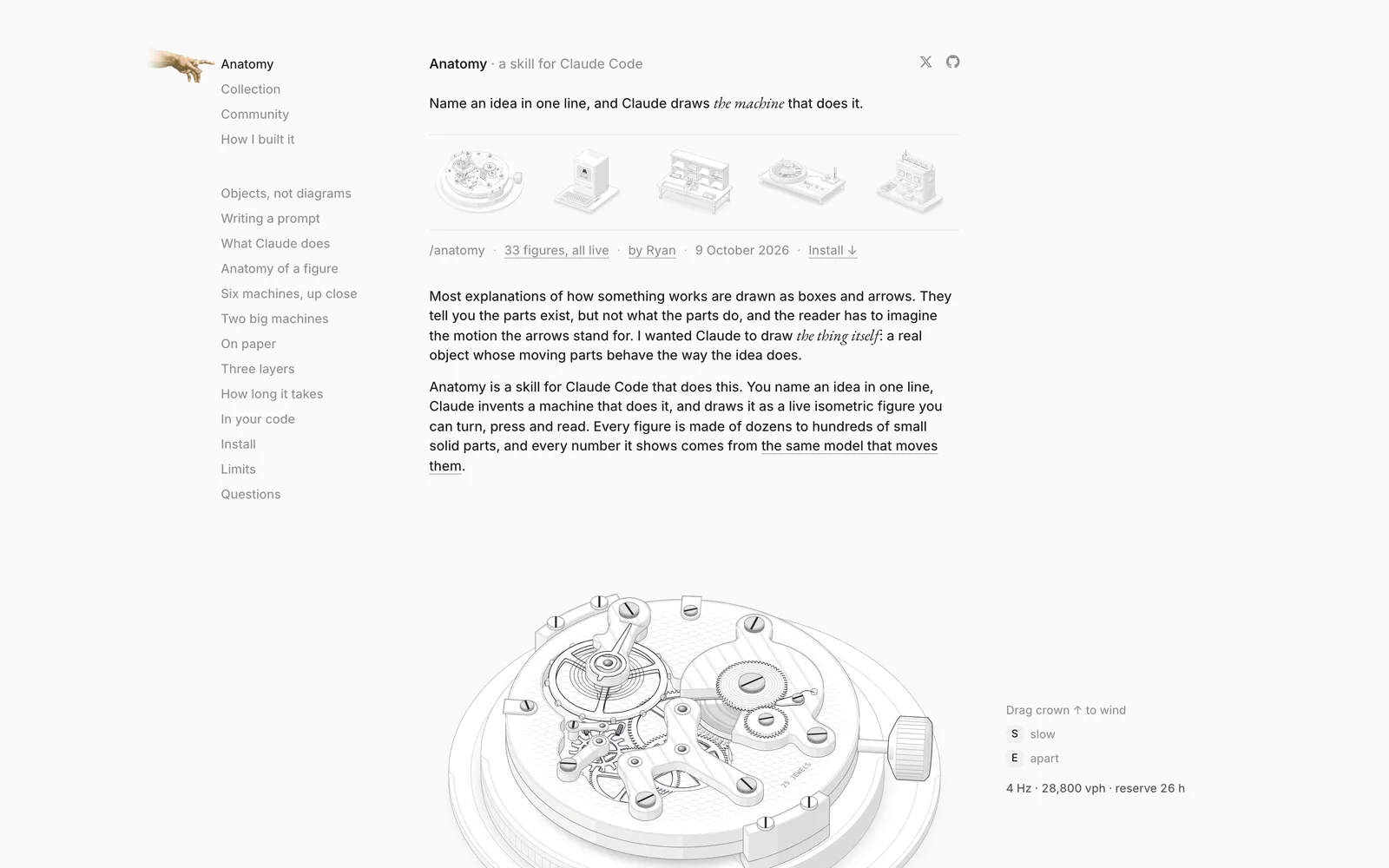 1 / 2
This product has no owner yet
It was listed by the platform or its author left. If it is your work, prove your relationship to become the owner.
Claim this productAlternatives
teardown
A Claude Code skill that turns any machine into a disassemblable offline 3D simulator.
Released 2 weeks ago49
Open Source

YouTube Skills for AI Agents
Equips AI agents with YouTube transcript retrieval, video search, channel browsing, and playlist extraction.
Released last month9
Freemium

OpenClaw Agent Skills
Reusable, shared workflow skills for coding agents like Codex and Claude Code.
Released last month4
Open Source
AWS Agent Skills
Localized engineering knowledge skill pack for Claude Code and Codex, covering 18 AWS services
Released last month2
Open Source

Replica Skill
11 free Claude skills to reverse-engineer, rebuild, test, and improve any app.
Released 3 weeks ago39
Open Source

Vibe Security
An Agent Skill for auditing common security vulnerability patterns in AI-assisted applications.
Released last month4
Open Source

libtv-skills
A skill pack for AI Agents that provides AIGC capabilities such as image and video generation via the LibLib.tv OpenAPI.
Released last month18
Open Source

video-shotcraft
An AI video skill for Claude Code and Codex that turns product pages into editable promo videos using Remotion.
Released 4 weeks ago34
Open Source
Kotlin Agent Skills
A collection of AI agent skills following the Agent Skills standard for Kotlin projects.
Released last month7
Open Source

Higgsfield AI Skills
A skill set that equips AI coding agents with image and video generation, plus full visual brand system creation.
Released last month3
Open Source
The product content on this page was translated by AI from the author's original.