
November 11, 2026
dsh-image-gen
A DeepSeek Harness plugin that lets the AI agent generate, edit, and compare images directly within chat conversations.
Apache-2.0macOSWindows
 1 / 7
Product facts
- Type
- Extension & Plugin
- Category
- Creativity & Media › Image Generation
- Pricing
- Open source
- Platforms
- macOS · Windows
- License
- Apache-2.0
- Launched
- Nov 11, 2026
- Listed
- Nov 11, 2026
- Website
- github.com
Overview
dsh-image-gen is a native image creation plugin for DeepSeek Harness (DSH). Rather than adding a standalone image generation button to the interface, it enables the DSH Agent itself to plan and execute image generation tasks through natural language conversation.
Core Capabilities
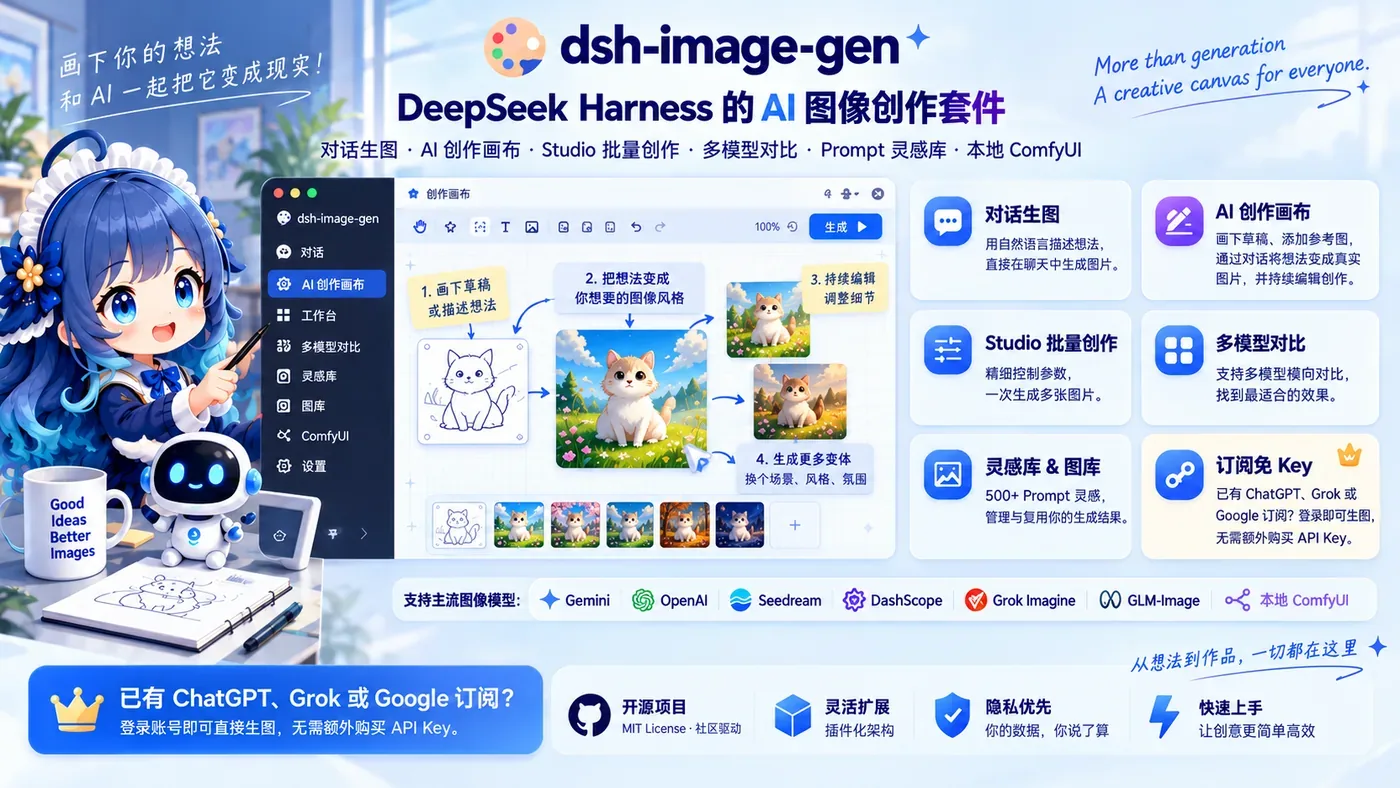
- Batch Image Generation via Chat: Users can request multiple images in a single message. The Agent breaks down the prompt, generates up to 10 images sequentially, and collects them into one reply. If one image fails, the others continue processing, and failed attempts are retried automatically.
- AI Canvas with Sketch Understanding: An infinite canvas allows users to draw rough sketches or place reference images. The Agent reads the canvas content and current selection area directly, enabling workflows like converting stick figures into finished illustrations or modifying only a circled region of an existing image without altering the rest.
- Prompt Library Integration: The plugin includes over 500 built-in prompts. The Agent can search this library to find appropriate style templates based on user requests before generating images.
- Multi-Model Comparison: Users can instruct the Agent to run the same prompt across different models concurrently and display the results side-by-side on the canvas for comparison.
- GIF Animation: When using supported models like GPT Image 2.6, users can generate looping GIF animations. Frame count (2–16) and duration (20–2000 ms) are configurable. GIFs play directly in chat cards with playback speed controls and frame-by-frame timeline navigation.
- Character Consistency: During image-to-image edits, the plugin instructs the model to retain the original subject while changing scenes, clothing, poses, or styles.
- Version Switching: Users can modify the original prompt to regenerate an image and switch between historical versions within the same card.
Supported Providers
The plugin supports multiple providers: Gemini, OpenAI / Compatible, Seedream, DashScope, Grok Imagine, GLM-Image, and local ComfyUI. Users with existing ChatGPT, Grok, or Google subscriptions can log in directly to use text-to-image and image-to-image features without purchasing separate API keys. For ComfyUI, users import API Format Workflow JSON files and switch between workflows via the UI.
Installation & Requirements
Requires DeepSeek Harness stable version and Node.js ^22.19.0 or >= 24.0.0. Installed via the command line using pnpm dsh plugin --profile web add dsh-image-gen@latest. Configuration is handled through the DSH plugin panel where users select providers, input API keys or log in, test connections, and pull available models.
Key features
- Chat Batch Generation:Generate up to 10 images in a single message; the Agent plans prompts and handles failures individually.
- AI Canvas Editing:Draw sketches or circle areas on an infinite canvas for the Agent to interpret and modify directly.
- 500+ Prompt Library:Built-in prompt library that the Agent searches to apply suitable style templates automatically.
- Multi-Model Comparison:Run the same prompt across different models concurrently and compare outputs side-by-side.
- GIF Animation Support:Generate looping GIFs with configurable frame counts and durations using supported models.
- Character Consistency:Maintain the same subject across image-to-image edits while changing scenes or styles.
- Subscription Login:Use existing ChatGPT, Grok, or Google subscriptions directly without needing separate API keys.
- ComfyUI Integration:Connect to local ComfyUI instances by importing API Format Workflow JSON files.
- Version Switching:Regenerate images from modified prompts and toggle between historical versions in one card.
- One-Click Model Pull:Fetch all supported image generation models from a selected provider without manual lookup.
Releases
Notify me Initial · dsh-image-gen
Q&A
- What environment is required to install dsh-image-gen?AI-generated
- It requires a stable version of DeepSeek Harness and Node.js ^22.19.0 or >= 24.0.0. It is installed via pnpm or dsh CLI commands.
- Do I need to buy an API key to use this plugin?AI-generated
- Not necessarily. If you have an existing ChatGPT, Grok, or Google subscription, you can log in directly through the plugin configuration to use text-to-image and image-to-image features without an API key.
- How does batch generation differ between chat and Studio modes?AI-generated
- Chat batch generation has the Agent plan a set of different images based on a single request. Studio batch generation uses the same prompt to produce multiple candidates for the user to select from.
- Which image generation providers are supported?AI-generated
- Supported providers include Gemini, OpenAI / Compatible, Seedream, DashScope, Grok Imagine, GLM-Image, and local ComfyUI.
- Can I edit specific parts of an image?AI-generated
- Yes. Using the AI Canvas, you can circle a specific area of an existing image and tell the Agent what to change. Only the selected region will be modified.
- How do I configure ComfyUI with this plugin?AI-generated
- Enter a service address accessible by the DSH Host in the plugin settings and import API Format Workflow JSON files. Multiple workflows can be imported and switched between in the UI.
Bookmark
This product has no owner yet
It was listed by the platform or its author left. If it is your work, prove your relationship to become the owner.
Claim this product