
October 14, 2026
Mzu 3D Solar System
A free interactive 3D solar system simulator. Explore planets, switch to true scale, and roam in first person—all in your browser.
Product facts
- Type
- Web App / SaaS
- Category
- Education & Research › Scientific Computing and Simulation
- Pricing
- Free
- Launched
- Oct 14, 2026
- Listed
- Oct 14, 2026
- Website
- 3dsolarsystem.net
Overview
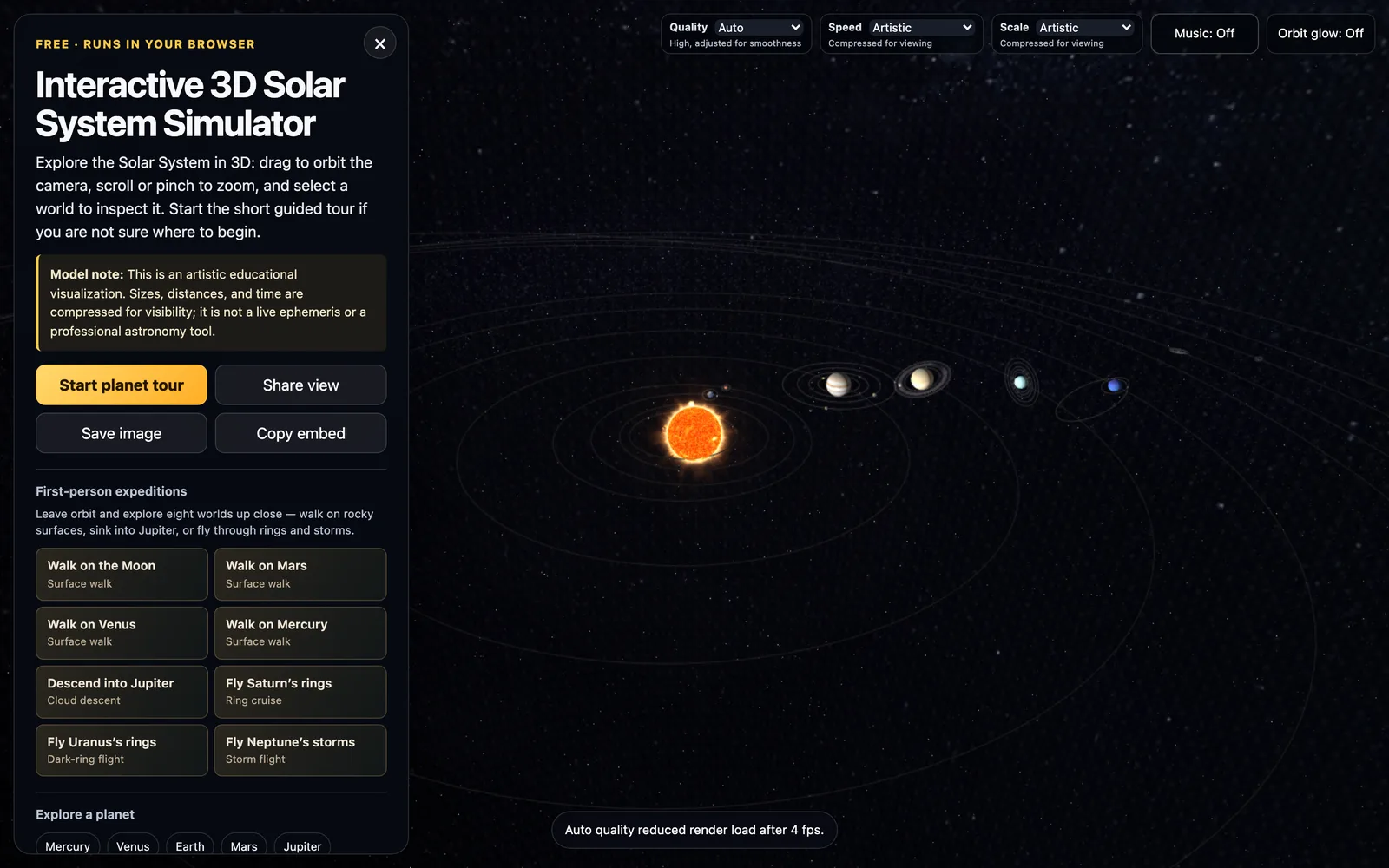
Mzu 3D Solar System is a free WebGL-based web app for interactively exploring the solar system in your browser. Designed for education and astronomy enthusiasts, it offers 3D visualizations of the Sun, eight planets, major moons (such as the Moon, Phobos, Deimos, and Jupiter's Galilean moons), and Saturn's rings. **Core Capabilities** - **View Controls & Tour**: Drag to rotate, scroll or pinch to zoom, and click any celestial body to see data like radius, distance from the Sun, and orbital eccentricity. A built-in short planetary tour is ideal for first-time users. - **Multi-Scale Switching**: The default view compresses sizes and distances so everything fits on screen. Use the Scale menu to switch to Real distances, Real sizes, or True scale to observe the solar system's actual proportions. - **Time Speed Control**: The Speed menu supports rates from per hour to per year per second, with planets moving according to their real orbital and rotational periods. - **First-Person Roaming**: Leave the orbital view to walk on the surfaces of the Moon, Mars, Venus, and Mercury, descend into Jupiter's clouds, or fly over Saturn's rings, Uranus's dark rings, and Neptune's storms. - **Sharing & Embedding**: Save the current view as an image, generate a shareable link, or use Copy embed to get iframe code for embedding into other websites or teaching pages. **Notes** Officially described as an artistic educational visualization tool, not a real-time ephemeris or professional astronomy software. Planetary starting positions do not reflect the actual sky on any given day, so it cannot be used for stargazing tonight. Planetary data comes from the NASA Planetary Fact Sheet. No download, registration, or plugin installation is required. It works on both desktop and mobile browsers. On older mobile devices, set Quality to Low or Auto to maintain frame rates.
Key features
- 3D Solar System Browsing: Drag to rotate and zoom to view the Sun, eight planets, major moons, and Saturn's rings.
- Celestial Body Data: Click any body to view its radius, distance from the Sun, orbital eccentricity, and more.
- True Scale Switching: Toggle between the compressed view and real distances, real sizes, or true scale.
- Time Speed Control: Set speeds from per hour to per year per second, running on real orbital periods.
- First-Person Roaming: Walk on the Moon or Mars, or fly through Jupiter's clouds, Saturn's rings, and Neptune's storms.
- Planetary Tour: A short guided tour introducing each planet.
- Share & Embed Views: Export the current view as a link, image, or iframe code for sharing and embedding.
- Quality Settings: Four quality options—Auto, High, Balanced, and Low.
- Mobile Support: Touch-friendly with one-finger rotation, two-finger zoom, and tap-to-select bodies.
Releases
Notify me Initial · Mzu 3D Solar System
Q&A
- Is this 3D solar system built to true scale?AI-generated
- Not by default. At real distances, planets would shrink to invisible dots, so sizes and distances are compressed. Select Real distances, Real sizes, or True scale from the Scale menu to view actual proportions.
- Does it show the planets' actual positions today?AI-generated
- No. Planets move along their orbits, but their starting positions aren't based on a real-time ephemeris, so you can't use it to locate planets in tonight's sky. It's mainly for comparing sizes, distances, and orbital periods.
- Is it free? Do I need to install anything?AI-generated
- It's completely free and runs in any modern browser that supports WebGL—no downloads, account sign-ups, or plugins required.
- Can I explore the surfaces of other planets?AI-generated
- Yes. First-person roaming lets you walk on the Moon, Mars, Venus, and Mercury, descend into Jupiter's clouds, and fly over Saturn's rings, Uranus's rings, and Neptune's storms.
- Does it work on phones and tablets?AI-generated
- Yes. It supports one-finger drag to rotate, two-finger pinch to zoom, and tap to select. On older devices, set Quality to Low or Auto to reduce detail and keep things smooth.
- Can I use it in class or embed it on my website?AI-generated
- Yes. Use Share view to copy a link to a specific planet, or use Copy embed to get iframe code for embedding into a class page or blog.
Bookmark
This product has no owner yet
It was listed by the platform or its author left. If it is your work, prove your relationship to become the owner.
Claim this productAlternatives



The product content on this page was translated by AI from the author's original.