
October 22, 2026

A browser-based AI 3D model generation and editing workspace for creating, refining, and converting 3D files from text or images.
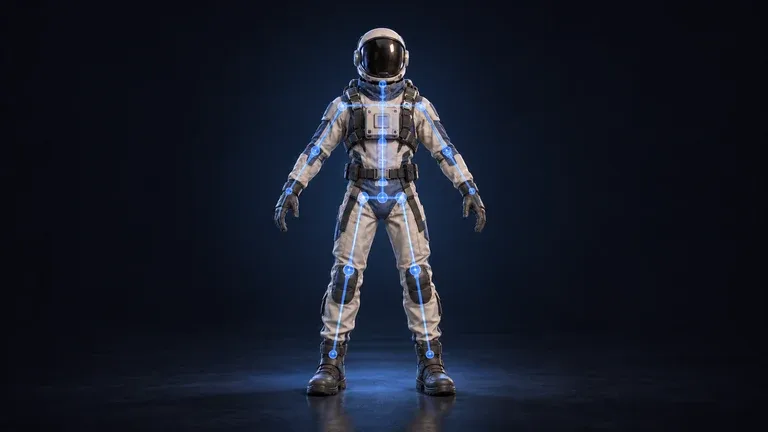 1 / 8
Product facts
- Type
- Web App / SaaS
- Category
- Creativity & Media › 3D Modeling and Animation
- Pricing
- Free trial
- Launched
- Oct 22, 2026
- Listed
- Oct 22, 2026
- Website
- novagen3d.com
Overview
NovaGen3D is a browser-based AI 3D model generation platform designed for modeling products, props, characters, and more. Without installing local modeling software, users can complete the entire workflow—from initial mesh generation to subsequent refinement—via cloud processing.
Input Methods
The platform supports multiple starting points:
- Text to 3D: Enter a 1–1000 character text description to generate a GLB model.
- Image to 3D: Upload a single PNG, JPG, JPEG, or WebP reference image to infer surfaces outside the camera view.
- Multi-view to 3D: Provide multiple views of the same object (2–8 images, depending on the selected model) for generation.
Available Generation Models
Switch between multiple AI models within a single account, with no need to set up separate environments for each:
- Auto: Automatically matches the appropriate model based on your input, with base or Pro quality options.
- Hunyuan 3D: Accepts text or multi-view image inputs and outputs textured or geometry-only GLB files, with optional PBR materials.
- Tripo: Supports text, single-image, or 2–4 view inputs, allowing independent settings for geometry and texture quality.
- Rodin: Offers Fast and Standard modes; Standard mode includes additional quality tiers and a High Pack option.
- Hitem3D: Image input only, with separate object and portrait modes plus Fast and Pro quality options.
- Trellis: Single-image input only.
Model Editing & Animation
For existing GLB files (up to 100 MB), the platform provides these tools:
- Texture generator: Regenerate textures for an existing model using one appearance reference image.
- Separate parts: Split a model into independently selectable mesh components, with adjustable boundaries in the editor.
- Auto rigging: Add bones and skin weights to A-pose or T-pose humanoid GLB files (no animation clips included).
- Apply animations: Apply animations from a preset library to static humanoid models (up to 10 motions from 38 presets), outputting a separate GLB for each motion.
Viewing & Format Conversion
The built-in 3D Viewer opens GLB, GLTF, OBJ, STL, PLY, FBX, 3MF, DRC, and other formats, keeping files on your local device. The converter exports GLB files up to 100 MB as GLTF, OBJ ZIP, STL, PLY, or static USDZ, with conversion performed locally.
Key features
- Text to 3D: Enter a 1–1000 character text description to directly generate a 3D model in GLB format.
- Image to 3D: Upload a single reference image to generate a 3D model, automatically inferring surface structures outside the camera view.
- Multi-view to 3D: Upload 2–8 multi-view images of the same object for more precise 3D generation.
- Multi-model switching: Use multiple AI models—including Hunyuan 3D, Tripo, Rodin, Hitem3D, and Trellis—within a single account.
- Texture generator: Upload a GLB file (up to 100 MB) and a reference image to regenerate textures for an existing model.
- Separate parts: Split a GLB model into independently selectable and editable mesh components.
- Auto rigging: Automatically add bones and skin weights to A-pose or T-pose humanoid GLB files.
- Apply animations: Apply up to 10 motions from 38 presets to a static humanoid model, outputting a separate GLB for each.
- 3D Viewer: View GLB, OBJ, STL, FBX, and other formats in your browser, with files kept on your local device.
- Format conversion: Convert GLB files up to 100 MB into GLTF, OBJ ZIP, STL, PLY, or static USDZ.
Releases
Notify me Initial · NovaGen3D
Q&A
- Does NovaGen3D require software installation?AI-generated
- No. NovaGen3D is a browser-based workspace that uses cloud processing for AI generation, so there's no need to install any local modeling applications.
- Which AI generation models are supported?AI-generated
- Auto, Hunyuan 3D, Tripo, Rodin, Hitem3D, and Trellis are supported. Text to 3D works with the first four, while Image to 3D supports all six.
- Can I retexture an existing 3D model?AI-generated
- Yes. Texture generator accepts a GLB file up to 100 MB and a PNG, JPG, or JPEG appearance reference image to regenerate textures.
- What's the difference between Auto rigging and Apply animations?AI-generated
- Auto rigging adds editable bones and skin weights to a humanoid model without animation clips. Apply animations applies motions from a preset library, builds a new skeleton for the model, and outputs a separate GLB for each motion.
- Is format conversion done in the cloud?AI-generated
- No. GLB format conversion runs locally on your device.
- What are the image count requirements for Multi-view to 3D across different models?AI-generated
- Hunyuan 3D accepts 2–8 annotated-view images (Front preferred); Tripo accepts 2–4; Hitem3D accepts 2–4; Rodin accepts 2–5.
Bookmark
This product has no owner yet
It was listed by the platform or its author left. If it is your work, prove your relationship to become the owner.
Claim this productAlternatives

3DLogoLab
Turn 2D logos into 3D spinning animations. Export as video or 3D models—no design skills required.
Released yesterday2
Freemium
Hi3D
An AI-powered 3D model generation platform that quickly creates printable, high-fidelity 3D models from text or images.
Released last month6
Freemium

千面动捕
A web app that captures any motion from any video
Released last month2
Paid

Sand3D
An open-source dataset of 100,000 code-written 3D assets, designed specifically for LLMs.
Released yesterday4
Open Source

oakleaf3d Image to STL Converter
An AI-powered web tool that converts PNG or JPG images into 3D-printable STL models.
Released last month2
Freemium

Plask Motion
An AI-powered motion capture tool that converts ordinary videos into 3D animations—no mocap suit required.
Released last month1
100% Free

Tencent Hunyuan 3D
An all-in-one AI creation platform for 3D content powered by the Tencent Hunyuan 3D generative foundation model, supporting text-to-3D, image-to-3D, and more.
Released last month3
Free trial

Hyper3D Rodin
An AI tool that generates high-quality 3D models from text or images, supporting multiple export formats and workflow integrations.
Released yesterday3
Free trial
Yazai芽仔
An all-in-one AI creation platform for game artists and teams, offering image generation and collaboration from 2D to 3D.
Released last month13
Freemium

来画LAiPIC AI
An AI animation and 3D content creation platform for global creators and businesses, automatically generating videos and interactive experiences from your ideas or assets.
Released last month2
Freemium
The product content on this page was translated by AI from the author's original.