
October 16, 2026

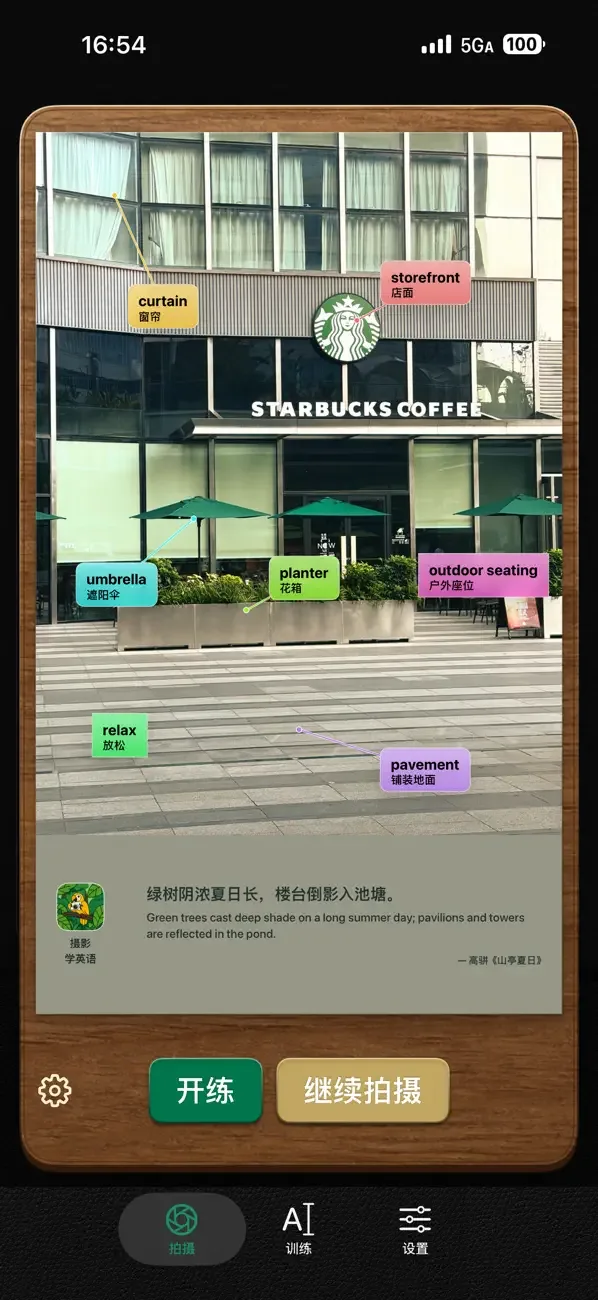
Turn everyday photos into English learning materials. Recognize objects in images to generate bilingual vocabulary flashcards.
iOS
 1 / 4
1 / 4Product facts
- Type
- Mobile App
- Category
- Education & Research › Language Learning
- Pricing
- Freemium
- Platforms
- iOS
- Launched
- Oct 16, 2026
- Listed
- Oct 16, 2026
- Website
- apps.apple.com
Overview
摄影学英语 is an educational app for iPhone developed by jianzhao Li. It takes photos you capture or select from your album, recognizes the objects and scene vocabulary within them, and generates study cards with bilingual Chinese-English labels. ### Core Features - **Photos to Flashcards**: Take a photo or import one from your album. The app recognizes the content, extracts the corresponding English vocabulary, and creates illustrated cards. - **Spelling & Read-Along Practice**: Practice spelling words based on the generated photo cards, and reinforce memory by reading along with example sentences. - **Dual Recognition Modes**: Choose between on-device offline recognition and online AI models. According to user reviews, offline speech recognition is built on the Apple ecosystem; release notes also mention optional local Qwen model and DeepSeek configurations. - **Local Data Management**: Photos, cards, and learning progress are all managed locally on your device. Supports automatic incremental backups via WebDAV, as well as LAN web access. ### Additional Features - **Shushu Survival**: A word-spelling adventure game in the Lab module. Combine deck words, images, and pronunciation to earn gear, featuring survival challenges and battle sound effects. Progress for the current round can be restored after exiting. - **Official Decks**: Offers official content such as the "Programmer Interview Deck" available as a one-time purchase (¥18.00) with free updates in future versions. - **Home Screen Widgets & Dynamic Island**: Switch between words on the Home Screen and Dynamic Island, synced with your current practice status in the app. - **Export & Share**: Export cards as GIFs or videos. ### Who It's For Ideal for learners who want to build English vocabulary through everyday visual scenes. The app requires iOS 17.0 or later, is compatible with iPhone, iPad, and iPod touch, and is rated 13+. Core features are free, while some official decks require in-app purchases to unlock.
Key features
- Photo-to-Flashcard: Take a photo or pick one from your album to recognize objects and scenes, generating bilingual Chinese-English cards.
- Spelling & Read-Along Practice: Practice spelling words using photo cards and reinforce memory by reading along with example sentences.
- On-Device & Online Recognition: Supports offline on-device recognition or online AI models for vocabulary extraction.
- Local Data Management: Photos, word lists, and learning records stay on your device, with automatic incremental WebDAV backup.
- Shushu Survival Word Adventure: A lab mini-game where you combine deck words, images, and pronunciation to spell for gear, with progress saving.
- Official Deck Purchases: Access decks like the "Programmer Interview Deck" with a one-time purchase and free future updates.
- Widgets & Dynamic Island: Switch words on the Home Screen and Dynamic Island, synced with your in-app practice progress.
- Card Export: Export vocabulary cards as GIFs or videos.
- LAN Web Version: Supports mobile hotspot and auto port selection, letting you share an access link directly from the training page.
Releases
Notify me Initial · 摄影学英语
Q&A
- Is this app free?AI-generated
- The app is free to download and use, but includes in-app purchases. For example, the "Programmer Interview Deck" requires a one-time purchase of ¥18.00.
- Which devices and OS versions are supported?AI-generated
- Requires iOS 17.0 or later and is compatible with iPhone, iPad, and iPod touch. The store page notes it is designed for iPhone only.
- Can I use it offline?AI-generated
- Yes, on-device offline recognition is supported. User reviews note that speech recognition works offline via the Apple ecosystem, and release notes mention an optional local Qwen model.
- Can I import my own word lists?AI-generated
- Based on user feedback, importing custom word lists is not currently supported.
- How is learning data backed up?AI-generated
- It supports automatic incremental backups via WebDAV, with photos and learning progress managed separately.
Bookmark
This product has no owner yet
It was listed by the platform or its author left. If it is your work, prove your relationship to become the owner.
Claim this productAlternatives

The product content on this page was translated by AI from the author's original.