
October 13, 2026

ParkerLabel
A lightweight, CPU-only AI-assisted interactive annotation tool for object detection and instance segmentation.
GPL-3.0
Product facts
- Type
- Web App / SaaS
- Category
- Data & Analytics › Data Labeling
- Pricing
- Open source
- License
- GPL-3.0
- Launched
- Oct 13, 2026
- Listed
- Oct 13, 2026
- Website
- github.com
Overview
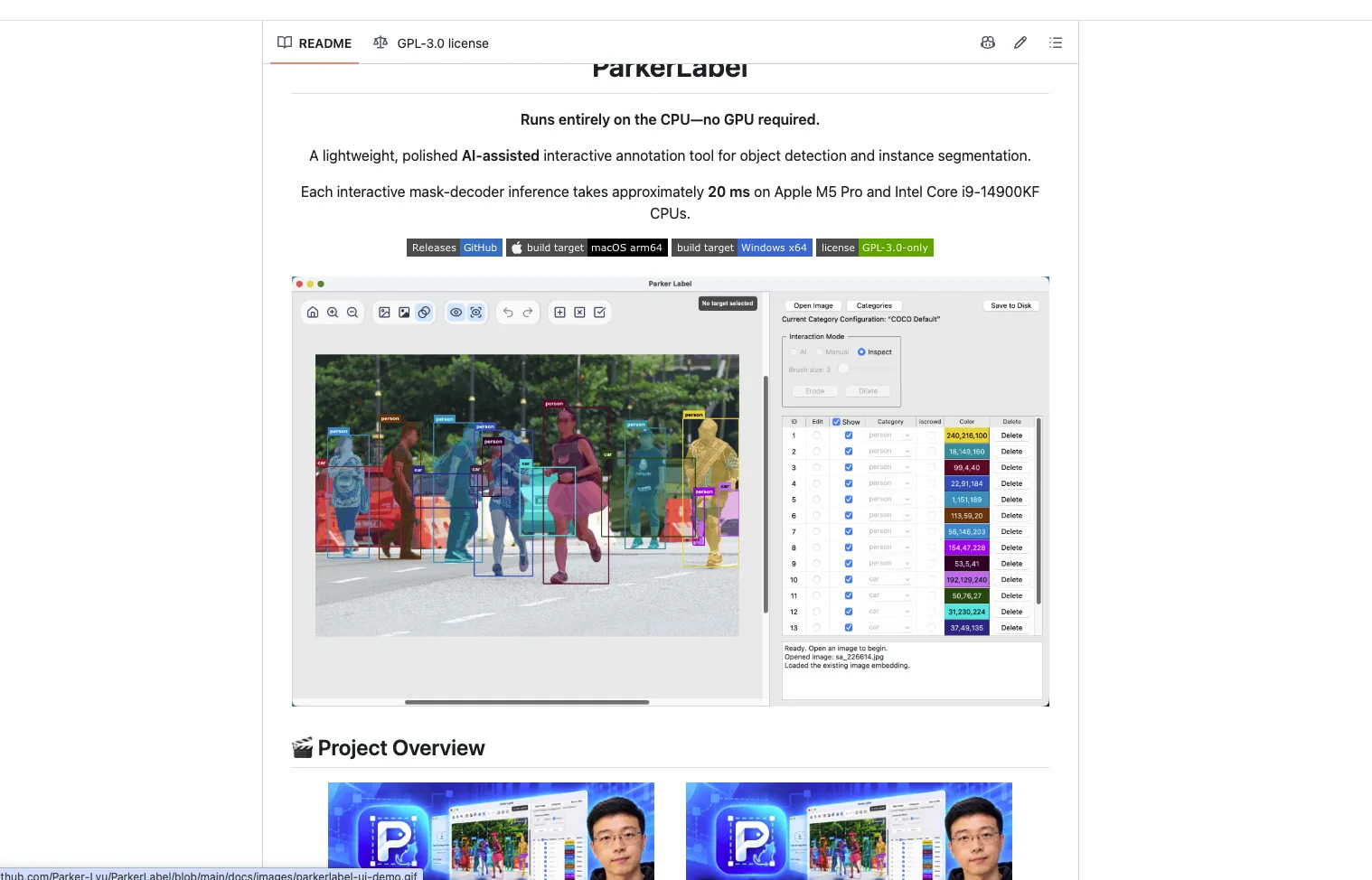
ParkerLabel is a Python-based AI-assisted interactive image annotation tool designed primarily for object detection and instance segmentation. Its core feature is that it runs entirely on the CPU, requiring no GPU support. On CPUs such as the Apple M5 Pro and Intel Core i9-14900KF, each interactive mask-decoder inference takes about 20 ms. ### Key Capabilities - **AI-Assisted Annotation**: In AI mode, users guide the MobileSAM model with positive and negative clicks to generate masks for the current object. - **Multi-Mode Switching**: Offers three working modes—AI, Manual, and Inspect—with default shortcuts Q, W, and E respectively. - **Category Configuration Management**: Includes a built-in read-only configuration of 80 standard COCO categories. Users can create an empty configuration or duplicate an existing one to generate a new version. Saved configurations are immutable; modifications require duplication to produce a new version. - **Data Integrity Verification**: Each annotation is bound to a specific category configuration via UUID and SHA-256 digest. If the active configuration doesn't match, the app prompts you to switch; if the configuration is missing or verification fails, annotations open in read-only mode. - **Multilingual Interface**: Supports Simplified Chinese, Traditional Chinese, English, Japanese, Korean, German, French, Italian, and Spanish. ### File & Storage Formats Each source image corresponds to three adjacent files: - `.npy`: Stores reusable image embeddings. - `.json`: Stores the category, bounding box, area, and uncompressed COCO RLE mask at source resolution for each instance. This JSON uses COCO annotation fields but is not a complete COCO dataset file. - `.mask.png`: Stores a flattened color preview at source resolution. ### Deployment Portable release packages are available for macOS arm64 and Windows x64. You can also run from source by creating a Python 3.11 environment via Conda. The app automatically verifies and downloads missing ONNX models to the `pretrain/` directory. The project is open-sourced under the GPL-3.0 license.
Key features
- CPU-Only: No GPU required. ~20 ms per inference on Apple M5 Pro and Intel i9-14900KF.
- AI-Assisted Interactive Annotation: Guide MobileSAM with positive/negative clicks to generate object masks for detection and instance segmentation.
- Multiple Working Modes: AI, Manual, and Inspect modes with quick switching via shortcuts.
- Category Config Versioning: Built-in 80-class COCO config; duplicate to create new versions. Saved configs are immutable.
- Config Integrity Check: Annotations bind to category configs via UUID and SHA-256, preventing data inconsistency from accidental changes.
- Multilingual UI: Supports 9 languages including Chinese, English, Japanese, Korean, German, French, Italian, and Spanish.
- Custom Shortcuts: View, modify, clear, or restore key bindings in settings; changes take effect immediately upon saving.
- Structured Annotation Storage: Generates .npy, .json, and .mask.png per image. JSON uses COCO field format.
- Portable & Source Builds: Portable packages for macOS and Windows, plus source launch via Conda environments.
- Auto Model Download: Automatically verifies and downloads missing ONNX models to the pretrain directory at startup.
Releases
Notify me Initial · ParkerLabel
Q&A
- Does ParkerLabel require a GPU to run?AI-generated
- No. ParkerLabel runs entirely on the CPU. On Apple M5 Pro and Intel Core i9-14900KF CPUs, each interactive mask-decoder inference takes only about 20 ms.
- Which operating systems are supported?AI-generated
- Portable release packages are available for macOS arm64 and Windows x64. You can also run from source on any supported platform using a Conda environment.
- What format are annotations saved in?AI-generated
- Three files are generated per source image: .npy stores image embeddings, .json stores the category, bounding box, area, and uncompressed COCO RLE mask for each instance, and .mask.png stores a color preview. The JSON uses COCO annotation fields but is not a complete COCO dataset file.
- What should I do if macOS blocks the app on first launch?AI-generated
- The macOS package is ad-hoc signed but not notarized by Apple. After your first attempt to open it, go to System Settings → Privacy & Security, scroll to the Security section, and click "Open Anyway".
- How do I change the interface language?AI-generated
- Change the interface language in-app via Settings → Interface Language. ParkerLabel supports Simplified Chinese, Traditional Chinese, English, Japanese, Korean, German, French, Italian, and Spanish.
- Can category configurations be modified?AI-generated
- Saved configurations are immutable. To make changes, you must duplicate an existing configuration (including the built-in COCO config) into a new version, then edit the new version.
Bookmark
This product has no owner yet
It was listed by the platform or its author left. If it is your work, prove your relationship to become the owner.
Claim this productThe product content on this page was translated by AI from the author's original.