
October 18, 2026

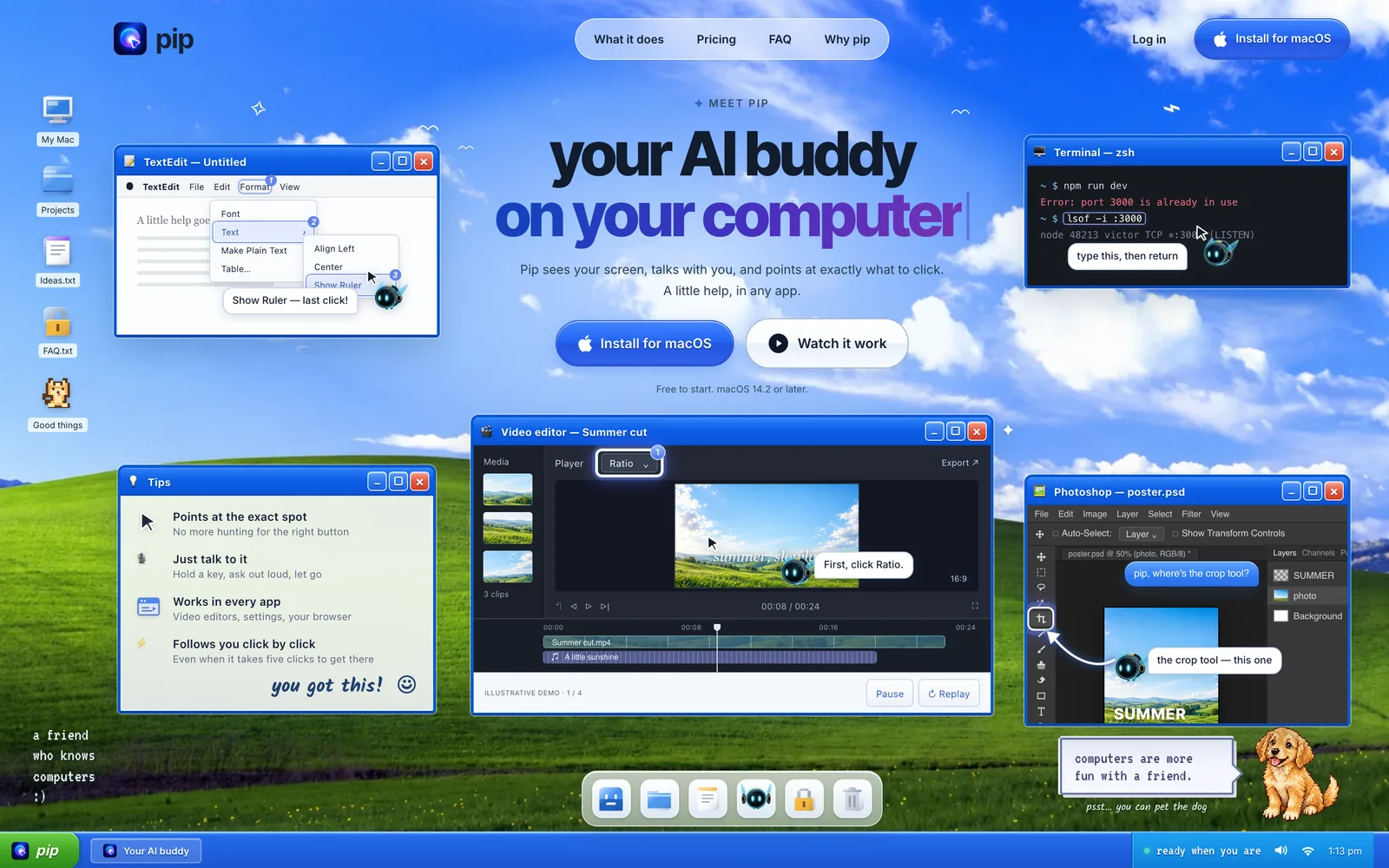
A Mac desktop AI assistant that reads your screen and uses voice to guide you to the right click.
Product facts
- Type
- Web App / SaaS
- Category
- AI & Machine Learning › AI Agents
- Pricing
- Freemium
- Launched
- Oct 18, 2026
- Listed
- Oct 18, 2026
- Website
- hipip.app
Overview
Pip is an AI desktop assistant for macOS. It lives as a glowing icon next to your cursor, helping you work across apps by reading your screen, talking with you, and visually pointing out what to do. **The problem it solves** Many users get stuck in professional software (like video editors or design tools) or the terminal because they can't find a button or don't know a command. Instead of making you describe your screen in a chat window, Pip reads it directly, highlights the control you need to click, and guides you step by step. **Key capabilities** - **Screen recognition & guidance**: Hold a shortcut to ask a question, and Pip highlights the target button or panel on screen, supporting continuous multi-step guidance. - **Voice interaction**: Hold a shortcut to ask by voice, release to hear the answer; you can also point at something and ask "What is this?" - **Terminal assistance**: Describe what you need in natural language, and Pip shows the exact command and explains what it does before you run it. - **System shortcuts**: Adjust volume, toggle dark mode, set timers, check your calendar, and more—no screenshots needed. - **Works across apps**: Works in any Mac app, including browsers, spreadsheets, and design tools, with no per-app plugins required. **Privacy** Pip only captures your screen when you actively trigger it, and screenshots are never stored. Subsequent steps in multi-click guidance run locally and never leave your device. **Who it's for** Ideal for users learning complex software workflows and developers unfamiliar with the terminal. Currently supports macOS 14.2 and later.
Key features
- Screen recognition & guidance: Reads your screen and highlights the button or panel you need to click.
- Multi-step guidance: Follows your clicks and prompts you through each step, even for complex tasks.
- Voice interaction: Hold a shortcut to ask by voice, release to get the answer—no chat windows to manage.
- Terminal assistance: Ask in natural language to see the exact command and an explanation before running it.
- Terminal voice input: Pro and higher plans support voice input in the terminal for Claude Code and Codex.
- System shortcuts: Adjust volume, toggle dark mode, set timers, check your calendar, and more—no screenshots needed.
- Cross-app compatibility: Works in any Mac app by reading your screen like a human eye—no separate plugins required.
- On-demand capture: Only views your screen when you hold the shortcut or ask a question. Screenshots are never stored.
Releases
Notify me Initial · Pip
Q&A
- What is Pip?AI-generated
- Pip is an AI assistant that lives next to your Mac cursor. Hold a shortcut to ask by voice or point at something to ask about it—it answers in one sentence and highlights the exact spot on screen, with no chat window needed.
- Does Pip constantly monitor my screen?AI-generated
- No. Pip only looks at your screen when you hold the shortcut, ask a question after double-tapping it (stopping after one minute max), or type a question. Screenshots are never stored.
- How is my data privacy protected?AI-generated
- Voice is sent to a speech-to-text service, your question and a single screenshot go to the model, and the answer is read aloud via a voice service. Subsequent steps in multi-click guidance run locally on your Mac and never leave your computer.
- Will Pip click the mouse for me?AI-generated
- No. Pip only highlights controls and explains what they do—you do the clicking yourself. It teaches you how to operate your apps while you stay in full control of your computer.
- Can Pip handle simple tasks for me?AI-generated
- Yes. It can lower the volume, enable dark mode, pause playback, set timers, check your calendar, and more—all directly on your Mac without screenshots. Actions that send or delete things will wait for your confirmation first.
- Which apps does Pip support?AI-generated
- Any app on your Mac, including System Settings, browsers, video editors, spreadsheets, and design tools. It reads your screen like a human, so no per-app plugins are needed.
- How much does Pip cost? Can I cancel?AI-generated
- The Free plan offers 30 questions per month, forever free. The Pro plan is $15/month for up to 300 questions, including terminal voice input. The Max plan is $69.99/month for up to 1,000 questions. You can upgrade, switch, or cancel anytime from the Pip menu.
- What are the system requirements?AI-generated
- macOS 14.2 or later is required.
- How can I get help?AI-generated
- Email the team at support@hipip.app for help with bugs, billing, account deletion, and more.
Bookmark
This product has no owner yet
It was listed by the platform or its author left. If it is your work, prove your relationship to become the owner.
Claim this productAlternatives


Subatomic AI
An AI workforce platform offering AI Co-Workers you can onboard, train, and manage just like real employees.
Released 3 weeks ago0
Paid

Creao AI
将重复性工作转化为可自主运行、具备持久记忆的 AI Agent 的工作空间。
Released 3 weeks ago0
Freemium

OnePagent
运行在浏览器单页面中的 AI Agent,支持多模型、MCP 工具、Swarm 协作与本地存储。
Released 3 weeks ago0
Open Source



The product content on this page was translated by AI from the author's original.