
September 27, 2026
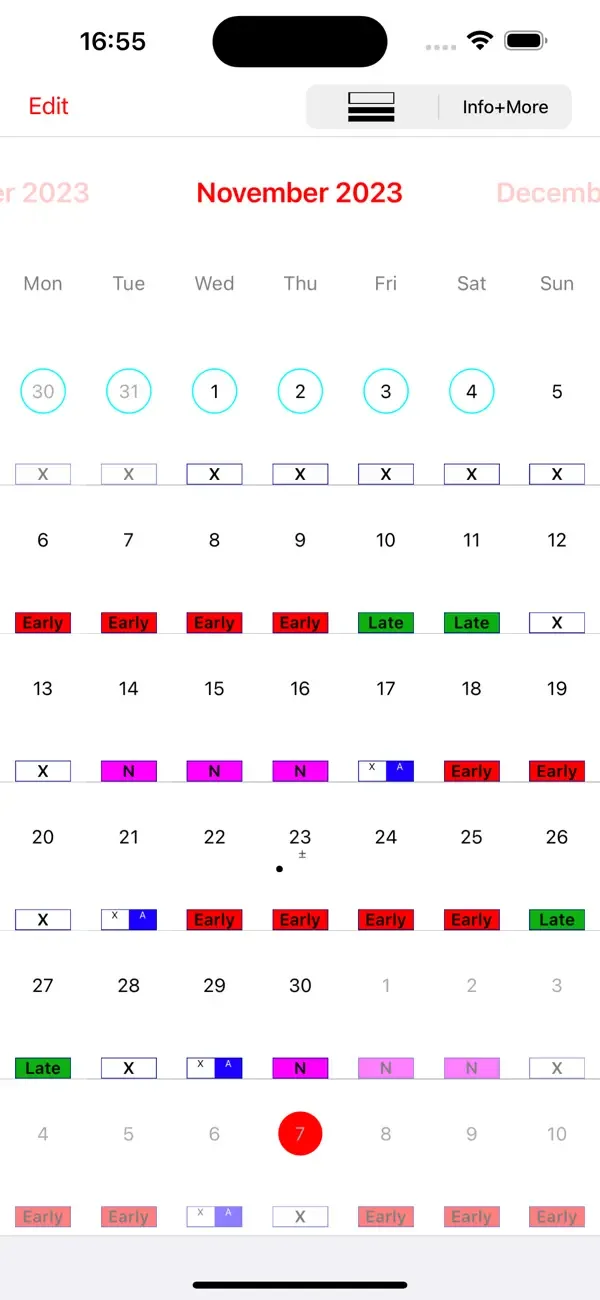
Help shift workers quickly enter early, day, or night shifts into their calendar.
iOS
 1 / 4
1 / 4Product facts
- Type
- Mobile App
- Category
- Productivity & Workflow › Calendar and Time Management
- Pricing
- Paid
- Platforms
- iOS
- Launched
- Sep 27, 2026
- Listed
- Sep 27, 2026
- Website
- apps.apple.com
Overview
轮班表日历 Pro is an iOS business app for shift workers, developed by michael heinz. It helps users quickly enter shift patterns into the device calendar, with customizable shift times, colors, names, and more. ### Core Operations Users simply select a shift type (early, day, or night) and tap the corresponding date to log it. The app supports single taps to add or remove calendar entries, double taps to swap shifts, and automatically adds recurring rotation cycles to your schedule. ### Key Features - **Templates & Customization**: Offers free, editable templates. Users can set work hours, names, and colors, and add notes to any date. - **Export**: Export monthly schedules as PDF files. Update logs show support for exporting annual calendars up to 2027 and 2028. - **Data Sync**: Syncs data via iCloud and allows manual or automatic syncing of schedules with the device's default calendar and notes. - **Overtime Calculation**: According to version history, the app includes overtime calculation features. ### Target Audience Ideal for workers managing complex shift rotations—such as healthcare staff, factory workers, and security personnel—helping them create complete shift patterns in under a minute. ### System & Language Requires iOS 15.6 or later. Compatible with iPhone, iPad, iPod touch, and Apple Vision. Supports 10 languages including Simplified Chinese, English, German, and Japanese. App size: 24.1 MB. Age rating: 16+.
Key features
- Quick Shift Entry: Select early, day, or night shifts and tap dates to log them. Create full shift patterns in under a minute.
- Free Editable Templates: Provides free scheduling templates that you can customize to your needs.
- Single-Tap Add/Remove: Add or remove shift entries in the calendar with a single tap.
- Double-Tap Swap: Double-tap a calendar entry to swap shifts.
- Custom Shift Properties: Customize work hours, names, colors, and other options for each shift.
- Date Notes: Add text notes to any date.
- PDF Export: Export monthly schedules as PDF files.
- iCloud Sync: Match and sync schedule data across devices via iCloud.
- System Calendar Sync: Manually or automatically sync schedules with the device's default calendar and notes.
- Auto-Recurring Cycles: Automatically add recurring rotation cycles to your schedule.
Releases
Notify me Initial · 轮班表日历 Pro
Q&A
- Which devices does this app support?AI-generated
- It supports iPhone, iPad, and iPod touch with iOS 15.6 or later, as well as Apple Vision with visionOS 1.0 or later.
- How much does the app cost?AI-generated
- The base price is ¥22.00, with in-app purchases available. For example, the Website+Extras subscription is ¥6.00, individual add-ons (images, audio, overtime, security, etc.) are ¥8.00 each, and the bundle of all extras is ¥15.00.
- Can I export my schedule?AI-generated
- Yes. The app lets you export monthly schedules as PDF files, and update logs indicate support for exporting annual calendars from 2025 to 2028.
- Which languages are supported?AI-generated
- It supports 10 languages: Simplified Chinese, Russian, German, Italian, Japanese, French, English, Portuguese, Spanish, and Korean.
- How do I edit an existing shift entry?AI-generated
- Single-tap to delete a calendar entry, or double-tap to swap shift entries.
Bookmark
This product has no owner yet
It was listed by the platform or its author left. If it is your work, prove your relationship to become the owner.
Claim this productAlternatives


The product content on this page was translated by AI from the author's original.