
September 27, 2026
A macOS desktop app that helps cross-timezone workers manage world clocks, plan meetings, and view calendars.
macOSiOS
 1 / 4
1 / 4Product facts
- Type
- Desktop App
- Category
- Productivity & Workflow › Calendar and Time Management
- Pricing
- Paid
- Platforms
- macOS · iOS
- Launched
- Sep 27, 2026
- Listed
- Sep 27, 2026
- Website
- apps.apple.com
Overview
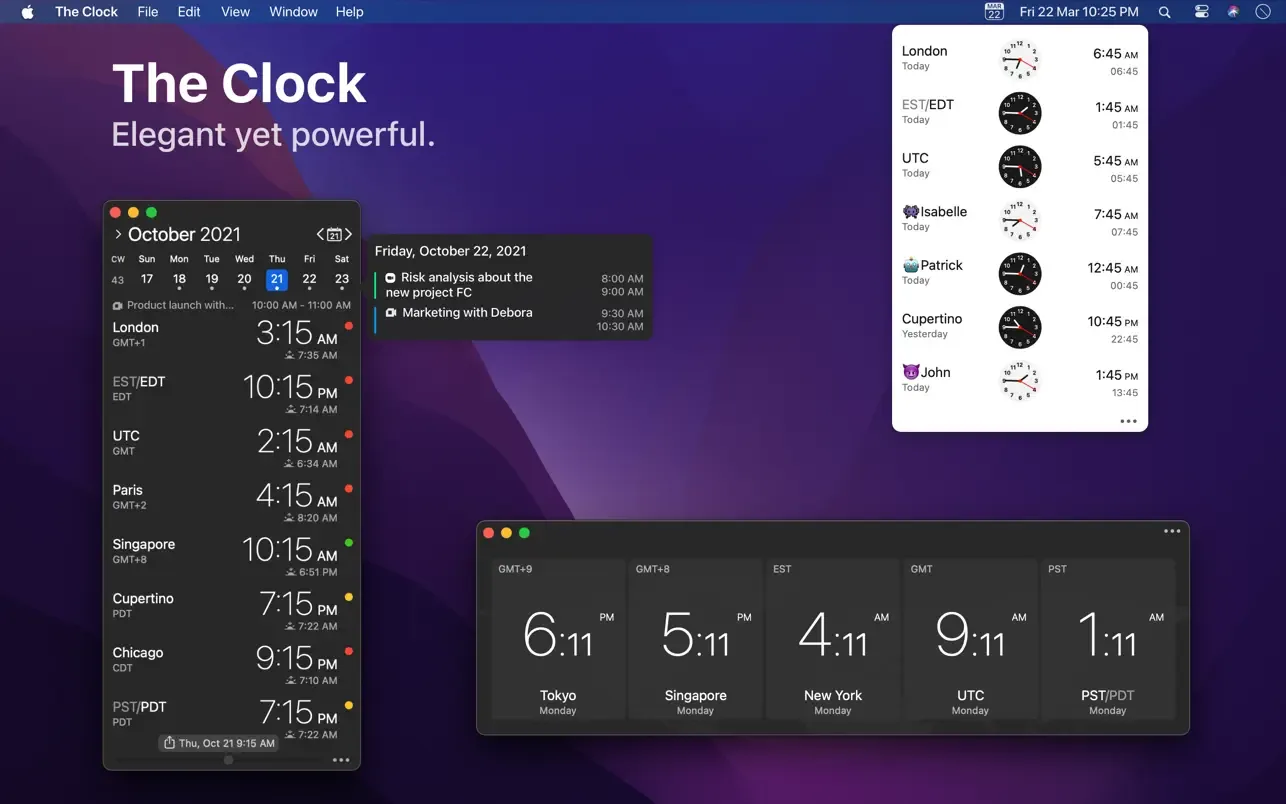
The Clock is a productivity desktop app for macOS developed by Fabrice Leyne, requiring macOS 13 or later. It provides time management tools for users who collaborate with contacts, clients, or subcontractors across different time zones. **Core Features** - **World Clock**: Supports analog or digital dials, customizable to AM/PM or 24-hour format. Users can set the time format and city name individually for each city, and add various complications such as business hours, time zone offsets, and sunrise/sunset times. Clocks automatically adjust for daylight saving time changes (PDT, CDT, MDT, GMT, etc.). - **Meeting Planner**: Offers a time slider to quickly browse different times, along with business hour indicators to confirm whether contacts are within working hours. You can select a date in the calendar for accurate daylight saving adjustments, and the time slider can snap automatically to 15- or 30-minute intervals. Schedules can be exported via copy-paste, the share menu, or drag-and-drop. - **Calendar Integration**: Optionally integrates with macOS Calendar for quick schedule viewing. Supports switching between week and month views, showing or hiding week numbers, and choosing week numbering based on locale settings or ISO 8601. The calendar widget directly displays current and upcoming events. **Additional Features** The app offers four themes (White, Dark, Daisy Blue, Deep Dark) with transparency support, and themes can switch automatically with the system appearance. Windows are freely resizable with responsive layouts, accessible from the menu bar or Dock, and support floating windows. Trackpad gestures let you swipe through times, and it is compatible with Touch Bar and Notification Center widgets. With HandOff, it works seamlessly with The Clock on iPhone or iPad. For accessibility, it supports Voice Over, Dynamic Type font scaling, color-blind friendly mode, and haptic feedback. Settings can be backed up and restored locally, via Dropbox, or iCloud. It also includes break reminders and a companion screen saver.
Key features
- World Clock: Analog and digital dials with per-city custom time formats and automatic daylight saving adjustments.
- Meeting Planner: Schedule cross-timezone meetings using a time slider and business hour indicators.
- Calendar Integration: Optional macOS Calendar integration with week/month views and quick schedule previews.
- Complications: Display business hours, time zone offsets, sunrise/sunset, moon phases, and more on your clocks.
- Multiple Themes: Four themes—White, Dark, Daisy Blue, Deep Dark—that auto-switch with the system appearance.
- HandOff Support: Seamlessly continue work with The Clock on iPhone or iPad via HandOff.
- Trackpad Integration: Swipe on the trackpad to browse different times.
- Touch Bar Support: Compatible with the Mac Touch Bar.
- Notification Center Widgets: Add clock widgets to the macOS Notification Center.
- Break Reminders: Timed break alerts plus a screen saver featuring quotes or a world clock map.
- Accessibility: Supports Voice Over, Dynamic Type, color-blind friendly mode, and haptic feedback.
- Settings Backup & Restore: Back up configurations locally, to Dropbox, or to iCloud.
Releases
Notify me Initial · The Clock
Q&A
- Which operating systems does The Clock support?AI-generated
- The Clock is available only for Mac and requires macOS 13 or later.
- How much does The Clock cost?AI-generated
- According to the App Store page, The Clock costs ¥38.00.
- How do I use it with an iPhone or iPad?AI-generated
- The Clock supports HandOff, allowing seamless collaboration with The Clock on iPhone or iPad.
- Can I customize how the clock is displayed?AI-generated
- Yes. It supports analog or digital dials, AM/PM or 24-hour format, and lets you personalize the time format and city name for each city individually.
- How does the Meeting Planner handle daylight saving time?AI-generated
- You can select a specific date in the calendar, and the Meeting Planner will adjust accurately for daylight saving time accordingly.
- Which accessibility features are supported?AI-generated
- It supports Voice Over, Dynamic Type adaptive font sizing, a color-blind friendly mode, and haptic feedback on supported Macs.
Bookmark
This product has no owner yet
It was listed by the platform or its author left. If it is your work, prove your relationship to become the owner.
Claim this productAlternatives

The product content on this page was translated by AI from the author's original.