
September 27, 2026
A utility app to connect AirPods and other Bluetooth devices to your Mac with a single click or keyboard shortcut.
macOS
 1 / 3
1 / 3Product facts
- Type
- Desktop App
- Category
- Productivity & Workflow › Launchers and Utilities
- Pricing
- Paid
- Platforms
- macOS
- Launched
- Sep 27, 2026
- Listed
- Sep 27, 2026
- Website
- apps.apple.com
Overview
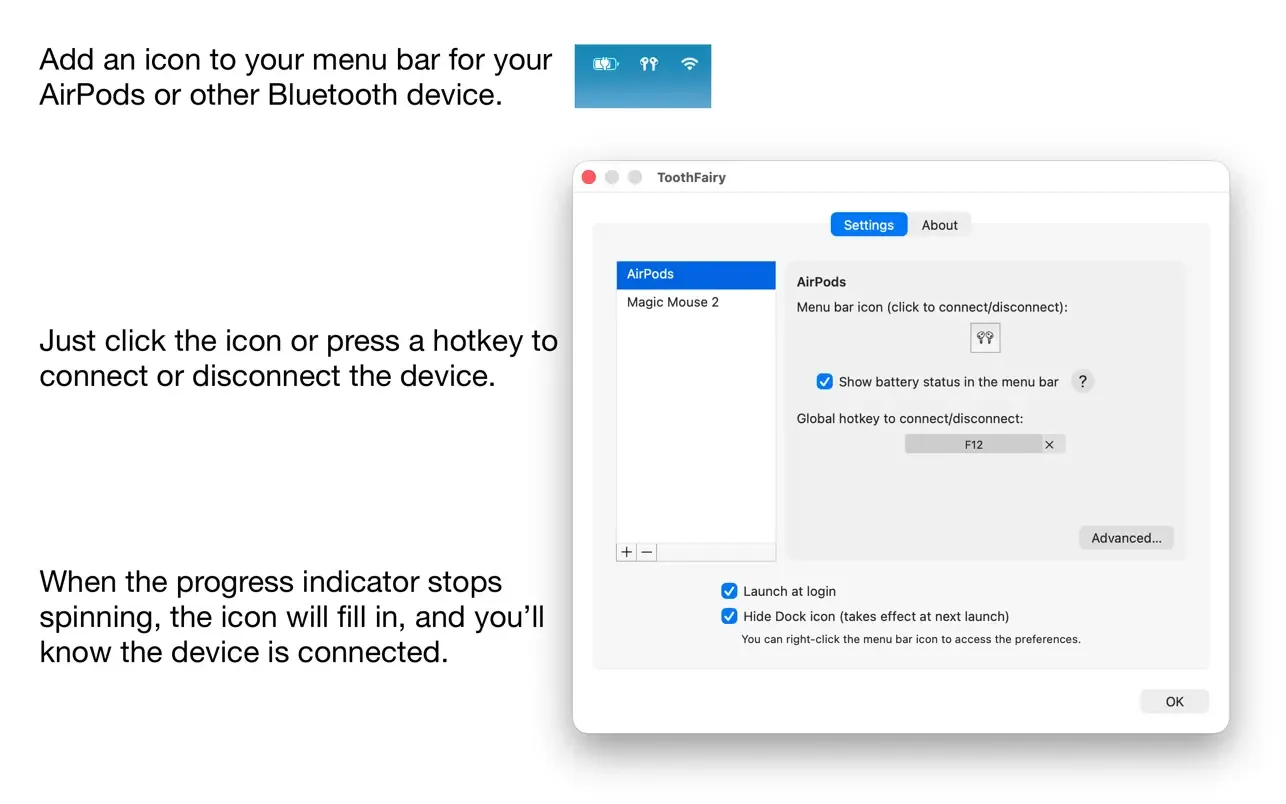
ToothFairy is a macOS desktop utility developed by C-Command Software, LLC that simplifies connecting your Mac to Bluetooth devices. It eliminates the need to repeatedly open menus or Control Center to switch Bluetooth audio devices in macOS. Once installed, you can assign individual menu bar icons to Bluetooth devices such as headphones, mice, and keyboards, making it easy to see connection status and battery levels at a glance. Connect or disconnect with a single click or a custom keyboard shortcut. The app supports multiple Bluetooth audio devices, each configurable with its own icon and shortcut. Regarding audio quality, macOS may default to the SCO codec when it detects microphone use. ToothFairy can force AAC output to improve sound quality when listening to music, watching videos, or gaming. It also supports running shell scripts when a device connects or disconnects—for example, sending notifications or starting and stopping other apps—and supports AppleScript so you can control it from other apps or automation tools. ToothFairy can launch automatically at login, and you can hide its Dock icon so it appears only in the menu bar. Note that the app works only with devices already paired in the macOS Bluetooth menu. HomePod is not supported (it isn't a Bluetooth audio device), and not all devices report battery information to ToothFairy. Requires macOS 10.13 or later.
Key features
- One-Click Connect & Disconnect: Connect or disconnect Bluetooth devices with a single click on the menu bar icon or a keyboard shortcut.
- Menu Bar Status Display: Assign a dedicated icon to each Bluetooth device to show connection status and battery level in real time.
- Multi-Device Support: Manage multiple Bluetooth audio devices simultaneously, with custom icons and shortcuts for each.
- Improved Audio Quality: Force the AAC codec instead of SCO for better audio output when listening to music or watching videos.
- Shell Script Execution: Automatically run shell scripts when a Bluetooth device connects or disconnects, such as sending notifications or launching/quitting apps.
- AppleScript Support: Control ToothFairy and your devices from other apps or automation tools via AppleScript.
- Launch at Login: Start automatically when you log in so it's always ready to use.
- Hide Dock Icon: Optionally hide the Dock icon so the app appears only in the menu bar.
- Broad Device Compatibility: Works with AirPods, headphones, speakers, game controllers, keyboards, mice, and any device that connects via macOS Bluetooth.
Releases
Notify me Initial · ToothFairy
Q&A
- Which Bluetooth devices does ToothFairy support?AI-generated
- It supports any device that can connect to your Mac through the macOS Bluetooth menu, including AirPods, earbuds, speakers, headphones, game controllers, keyboards, and mice. HomePod is not supported because it isn't a Bluetooth audio device.
- How can I improve Bluetooth audio output quality?AI-generated
- macOS often switches to the SCO codec when it thinks you're using the microphone. ToothFairy ensures the higher-quality AAC codec is used when you only need audio output, such as for music, videos, or games.
- Does ToothFairy show battery levels for all devices?AI-generated
- Not necessarily. Not all Bluetooth devices report their battery level, or provide it in a way ToothFairy can read.
- How do I switch a Bluetooth device between multiple Macs?AI-generated
- This requires the Bluetooth device itself to support pairing with multiple computers or phones simultaneously. Current-generation Apple Magic Keyboard, Mouse, and Trackpad don't support this. Make sure the device is already paired with your Mac before using it.
- How much does ToothFairy cost?AI-generated
- According to the store page, ToothFairy costs ¥48.00.
- What are the system requirements for ToothFairy?AI-generated
- It requires macOS 10.13 or later and is available only for Mac.
Bookmark
This product has no owner yet
It was listed by the platform or its author left. If it is your work, prove your relationship to become the owner.
Claim this productAlternatives

PipNow
macOS 画中画工具,把任意窗口一键变成悬浮小窗并置顶在所有应用之上。
Released today0
Freemium

DockThings
一款 macOS 桌面工具,帮助用户将常用文件、文件夹和网站固定在 Dock 面板中以便快速访问。
Released 3 weeks ago1
Paid

AnVirt模拟器
一款无需安装 Android Studio 和 SDK 即可在 Mac 上运行 Android 应用的桌面模拟器。
Released 3 weeks ago2
Paid

Zush
An AI-powered desktop file renaming tool for macOS and Windows that automatically generates filenames based on file content.
Released 3 weeks ago2
Freemium

Caffeinated - 防休眠应用
一款 macOS 菜单栏工具,防止 Mac 进入休眠、屏幕变暗或启动屏保。
Released 3 weeks ago0
Paid

Blackmagic Disk Speed Test
一款用于快速测量和验证磁盘读写性能的 macOS 桌面工具,面向高质量视频工作流。
Released 3 weeks ago0
100% Free
Moom Classic
一款 macOS 窗口管理工具,帮助用户通过鼠标或键盘移动、缩放和排列窗口。
Released 3 weeks ago0
Paid
DeskMat - 一键隐藏整个桌面
一款 macOS 桌面工具,通过虚拟桌垫一键隐藏桌面文件和文件夹,适用于直播、视频会议和屏幕共享。
Released 3 weeks ago0
Paid

PCalc
面向科学家、工程师、程序员和学生的 macOS 多功能计算器应用。
Released 3 weeks ago0
Paid

右键助手专业版 - MouseBoost Pro
为 Mac 用户集成 60 多种右键菜单小工具,提升文件管理与日常操作效率。
Released 3 weeks ago0
Paid
The product content on this page was translated by AI from the author's original.