
September 29, 2026

An AI thumbnail generator for YouTube creators. Quickly create thumbnails from a link, image, or text description.
 1 / 5
1 / 5Product facts
- Type
- Web App / SaaS
- Category
- Creativity & Media › Image Generation
- Pricing
- Freemium
- Launched
- Sep 29, 2026
- Listed
- Sep 29, 2026
- Website
- wthumb.co
Overview
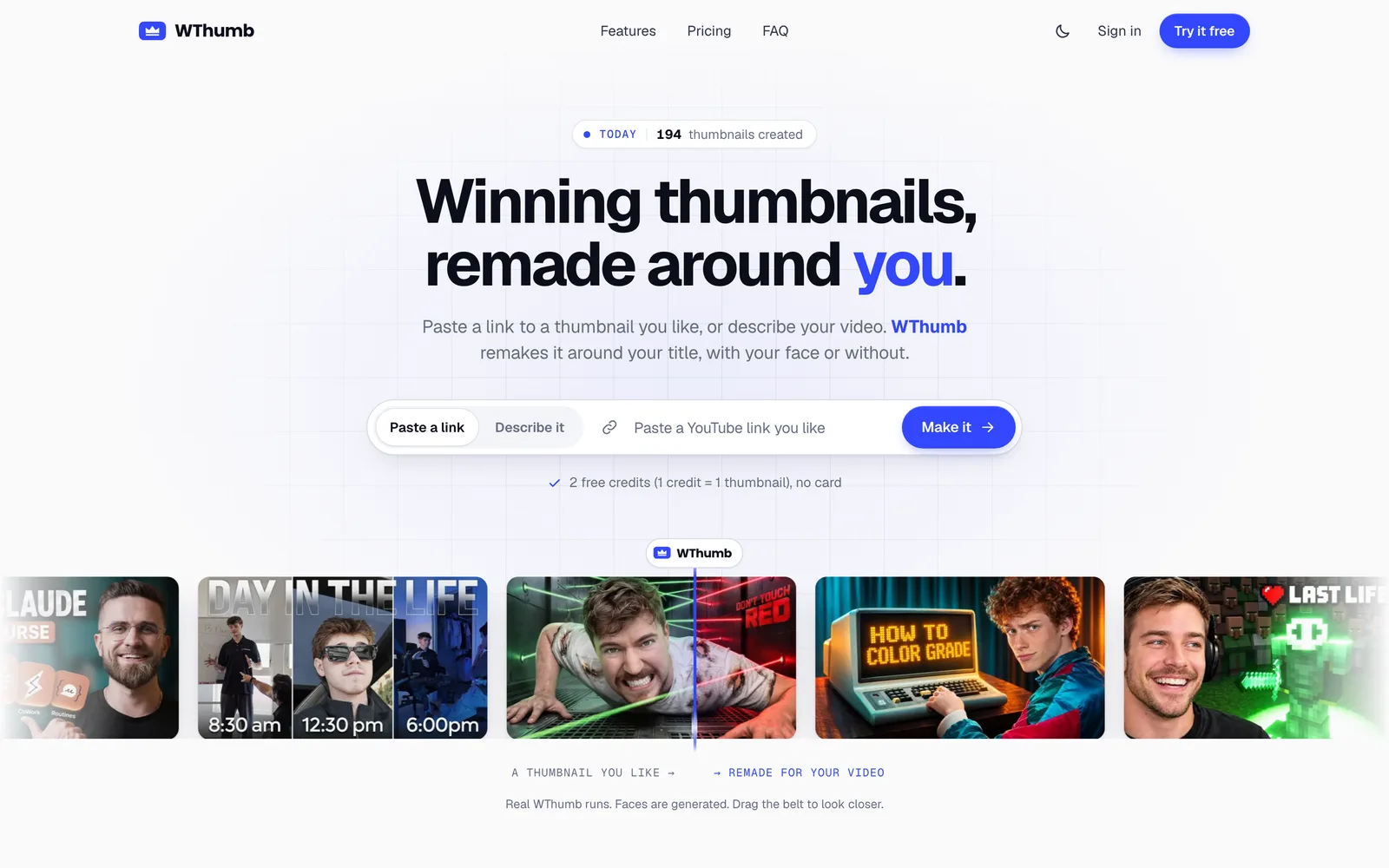
WThumb (Winning Thumbnail) is a web-based AI tool for creating YouTube thumbnails. It helps video creators generate thumbnails for long-form videos (16:9) and Shorts (9:16) without using traditional image editors. ### Core Workflow Users can start the generation process in three ways: - **Paste a YouTube link**: Enter a video link you like. WThumb reads its layout, hierarchy, and visual style, then recreates it around your title. - **Upload an image**: Upload any image as a reference, or add extra assets such as products or logos. - **Text description**: If you have no reference image, simply enter your video title and content description, and let the AI design from scratch. The entire interaction takes place in WThumb Studio through a short conversation. You confirm the format, whether to include a face, the exact copy, and any details to adjust, then click Make to generate. Each generation or edit costs 1 credit. ### Key Capabilities - **Face and Faceless modes**: Save a Persona (name and photo) so the AI blends your face into the thumbnail, or choose Faceless mode— even if the reference contains people, the result will be rebuilt without them. - **Natural language edits**: Click the pencil icon on a generated thumbnail and describe your changes in natural language to get a new version. All previous versions are kept in your gallery. - **High-resolution output**: 16:9 thumbnails export as 2048 × 1152 JPEGs and 9:16 as 1152 × 2048, watermark-free and ready to upload to YouTube. - **Landscape/portrait conversion**: Redesign landscape references into portrait thumbnails and vice versa, rather than simply cropping. - **Multilingual support**: Copy can be entered in any language. ### Thumbnail Inspiration Library WThumb includes a built-in Library of thousands of thumbnails from popular channels. Each thumbnail shows an Outlier score—the multiple by which the video's views exceeded the channel's average. Filter and search by tone, topic, style, mood, object, or color, then jump straight into the recreation workflow with one click. ### Who It's For WThumb is ideal for solo creators, podcasters, and gaming channel operators who lack design skills but need to update their YouTube thumbnails frequently.
Key features
- Link-based recreation: Paste a YouTube video link, and the AI reads its layout and style to regenerate a thumbnail around your title.
- Image reference upload: Upload any image as a design reference, or add extra assets such as products or logos.
- Text-only generation: No reference needed—enter your video title and description, and the AI generates a thumbnail directly from text.
- Face and Faceless modes: Save a Persona photo to appear in your thumbnails, or choose Faceless mode to generate images without people.
- Dual aspect ratios: Supports YouTube 16:9 and Shorts 9:16, designed independently for each frame rather than cropped.
- Natural language edits: Describe changes in plain text for a generated thumbnail, and the AI reprocesses it into a new version.
- High-res, watermark-free: Outputs 2048×1152 or 1152×2048 JPEG files with no watermarks, ready to upload to YouTube.
- Inspiration library: Thousands of trending thumbnails with Outlier scores, filterable by topic, style, color, and more.
- Landscape/portrait conversion: Redesign landscape references into portrait thumbnails, or portrait into landscape.
- Multilingual copy: Text on thumbnails can be entered in any language.
Releases
Notify me Initial · WThumb
Q&A
- How does WThumb work?AI-generated
- Open Studio and paste a YouTube link, upload an image, or describe your video in text. A short conversation walks you through the format, whether to include a face, the copy, and any edits. Confirm and click Make to generate. Only then do you need to sign in with Google or email.
- Do I have to put my own face on the thumbnail?AI-generated
- No. Skip the photo upload and choose Faceless mode. Even if the reference image contains people, WThumb rebuilds the layout without them.
- What resolution are the generated thumbnails?AI-generated
- 16:9 thumbnails are 2048 × 1152 JPEGs and 9:16 thumbnails are 1152 × 2048—both above 1080p, watermark-free, and ready for YouTube uploads.
- Can I edit a thumbnail after it's generated?AI-generated
- Yes. Click the pencil icon on a finished thumbnail and describe your changes in natural language; WThumb generates a new version. Each edit costs 1 credit, and all versions are saved in your gallery. Canvas- or layer-style editing is not supported.
- How is WThumb priced?AI-generated
- Verify your account to get 2 free credits—no credit card required. Paid plans start at $12/month ($9/month billed yearly) across Starter, Creator, and Studio tiers. All plans use the same generator and image quality.
- Which languages are supported? Can others see my thumbnails?AI-generated
- Copy can be entered in any language. Generated thumbnails and uploaded assets are visible only to your account and remain private.
- Can I turn a landscape reference into a portrait thumbnail?AI-generated
- Yes. Choose YouTube 16:9, Shorts 9:16, or both at the start, and WThumb redesigns the composition for the selected frame instead of simply cropping.
- Can I use my own image as a reference?AI-generated
- Yes. Besides pasting a link, you can upload any image as a reference and add extra assets like product photos or logos into the thumbnail.
- What kind of photo works best for upload?AI-generated
- A clear, well-lit face photo, ideally looking straight at the camera. Both studio shots and phone selfies work fine.
- What does the name WThumb mean?AI-generated
- WThumb stands for Winning Thumbnail—W for Winning and Thumb for Thumbnail.
Bookmark
This product has no owner yet
It was listed by the platform or its author left. If it is your work, prove your relationship to become the owner.
Claim this productAlternatives

Inkspo
Free AI tattoo design generator that turns ideas into tattoo art in seconds—no sign-up required.
Released 2 days ago8
Freemium

CPages - Free AI Coloring Page Generator
将文字描述或照片转换为可打印的无水印涂色页,支持 PNG 和 PDF 格式。
Released 3 weeks ago3
Freemium

PIXADO
面向 YouTube 创作者的 AI 缩略图生成与分析工具,帮助提升视频点击率。
Released 3 weeks ago3
Freemium

AI Anime Pro
基于文本提示或参考图生成动漫风格角色、头像与插画的 AI 图像工具。
Released 3 weeks ago3
Freemium

CoverUpInk
Over 300 design ideas for covering old tattoos, plus upload a photo to generate AI cover-up concepts.
Released last week2
Paid

OmniRoom
为家具卖家提供 AI 产品场景图生成工具,一张照片即可生成多种房间场景、角度和视频。
Released 3 weeks ago3
Freemium

fal Agent
面向创作者和团队的 AI 创意助手,跨图像、视频与 3D 模型生成一致的媒体素材。
Released 3 weeks ago3
Freemium

360智图
基于AI识别的图片版权查询与创作平台,为运营、设计师等提供配图服务。
Released 3 weeks ago6
Freemium


The product content on this page was translated by AI from the author's original.