
October 14, 2026
Compositor
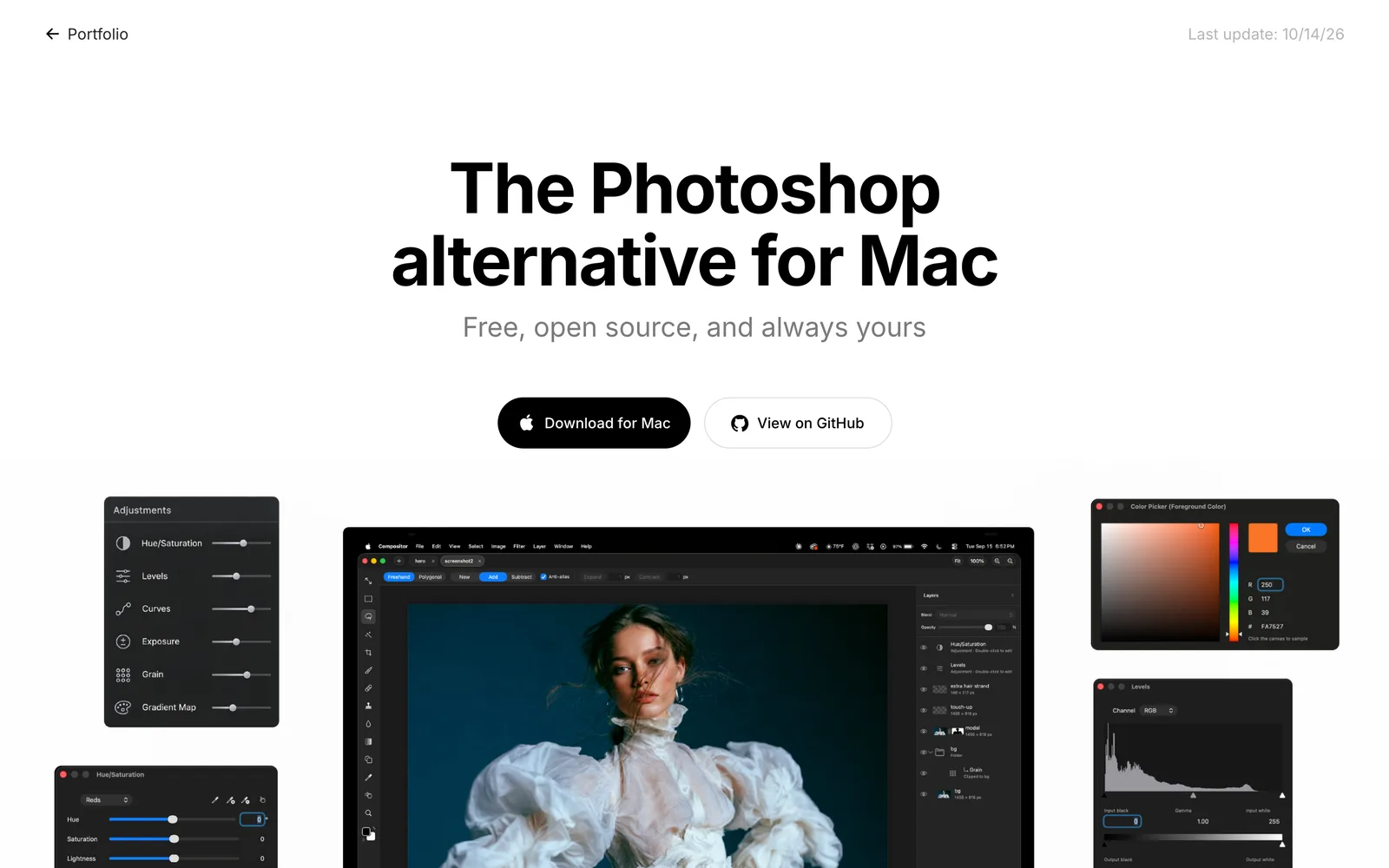
A free, open-source image editor for Mac users, offering Photoshop-like layer compositing and post-processing workflows.
MITmacOS
 1 / 5
1 / 5Product facts
- Type
- Desktop App
- Category
- Creativity & Media › Image Editing
- Pricing
- Open source
- Platforms
- macOS
- License
- MIT
- Launched
- Oct 14, 2026
- Listed
- Oct 14, 2026
- Website
- github.com
Overview
Compositor is a macOS desktop image editing app built with Swift and open-sourced under the MIT license. The author created it because Adobe Photoshop subscriptions are too expensive, while alternatives like GIMP have workflows that disrupt productivity. Its core goal is to provide a fully free, open-source, full-featured image editor designed primarily around image compositing and post-processing workflows, helping users output pixel-perfect final images. **Key capabilities include:** - **Layer system**: Supports layers and folders, opacity, full blend modes, layer masks, clipping masks, various adjustment layers, and GPU-rendered layer effects. - **Non-destructive transforms**: Move, scale, rotate, and flip operations preserve image resolution, with support for free distortion and simultaneous multi-layer transforms. - **Selections and painting**: Offers rectangular, elliptical, lasso, and magic wand selection tools, including content-aware fill; built-in brush, clone stamp, spot healing brush, and other retouching tools. - **Filters and adjustments**: Integrates a Camera Raw filter panel supporting levels, curves, Gaussian blur, motion blur, and more, with live previews. - **File compatibility**: Imports JPEG, PNG, HEIC, TIFF, WebP, SVG, Camera RAW, and Photoshop PSD/PSB files (8-bit RGB); exports to PNG, JPEG, or single-page PDF. - **AI collaboration**: `.comp` project files are essentially folders containing PNG layers and a manifest file, allowing AI agents and scripts to build and edit projects directly, with open projects updating in real time. The app requires a Mac with Apple silicon running macOS 26.0 or later. Currently, only the English interface is supported, and translation PRs are not accepted. You can download the DMG installer from the official website, install via Homebrew, or download the Xcode project to compile and modify features yourself.
Key features
- Full layer system: supports layer folders, opacity, blend modes, layer masks, clipping masks, and various adjustment layers.
- GPU layer effects: stroke, drop shadow, color overlay, inner/outer glow, and more—rendered by the GPU and editable at any time.
- Non-destructive transforms: move, scale, rotate, and flip preserve original resolution, with support for free distortion and synchronized multi-layer transforms.
- Selections and content-aware fill: multiple selection tools, subject selection, expand/contract, and content-aware fill that extends canvas edges.
- Painting and retouching tools: brush, eraser, spot healing brush, clone stamp, blur tool, plus vector shape and text tools.
- Camera Raw filter: built-in panels for light, color, curves, mixer, detail, optics, and geometry adjustments, each independently resettable.
- PSD import: imports 8-bit RGB Photoshop PSD and PSB files, preserving editability of folders, masks, and blend modes.
- Command search: invoke a search box via shortcut to find and run all menu commands and tools by name.
- Multi-tab projects: open and edit different project files simultaneously across multiple tabs.
- AI agent support: project files use a folder structure of PNG layers plus a manifest, so AI agents and scripts can write directly and update the canvas in real time.
- Large file memory adaptation: memory budget scales automatically with Mac hardware; oversized Photoshop files crop layers to the canvas bounds to open properly.
- Custom shortcuts: defaults to Photoshop-like keyboard shortcuts, which users can remap in settings.
Releases
Notify me Initial · Compositor
Q&A
- Which operating systems does Compositor support?AI-generated
- Only Macs with Apple silicon running macOS 26.0 or later are supported.
- How do I install Compositor?AI-generated
- Download the installer from the official website or GitHub Releases, or install via Homebrew using `brew install --cask robbietilton-compositor`.
- Can Compositor open Photoshop PSD files?AI-generated
- Yes, it imports 8-bit RGB PSD and PSB files (CMYK is not supported). Photoshop folders, masks, blend modes, filled rectangles/ellipses, and simple horizontal text remain editable; other vectors and vertical text are rasterized. A conversion report is shown before importing.
- Is Compositor free?AI-generated
- Yes, Compositor is completely free and open source under the MIT license.
- Does it support Chinese or other languages?AI-generated
- Currently only English is supported. Since it's maintained by one person, every new string would require ongoing translation, and languages the maintainer doesn't understand can't be reviewed, so localization PRs are not accepted for now.
- How can AI agents use Compositor?AI-generated
- Compositor's `.comp` project files are essentially folders containing PNG layers and a manifest file. AI agents and scripts can write these files directly to build and edit projects, and already-open projects update in real time.
- Can I modify the software's features myself?AI-generated
- Yes. Since it's open source, you can download the Xcode project and add, remove, or modify any feature to suit your workflow. Xcode 26 or later is required to build from source.
Bookmark
This product has no owner yet
It was listed by the platform or its author left. If it is your work, prove your relationship to become the owner.
Claim this productAlternatives

The product content on this page was translated by AI from the author's original.