
September 27, 2026
Folder Tidy
A macOS desktop tool that organizes messy folders with one click, sorting files into categorized subfolders using built-in or custom rules.
macOS
 1 / 4
1 / 4Product facts
- Type
- Desktop App
- Category
- Productivity & Workflow › Launchers and Utilities
- Pricing
- Paid
- Platforms
- macOS
- Launched
- Sep 27, 2026
- Listed
- Sep 27, 2026
- Website
- apps.apple.com
Overview
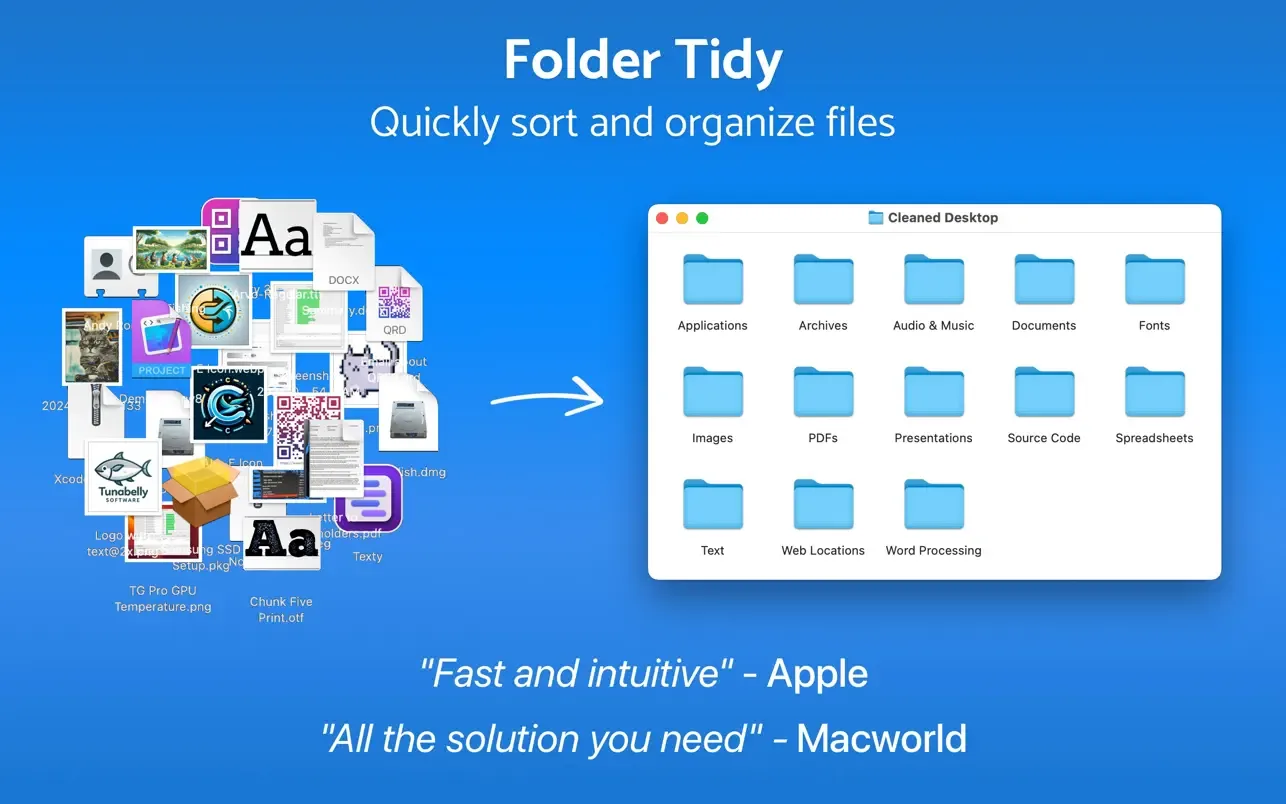
Folder Tidy is a macOS file organization desktop app developed by Tunabelly Software Inc., supporting macOS 10.13 or later. Its main purpose is to automatically sort cluttered folders into different subfolders based on rules. The app offers 22 built-in sorting rules covering common file types such as images, music, spreadsheets, and source code. Users can also create custom rules for more precise sorting—for example, moving images created before a specific date into a designated folder, or grouping Word documents with certain tags. Leveraging multi-core processing, Folder Tidy can handle gigabytes of files. For operational safety, Folder Tidy provides instant undo and historical undo features. If you're not satisfied with the results, the undo button restores all files to their original locations; historical undo lets you roll back previous sorting operations at a later date. Additionally, you can specify which file types to clean up, set exclusions (such as aliases, folders, and tagged items), and choose custom destination paths for sorted files. Recent updates added sorting rules for Markdown, e-books, and 3D model files, support for organizing cloud storage folders, and improved handling of hidden files and empty folders during the undo process. The app is 5.3 MB in size, supports English only, and is priced at ¥38.00.
Key features
- One-Click Organization: Move cluttered files into categorized subfolders with a single click.
- 22 Built-In Rules: Preset sorting rules for various file types including images, music, spreadsheets, and source code.
- Custom Rules: Create advanced sorting rules based on conditions like date and tags.
- Instant & Historical Undo: Restore files immediately via the undo button, or roll back previous sorting operations later.
- Multi-Core Processing: Leverages multi-core power to quickly manage gigabytes of files.
- File Types & Exclusions: Specify which file types to clean up and choose to ignore aliases, folders, or tagged items.
- Custom Destination Paths: Choose where your sorted files should be stored.
- Cloud Storage Support: Organize cloud storage folders with a confirmation dialog before proceeding.
- Remove Empty Folders: Optionally delete empty folders from the source directory after sorting.
Releases
Notify me Initial · Folder Tidy
Q&A
- Which operating systems does Folder Tidy support?AI-generated
- Folder Tidy is a Mac desktop app that requires macOS 10.13 or later.
- What if I'm not happy with the results after sorting?AI-generated
- You can use the undo button to restore all files to their original locations. The app also offers a historical undo feature, allowing you to roll back any sorting operation at a later date.
- How much does Folder Tidy cost?AI-generated
- It is priced at ¥38.00 on the Mac App Store.
- Does Folder Tidy support Chinese?AI-generated
- According to store information, the app currently supports English (EN) only.
- Can it handle large numbers of files?AI-generated
- Yes. Folder Tidy uses multi-core processing technology to quickly manage gigabytes of files.
Bookmark
This product has no owner yet
It was listed by the platform or its author left. If it is your work, prove your relationship to become the owner.
Claim this productAlternatives

PipNow
macOS 画中画工具,把任意窗口一键变成悬浮小窗并置顶在所有应用之上。
Released today0
Freemium

PCalc
面向科学家、工程师、程序员和学生的 macOS 多功能计算器应用。
Released 3 weeks ago0
Paid

右键助手专业版 - MouseBoost Pro
为 Mac 用户集成 60 多种右键菜单小工具,提升文件管理与日常操作效率。
Released 3 weeks ago0
Paid

Zush
An AI-powered desktop file renaming tool for macOS and Windows that automatically generates filenames based on file content.
Released 3 weeks ago2
Freemium

DockThings
一款 macOS 桌面工具,帮助用户将常用文件、文件夹和网站固定在 Dock 面板中以便快速访问。
Released 3 weeks ago1
Paid

AnVirt模拟器
一款无需安装 Android Studio 和 SDK 即可在 Mac 上运行 Android 应用的桌面模拟器。
Released 3 weeks ago2
Paid

ToothFairy
A utility app to connect AirPods and other Bluetooth devices to your Mac with a single click or keyboard shortcut.
Released 3 weeks ago0
Paid
Moom Classic
一款 macOS 窗口管理工具,帮助用户通过鼠标或键盘移动、缩放和排列窗口。
Released 3 weeks ago0
Paid

DeskMat - 一键隐藏整个桌面
一款 macOS 桌面工具,通过虚拟桌垫一键隐藏桌面文件和文件夹,适用于直播、视频会议和屏幕共享。
Released 3 weeks ago0
Paid

Caffeinated - 防休眠应用
一款 macOS 菜单栏工具,防止 Mac 进入休眠、屏幕变暗或启动屏保。
Released 3 weeks ago0
Paid
The product content on this page was translated by AI from the author's original.