
September 27, 2026
GrandPerspective
A macOS disk space visualization tool that uses treemaps to help you see which files and folders take up the most space.
macOS
 1 / 3
1 / 3Product facts
- Type
- Desktop App
- Category
- Productivity & Workflow › Launchers and Utilities
- Pricing
- Paid
- Platforms
- macOS
- Launched
- Sep 27, 2026
- Listed
- Sep 27, 2026
- Website
- apps.apple.com
Overview
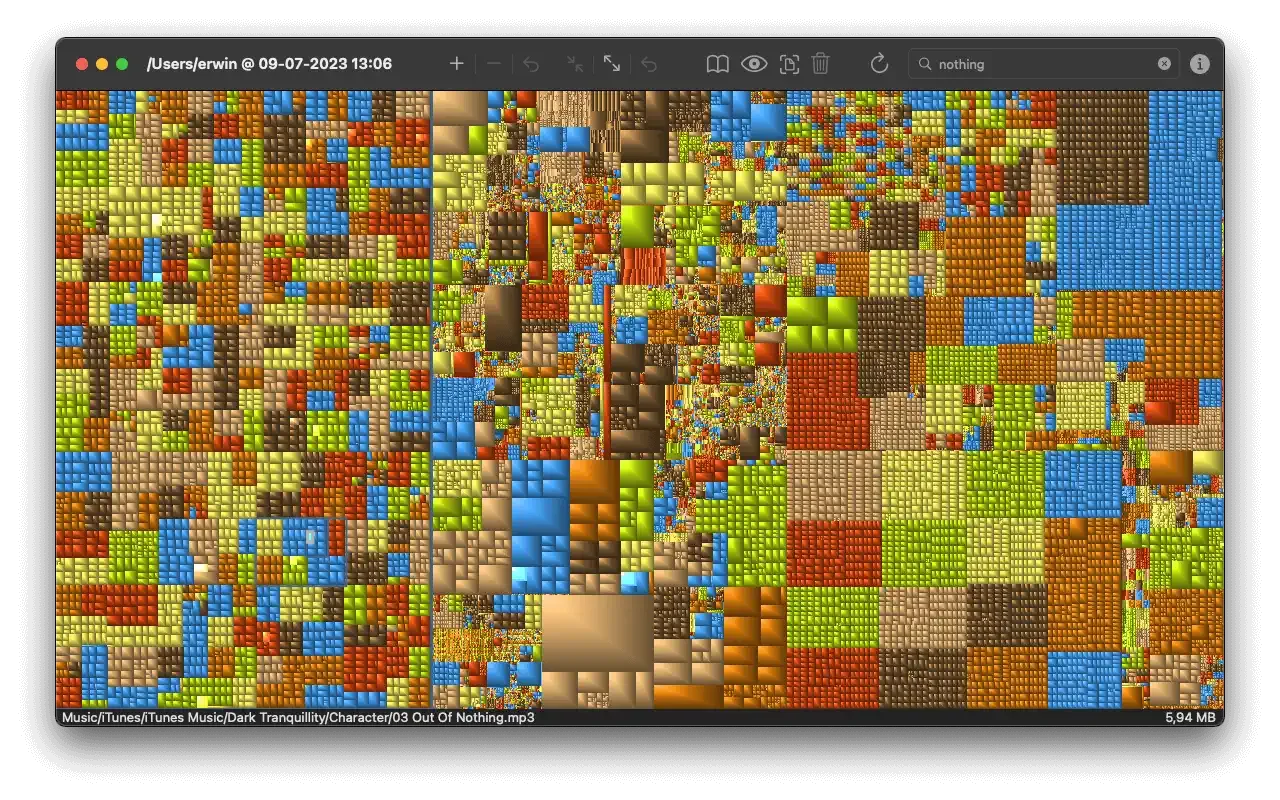
GrandPerspective is a disk usage analysis tool for macOS users, developed by Erwin Bonsma. It uses treemaps to graphically represent disk usage in your file system, helping you quickly locate files and folders consuming large amounts of storage. In GrandPerspective's visual interface, each file is displayed as a rectangle whose area is proportional to its size, with files in the same folder grouped together. This lets you intuitively understand how space is distributed across your drive, making disk management and cleanup easier. The app supports several useful features: - **Scanning & Filtering**: Search files by name, apply filters (such as excluding cloud files), rescan, and save or load scan data. - **Display Options**: Color by size, show folders only, configure display focus, and use keyboard shortcuts to show or hide the control panel. - **Preview & Export**: Preview selected items with Quick Look and export scan data as text. - **Performance Optimization**: Scan speed optimized for macOS 10.13 and later, with reduced memory usage when reading and writing scan data. GrandPerspective is available only for Mac and requires macOS 14.0 or later. The app is 3.2 MB in size and supports 11 languages, including Simplified Chinese. According to the App Store privacy details, the developer does not collect any data from this app.
Key features
- Treemap Visualization: Displays disk usage as a treemap, with files shown as rectangles sized proportionally to their actual size.
- Color by Size: Colors files based on their size, with the upper limit determined by display settings.
- File Search: Search for files by name via the toolbar.
- Filter Support: Apply default filters or specific ones like "No Cloud Files".
- Quick Look Preview: Preview selected files or folders using Quick Look.
- Scan Data Export: Export scan data as plain text.
- Keyboard Navigation: Navigate the treemap view using the keyboard.
- Show Folders Only: A display option to show folders exclusively.
- Drag-and-Drop Scanning: Drag a folder onto the welcome panel to start scanning immediately.
- Full Disk Access Check: Automatically checks whether full disk access has been granted.
- Control Panel Shortcut: New keyboard shortcut to show or hide the control panel.
Releases
Notify me Initial · GrandPerspective
Q&A
- Which operating systems does GrandPerspective support?AI-generated
- GrandPerspective is available only for Mac and requires macOS 14.0 or later.
- How much does GrandPerspective cost?AI-generated
- It is priced at ¥22.00 on the Mac App Store.
- Does GrandPerspective collect user data?AI-generated
- According to the App Store privacy details, the developer does not collect any data from this app.
- How large is the GrandPerspective app?AI-generated
- The app size is 3.2 MB.
- Does GrandPerspective support Chinese?AI-generated
- Yes, the app supports 11 languages, including Simplified Chinese.
Bookmark
This product has no owner yet
It was listed by the platform or its author left. If it is your work, prove your relationship to become the owner.
Claim this productAlternatives

PipNow
macOS 画中画工具,把任意窗口一键变成悬浮小窗并置顶在所有应用之上。
Released today0
Freemium

PCalc
面向科学家、工程师、程序员和学生的 macOS 多功能计算器应用。
Released 3 weeks ago0
Paid
右键助手专业版 - MouseBoost Pro
为 Mac 用户集成 60 多种右键菜单小工具,提升文件管理与日常操作效率。
Released 3 weeks ago0
Paid

Zush
An AI-powered desktop file renaming tool for macOS and Windows that automatically generates filenames based on file content.
Released 3 weeks ago2
Freemium
DockThings
一款 macOS 桌面工具,帮助用户将常用文件、文件夹和网站固定在 Dock 面板中以便快速访问。
Released 3 weeks ago1
Paid

AnVirt模拟器
一款无需安装 Android Studio 和 SDK 即可在 Mac 上运行 Android 应用的桌面模拟器。
Released 3 weeks ago2
Paid
ToothFairy
A utility app to connect AirPods and other Bluetooth devices to your Mac with a single click or keyboard shortcut.
Released 3 weeks ago0
Paid
Moom Classic
一款 macOS 窗口管理工具,帮助用户通过鼠标或键盘移动、缩放和排列窗口。
Released 3 weeks ago0
Paid
DeskMat - 一键隐藏整个桌面
一款 macOS 桌面工具,通过虚拟桌垫一键隐藏桌面文件和文件夹,适用于直播、视频会议和屏幕共享。
Released 3 weeks ago0
Paid

Caffeinated - 防休眠应用
一款 macOS 菜单栏工具,防止 Mac 进入休眠、屏幕变暗或启动屏保。
Released 3 weeks ago0
Paid
The product content on this page was translated by AI from the author's original.