
November 2, 2026

An AI tool that turns a single character image into animated sprite sheets for Idle, Walk, Run, Jump, and Attack.
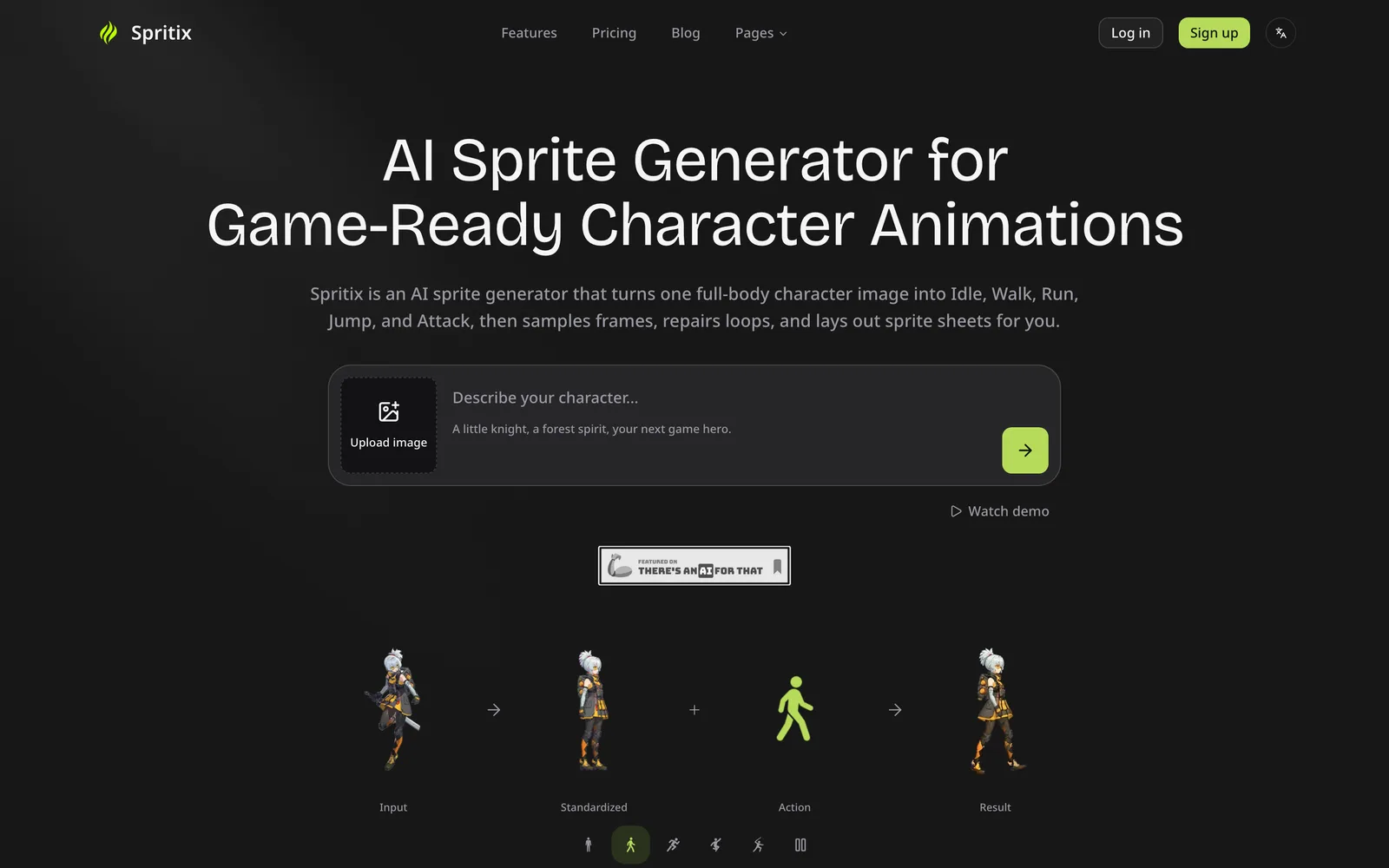 1 / 5
Product facts
- Type
- Web App / SaaS
- Category
- Development & Engineering › Game Development
- Pricing
- Freemium
- Launched
- Nov 2, 2026
- Listed
- Nov 2, 2026
- Website
- spritix.ai
Overview
Spritix is a web-based AI sprite sheet generator that converts a single full-body character image into game-ready animation assets. It supports five actions—Idle, Walk, Run, Jump, and Attack—with output options for 1 or 8 directions.
Workflow
Users first upload a full-body image in PNG, JPG, or WebP format (up to 10 MB), which the system processes into a standardized reference image. They then select an action type to generate. The required credits are displayed before each generation, and credits are automatically refunded if generation fails.
Export Formats
Each action can be exported in four standard file formats:
- Sprite Sheet PNG: A sprite sheet arranged in rows and columns, ready to import directly into engines like Godot, Unity, and Phaser.
- Animated GIF: For previewing timing or sharing for approval.
- Atlas JSON: Contains frame coordinates and timing data for code-driven playback.
- Frames ZIP: A ZIP archive of all individual PNG frames for further editing in pixel art tools.
Loop Editing
Generated animation loops can be adjusted directly in the browser without consuming generation credits. Available controls include trimming extra frames via handles at both ends, running Perfect Loop to automatically find the optimal seam, rotating the starting frame, toggling scaling smoothness, setting playback speed from 0.5x to 2x, and specifying frame count and frame size.
Version Management
Each usable result is saved as a version from v1 to vN, and switching back to previous versions incurs no charge. Characters, actions, versions, and export settings are all organized, and retries never overwrite existing results.
Compatibility
Output files use standard PNG, GIF, JSON, and ZIP formats with no proprietary runtime required. The site lists format compatibility badges for tools such as Unity, Godot, GameMaker, Phaser, Cocos Creator, Aseprite, PixiJS, and Tiled.
Spritix is ideal for game developers who need to quickly produce 2D character animation assets, especially individuals and small teams using the engines or frameworks mentioned above.
Key features
- Multi-action from a single image: Upload one full-body character image to generate animations for five actions—Idle, Walk, Run, Jump, and Attack.
- 1- or 8-direction output: Generate sprite sheets in either 1 direction or 8 directions for each action.
- Four export formats: Export each action as Sprite Sheet PNG, Animated GIF, Atlas JSON, and Frames ZIP.
- Credit-free loop editing: Trim frames, adjust speed, and set frame count in the browser without spending generation credits.
- Perfect Loop: Automatically finds the best seam position for seamless animation loops.
- Version history: Every usable result is saved as a separate version, and you can switch back to any previous version for free.
- Character consistency: All actions are generated from the same standardized reference image, minimizing style drift.
- Automatic refund on failure: Credits spent are automatically refunded if generation fails.
- Engine compatible: Standard output files can be imported directly into 2D toolchains like Godot, Unity, and Phaser.
Releases
Notify me Initial · Spritix
Q&A
- What type of image works best for uploading?AI-generated
- No specific recommendations are provided, but uploads should be clear full-body images in PNG, JPG, or WebP format, up to 10 MB.
- How does the AI maintain character consistency?AI-generated
- The uploaded source image is processed into a standardized reference image, and all actions are generated from this same reference to limit style drift.
- Which actions are currently supported?AI-generated
- Five actions are supported—Idle, Walk, Run, Jump, and Attack—each generated individually.
- Does fixing an animation loop cost credits?AI-generated
- No. Loop editing runs locally in the browser and doesn't consume generation credits; only the affected files are rebuilt.
- Which files can I export?AI-generated
- You can export Sprite Sheet PNG, Animated GIF, Atlas JSON, and a Frames ZIP containing all individual frames.
- Can the generated sprite sheets be used in Godot, Unity, or Phaser?AI-generated
- Yes. Sprite Sheet PNG files can be imported directly into these engines and sliced by rows and columns, with no Spritix proprietary runtime required.
- Are 8-direction sprite sheets supported?AI-generated
- Yes. The description states that sprite sheets can be generated in either 1 direction or 8 directions for each action.
- Is there a free plan?AI-generated
- Yes. The Free Plan provides 20 credits per month with no credit card required. Credits are valid for 30 days, and you get 2 downloads per month.
- When am I charged?AI-generated
- The required credits are shown before you submit a generation request and are deducted upon confirmation. Credits are automatically refunded if generation fails.
- Can I request a refund?AI-generated
- A Refund Policy page is mentioned, but the specific refund conditions are not detailed in the main text.
Bookmark
This product has no owner yet
It was listed by the platform or its author left. If it is your work, prove your relationship to become the owner.
Claim this productAlternatives


The product content on this page was translated by AI from the author's original.