
October 16, 2026

AI Zombie Video Generator
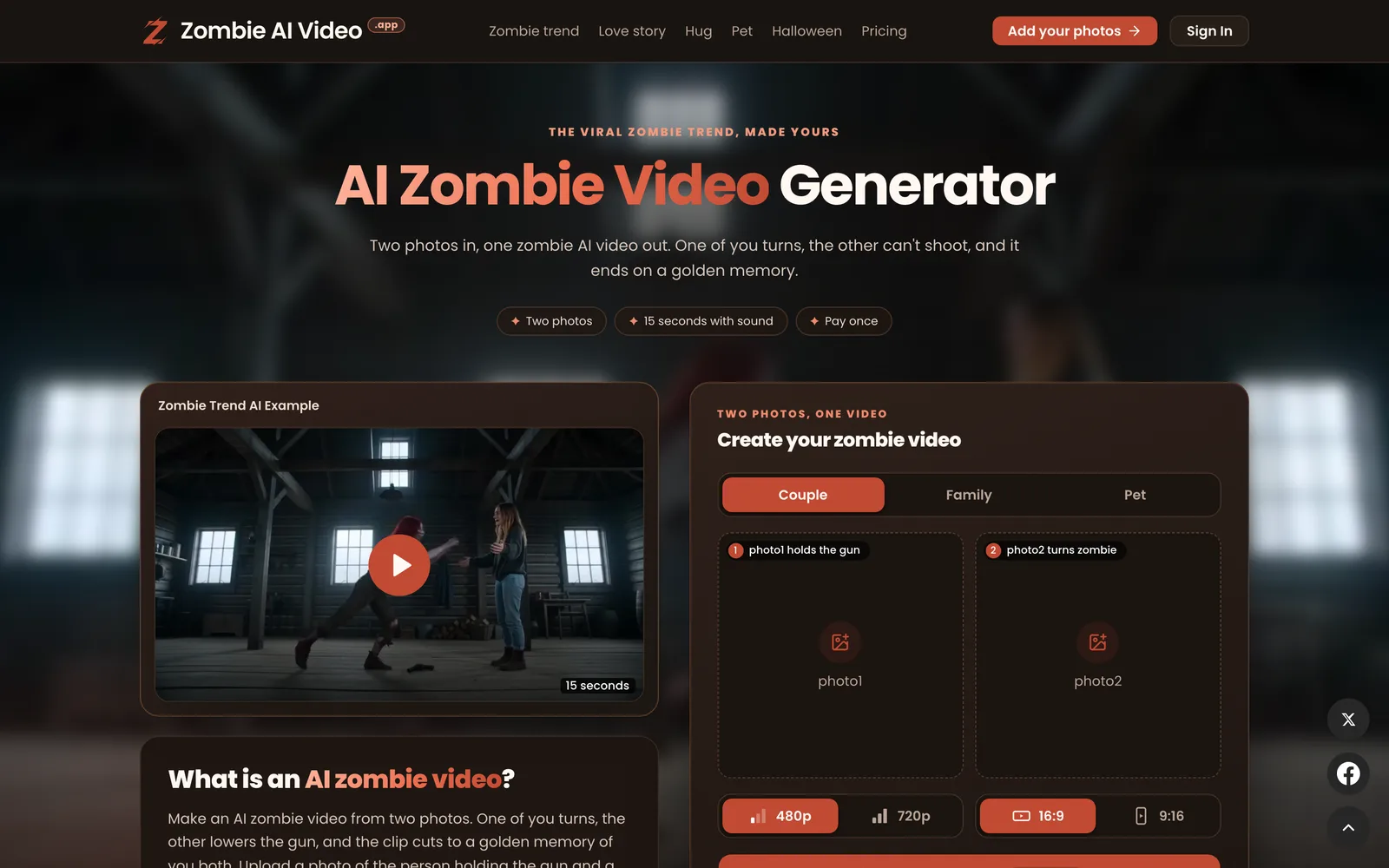
Upload two photos to generate a 15-second AI zombie trend video. One-time payment, no subscription required.
 1 / 7
1 / 7Product facts
- Type
- Web App / SaaS
- Category
- Creativity & Media › Video Generation
- Pricing
- Paid
- Launched
- Oct 16, 2026
- Listed
- Oct 16, 2026
- Website
- zombieaivideo.app
Overview
AI Zombie Video Generator is a web app that turns two photos into a 15-second short video matching the "zombie trend" popular on TikTok and Reels. No prompts needed—the system uses a built-in fixed four-scene script. ## What it is The tool runs on ByteDance's Seedance 2.5 video model. It first generates static frames for each scene based on your two uploaded photos, then animates them. Only the people or pets you upload appear in the video—no faces are pasted onto someone else's footage. ## Video structure The generated video contains four fixed segments: - **The cabin**: The person in the first photo raises a gun in a dim room. - **The face**: The person in the second photo turns into a zombie (pale gray skin, cloudy eyes, dark veins, no bloody wounds). - **The leap**: The gun holder lowers the weapon and opens their arms; the zombie lunges forward, turning into an embrace. - **The memory**: A hard cut to a sunny wheat field where both are smiling. ## How to use it 1. Upload two photos (JPG, PNG, or WebP, max 10MB each): one of the gun holder, one of the person or pet becoming the zombie. 2. Choose quality (480p costs 100 credits, 720p costs 200 credits) and aspect ratio (16:9 or 9:16, same price). 3. Wait for background rendering to finish, then download the MP4 file from My videos. ## Who it's for Ideal for couples, family members, friends, or pet owners who want to join the zombie trend, as well as for creating Halloween content. The tool operates independently and is not affiliated with TikTok or CapCut.
Key features
- Dual-photo input: Upload two photos—one for the gun holder and one for the character turning into a zombie. Supports people or pets.
- 15-second video with audio: Each video is exactly 15 seconds, with auto-generated wind, breathing, and background music. No copyrighted songs.
- Built-in four-scene script: No prompts needed. The video automatically unfolds through four shots: raising the gun, zombie close-up, embrace, and memory.
- Quality & aspect ratio options: Choose 480p or 720p quality, and 16:9 or 9:16 aspect ratio. Aspect ratio doesn't affect the price.
- One-time payment: Pay via credit packs. No subscriptions. Credits are valid for 365 days.
- Watermark-free output: Generated MP4 videos have no watermarks. Download and post them on any platform.
- Free retry on failure: If rendering fails or isn't delivered, spent credits are automatically refunded to your account.
- Mobile browser support: Use it directly in mobile browsers on iPhone and Android—no app installation required.
- Seedance 2.5 model: Powered by ByteDance's Seedance 2.5 video model, generating scenes based on your uploaded photos.
Releases
Notify me Initial · AI Zombie Video Generator
Q&A
- How do I make an AI zombie video?AI-generated
- Sign up on the website, top up credits, upload two photos, choose quality and aspect ratio, then click generate. Once rendering finishes, download the MP4 file from My videos. 480p costs 100 credits; 720p costs 200 credits.
- Is this tool free?AI-generated
- No. Every render consumes credits, sold in one-time packs. Some new accounts may receive one-off welcome credits, but not all visitors get them. Failed renders aren't charged.
- Do the videos have sound or watermarks?AI-generated
- Videos include auto-generated sound (wind, breathing, and light music) but no copyrighted songs, making it easy to add trending music when posting. Videos have no watermarks.
- Is the video content scary or gory?AI-generated
- Not gory. The zombie look is limited to pale gray skin, cloudy eyes, and dark veins—no blood or wounds—and the story ends with a heartwarming memory. Since AI outputs vary, preview the video before posting.
- Can I use anyone's photo?AI-generated
- Only use photos of yourself, your pets, or adults who have consented. Photos of children and public figures are not allowed. People in the photos must give informed consent before rendering.
- How are my photos handled?AI-generated
- Photos are used solely to generate and deliver your video and handle support requests. The platform never publishes them publicly or uses them to train AI models.
- What if the video generation fails?AI-generated
- If rendering fails or isn't delivered, credits are automatically refunded to your balance. However, if the video was successfully generated but you're unsatisfied, it doesn't count as a failure and credits won't be refunded. Use clear, front-facing photos for best results.
- Which AI model is used?AI-generated
- It uses ByteDance's Seedance 2.5 video model. It first generates static images for each scene from your two photos, then animates them. Your face is never pasted onto someone else's footage.
- Can I use it on my phone?AI-generated
- Yes. The tool works in mobile browsers on iPhone and Android. No app installation is needed, and you can upload photos directly from your phone's gallery.
Bookmark
This product has no owner yet
It was listed by the platform or its author left. If it is your work, prove your relationship to become the owner.
Claim this productAlternatives
pdoomvideo
Enter a single sentence and automatically generate an original music video, directed and illustrated by AI.
Released 2 days ago6
Freemium

AI Zombie Couple Video Generator
Turn two portrait photos into a 15-second zombie apocalypse-themed romance short video.
Released 4 days ago7
Paid

AI Studios
面向内容创作者和企业的 AI 数字人视频生成平台,支持将文本脚本转化为带数字人的视频。
Released 3 weeks ago4
Freemium

MovieFlow
A web app that generates complete AI movies in minutes from prompts or scripts.
Released 3 weeks ago1
Freemium

MakeAIVideo
通过提示词、脚本或图片生成 AI 视频,并自动发布到多个社交平台。
Released 3 days ago6
Free trial

Raindance AI Video Generator
Upload two photos to create a Raindance trend video featuring scenes of waiting on a pier, singing, and a beach sunset.
Released last week3
Paid
HappyHorse AI Video Generator
在线 AI 视频生成工具,支持文本、图片和视频到视频的转换工作流。
Released 3 weeks ago3
Freemium

Burning Bridges AI Video Generator
Upload a photo to place yourself, friends, pets, or characters into a Burning Bridges party scene video.
Released 4 days ago4
Paid
Hotel Lobby AI Video Generator
Upload two photos to generate an 8-second vertical AI video, placing people or pets into an orange recording studio scene.
Released last week2
Paid

ZSky AI
A free AI image and video generation platform for creators, supporting text-to-image, text-to-video, and image-to-video.
Released 3 weeks ago1
Freemium
The product content on this page was translated by AI from the author's original.