
October 16, 2026

Burning Bridges AI Video Generator
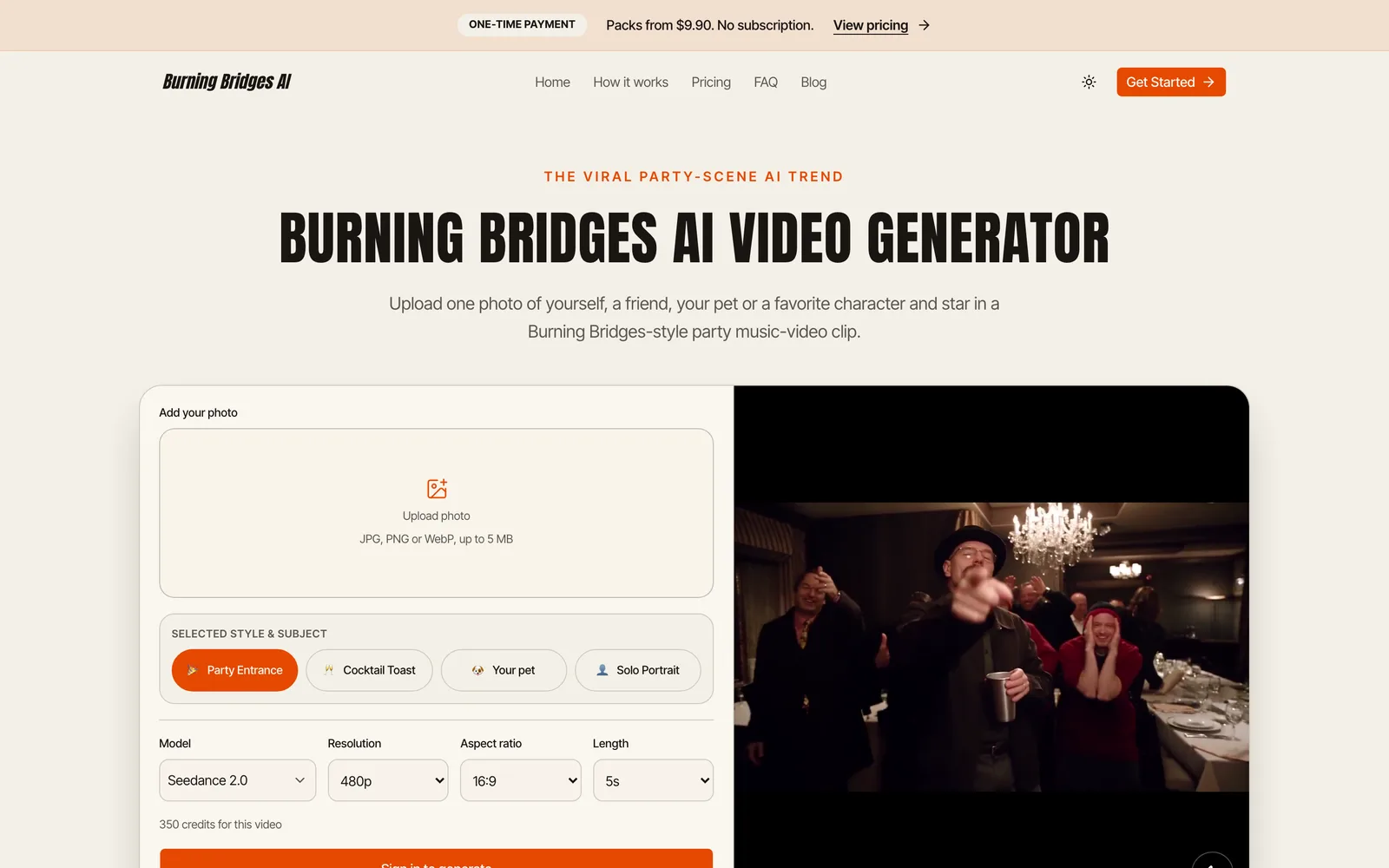
Upload a photo to place yourself, friends, pets, or characters into a Burning Bridges party scene video.
 1 / 7
1 / 7Product facts
- Type
- Web App / SaaS
- Category
- Creativity & Media › Video Generation
- Pricing
- Paid
- Launched
- Oct 16, 2026
- Listed
- Oct 16, 2026
- Website
- burning-bridges.net
Overview
Burning Bridges AI Video Generator is a web app for creating short clips tied to the "Burning Bridges" video trend that went viral in October 2026. Upload a photo and enter a short prompt to generate an AI video that places your chosen person, pet, or fictional character into a party scene. The tool renders using the Seedance model family (Seedance 2.0, 2.5, 2.0 Fast, and 2.0 Mini). Generated videos don't reuse footage from the original music video; instead, new clips are created from your photo and prompt. Audio is generated by default, though lip-sync isn't guaranteed every time. **Key capabilities** - **Single-photo casting**: Supports JPG, PNG, or WebP up to 5 MB. A clear, front-facing portrait with even lighting and no heavy filters works best. - **Customizable parameters**: Choose resolution (480p, 720p), aspect ratio (9:16, 16:9, 1:1), and duration (4 to 15 seconds). - **One-time credits**: No subscriptions—buy credit packs. The required credits are shown before generation, and any spent on a failed render are automatically refunded to your balance. - **All-in-one workflow**: Upload, generate, preview, and download on the same page—no extra editing software needed. **Who it's for** Everyday users and content creators looking to join social media short-video trends. Output ratios include vertical 9:16 for TikTok, Instagram Reels, and YouTube Shorts. Label posts as AI-generated when sharing. This tool is an independent product and is not authorized by or affiliated with any artist, record label, or social platform.
Key features
- Video from a single photo: Upload a JPG, PNG, or WebP image (up to 5 MB) to star in your video.
- Multiple model options: Supports Seedance 2.0, 2.5, 2.0 Fast, and 2.0 Mini.
- Adjustable resolution & duration: Choose 480p or 720p, with lengths from 4 to 15 seconds.
- Multiple aspect ratios: Offers 9:16, 16:9, and 1:1 formats.
- One-time credit purchases: No subscriptions—buy credit packs, with costs shown before generation.
- Auto-refund on failure: Credits spent on a confirmed failed render are returned to your balance.
- Audio by default: All models generate sound, but lip-sync isn't guaranteed on every render.
- Full workflow on one page: Upload, generate, preview, and download all within the same webpage.
- Community gallery: Browse videos other creators have made and shared with this tool.
Releases
Notify me Initial · Burning Bridges AI Video Generator
Q&A
- What is Burning Bridges AI?AI-generated
- It's both a video trend that went viral in October 2026 and the name of this generator. Creators use a single photo and a short prompt to place themselves, friends, pets, or characters into the party scene from the Burning Bridges music video.
- Where did this trend come from?AI-generated
- It started on X in early October 2026 and spread to TikTok, Instagram Reels, and YouTube Shorts. The scene comes from the music video for Drake's song "Burning Bridges".
- What does "where she at" mean?AI-generated
- It's a lyric from the song's chorus. In the videos, it's paired with a hand-over-the-eyes gesture like scanning the room, which creators adopted as the signature move for their remakes.
- What kind of photo works best?AI-generated
- A clear, front-facing portrait with the full face visible and even lighting. Avoid heavy filters, sunglasses, and crowded group shots.
- Can I use pets or cartoon characters?AI-generated
- Yes. Any clear photo can be the star—including you, friends, cats, dogs, or cartoon characters. Just make sure you have the right to use the image you upload.
- Is it a face swap or a full character replacement?AI-generated
- The goal is to replace the entire character, not just the face. The photo determines how the person looks, while the prompt controls what they do.
- Do the videos have sound?AI-generated
- All four models generate audio by default, but results may vary, and lip-sync isn't guaranteed on every render.
- How many credits does a video cost?AI-generated
- Costs depend on the model, resolution, and duration. For example, a 5-second video with Seedance 2.0 costs 350 credits at 480p and 765 credits at 720p. The exact amount is shown before you submit.
- What happens if generation fails?AI-generated
- Once a failure is confirmed, the credits used for that job are automatically returned to your account balance. This isn't a cash refund. Contact support if you run into unresolved issues.
- Is this an official tool?AI-generated
- No. It's an independent tool, not affiliated with or endorsed by any artist, record label, or social platform. It doesn't include footage from the original music video.
- Where can I download my video?AI-generated
- You can download it directly below the generator, or find completed videos in Generate history in your account.
Bookmark
This product has no owner yet
It was listed by the platform or its author left. If it is your work, prove your relationship to become the owner.
Claim this productAlternatives
pdoomvideo
Enter a single sentence and automatically generate an original music video, directed and illustrated by AI.
Released 2 days ago6
Freemium

AI Zombie Couple Video Generator
Turn two portrait photos into a 15-second zombie apocalypse-themed romance short video.
Released 4 days ago7
Paid

AI Studios
面向内容创作者和企业的 AI 数字人视频生成平台,支持将文本脚本转化为带数字人的视频。
Released 3 weeks ago4
Freemium

MovieFlow
A web app that generates complete AI movies in minutes from prompts or scripts.
Released 3 weeks ago1
Freemium

MakeAIVideo
通过提示词、脚本或图片生成 AI 视频,并自动发布到多个社交平台。
Released 3 days ago6
Free trial

Hotel Lobby AI Video Generator
Upload two photos to generate an 8-second vertical AI video, placing people or pets into an orange recording studio scene.
Released last week2
Paid

ZSky AI
A free AI image and video generation platform for creators, supporting text-to-image, text-to-video, and image-to-video.
Released 3 weeks ago1
Freemium

AI Zombie Video Generator
Upload two photos to generate a 15-second AI zombie trend video. One-time payment, no subscription required.
Released 4 days ago5
Paid

Raindance AI Video Generator
Upload two photos to create a Raindance trend video featuring scenes of waiting on a pier, singing, and a beach sunset.
Released last week3
Paid
HappyHorse AI Video Generator
在线 AI 视频生成工具,支持文本、图片和视频到视频的转换工作流。
Released 3 weeks ago3
Freemium
The product content on this page was translated by AI from the author's original.