
November 8, 2026

Img2Img AI
A web-based Image to Image AI generator. Upload an image to edit it, restyle it, and add effects.
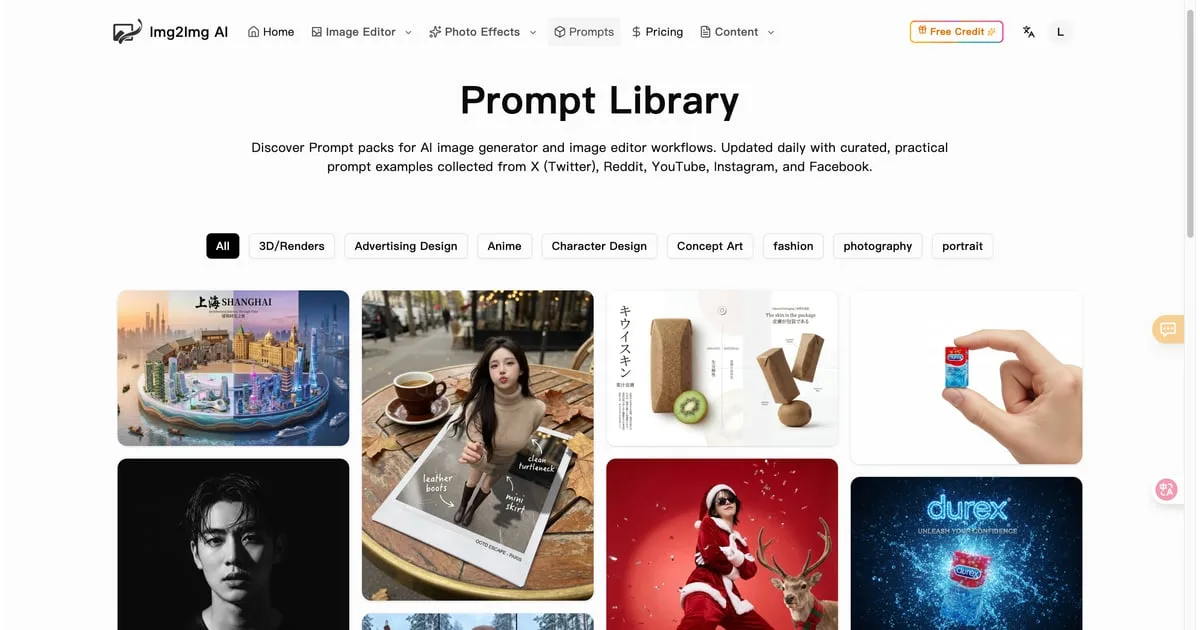 1 / 8
Product facts
- Type
- Web App / SaaS
- Category
- Creativity & Media › Image Generation
- Pricing
- Freemium
- Launched
- Nov 8, 2026
- Listed
- Nov 8, 2026
- Website
- imgtoimg-ai.com
Overview
Img2Img AI is a web-based Image to Image AI generation platform that lets you upload reference images and combine them with text prompts to edit, enhance, restyle, and outpaint your visuals.
Unlike Text to Image tools that create from scratch, Img2Img AI analyzes the composition, lighting, and structure of your uploaded image, using it as a blueprint to apply changes while keeping key elements consistent. No software installation or professional design skills are required.
Key capabilities:
- Multi-model support: Integrates 10+ models including Nano Banana Pro, Seedream 4.0, Seedream 4.5, Flux 2 max, and GPT Image 2, so you can choose based on credit cost and quality needs.
- Image processing tools: Offers 20+ ready-to-use tools such as watermark removal, background removal, photo restoration, and image enhancement.
- Effects & filters: Includes 100+ AI photo effects and filters for one-click application.
- Smart outpainting: Extends images beyond the original frame to fit different aspect ratios, like social banners or posters.
- Subject editing: Enables object-level precision editing, such as removing distractions, swapping props, or adjusting clothing details.
- Background handling: Removes backgrounds or generates new scenes that match the subject's lighting and perspective.
Who it's for:
The platform targets designers, marketers, e-commerce professionals, and content creators. According to user feedback, it's commonly used for A/B testing product photos, rapidly iterating social media assets, and restyling photography. It runs on a credit system, where generating images consumes credits accordingly.
Key features
- Image to Image generation: Upload a reference image and enter a prompt to create new variations while preserving the original composition.
- Text to Image generation: Supports pure text-to-image mode to create brand-new AI scenes.
- Multi-model switching: Choose from 10+ integrated models including Nano Banana, Seedream, Flux, and GPT Image.
- Smart style transfer: Convert images into illustration, film, and other styles while preserving the original composition, lighting, and subject.
- Subject editing: Object-level editing to remove distractions, swap props, or adjust clothing and product details.
- Image restoration & enhancement: Sharpen edges, recover textures, reduce noise, and improve clarity—ideal for old or blurry photos.
- Background handling: Remove backgrounds in one click, or generate new scenes that match the subject's lighting and perspective.
- Smart outpainting: Naturally extend images beyond the original frame to fit different aspect ratios like social banners or posters.
- AI effects & filters: 100+ popular AI photo effects and filters available for one-click application.
- Utility toolbox: 20+ zero-setup, ready-to-use tools including watermark removal and background removal.
- Prompt optimization: Built-in prompt optimizer helps produce clearer, sharper results.
- Prompt library & tutorials: Curated prompt packs and usage guides for each model.
Releases
Notify me Initial · Img2Img AI
Q&A
- What is Image to Image AI?AI-generated
- Image to Image AI is a way to transform photos using your own image as a base combined with simple text prompts. It analyzes the composition, lighting, and structure of the uploaded image, using it as a blueprint to apply modifications while keeping key elements consistent and natural-looking.
- How do I generate images with Img2Img AI?AI-generated
- Four steps: 1. Choose a creation mode (Text to Image or Image to Image); 2. Select a model based on your credit budget and quality needs; 3. Write a prompt describing the subject, style, colors, and mood; 4. Click generate, wait a moment, then download or share.
- Which AI models does the platform support?AI-generated
- The platform integrates 10+ models, including Nano Banana 2.1, Nano Banana Pro, Ideogram 4.0, GPT Image 2, GPT Image 2.5, Flux 2 max, Seedream 4.0, Seedream 4.5, and Seedream 5.0 Pro.
- Does generating images cost money?AI-generated
- The platform uses a credit system. Generating images consumes credits, and different models cost different amounts. Higher-cost options use more credits but deliver clearer, more detailed results. The interface may show a "0 credits remaining" status.
- Are there limits on uploaded images?AI-generated
- According to the page info, you can upload up to 4 reference images at a time, with a maximum file size of 15 MB per image.
- What's the maximum prompt length?AI-generated
- The prompt input field allows up to 4096 characters.
- Who is Img2Img AI for?AI-generated
- It's ideal for designers, marketers, e-commerce professionals, content creators, and photographers. No professional skills like Photoshop are required.
Bookmark
This product has no owner yet
It was listed by the platform or its author left. If it is your work, prove your relationship to become the owner.
Claim this productAlternatives

Nano Banana 中文站
Generate the images and videos you want from simple text prompts | Supports Nano Banana, GPT Image, and Seedance models
Released yesterday5
Freemium
CoverUpInk
Over 300 design ideas for covering old tattoos, plus upload a photo to generate AI cover-up concepts.
Released 4 weeks ago4
Paid
OmniRoom
An AI product scene image generator for furniture sellers. Turn a single photo into multiple room scenes, angles, and videos.
Released last month5
Freemium

WThumb
An AI thumbnail generator for YouTube creators. Quickly create thumbnails from a link, image, or text description.
Released last month6
Freemium

Text to GIF
An AI tool that generates original animated GIFs from text descriptions
Released 4 days ago10
Paid

SellerPic
AI fashion model and product image/video generation tool for e-commerce merchants, replacing traditional photoshoot workflows.
Released last month16
Free trial
fal Agent
An AI creative assistant for creators and teams, generating consistent media assets across images, videos, and 3D models.
Released last month11
Freemium

Inkspo
Free AI tattoo design generator that turns ideas into tattoo art in seconds—no sign-up required.
Released 3 weeks ago11
Freemium
CPages - Free AI Coloring Page Generator
Turn text descriptions or photos into printable, watermark-free coloring pages in PNG and PDF formats.
Released last month5
Freemium
PIXADO
AI thumbnail generator and analyzer for YouTube creators, designed to boost video click-through rates.
Released last month9
Freemium
The product content on this page was translated by AI from the author's original.