
November 8, 2026

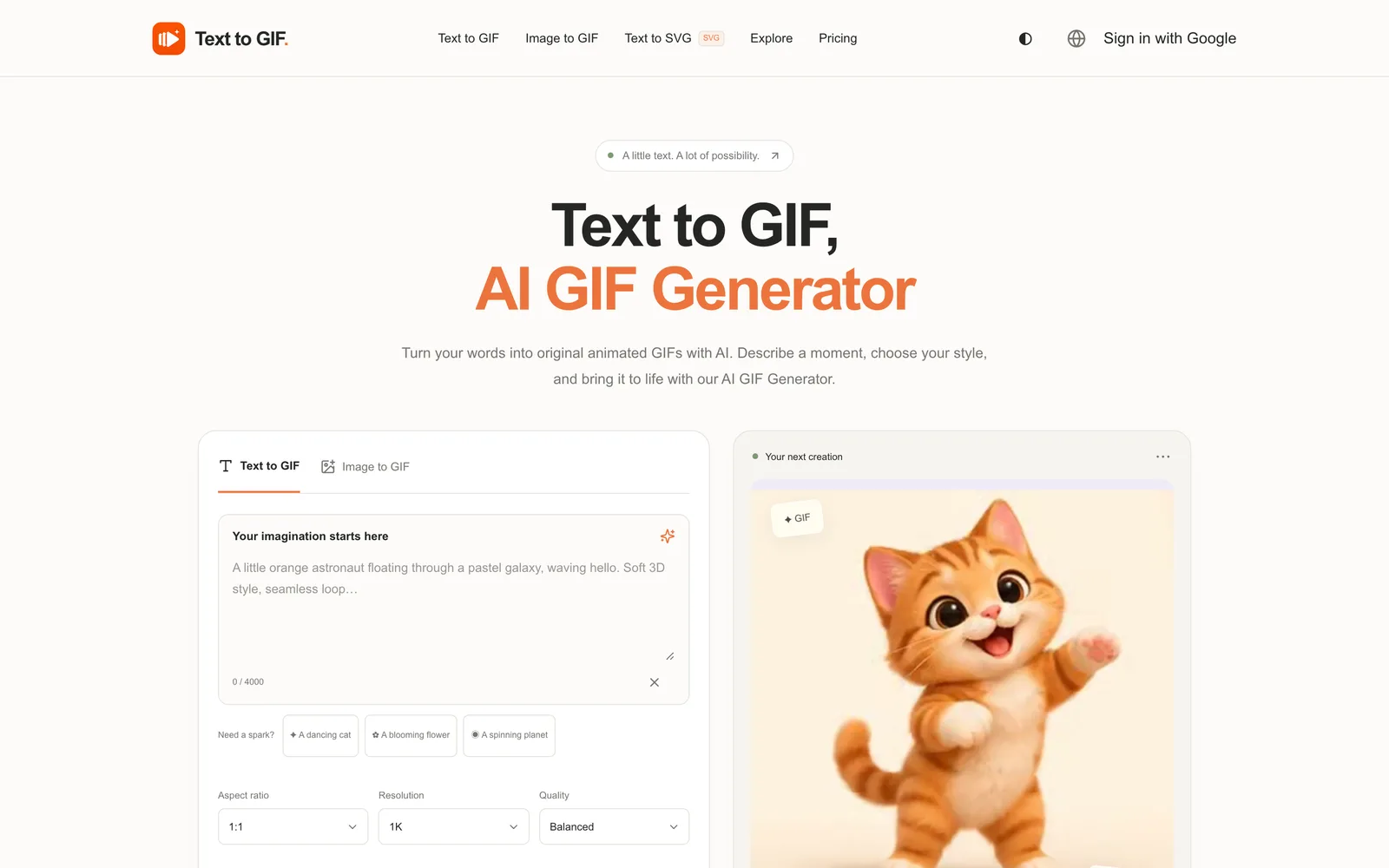
Text to GIF
An AI tool that generates original animated GIFs from text descriptions
 1 / 2
Product facts
- Type
- Web App / SaaS
- Category
- Creativity & Media › Image Generation
- Pricing
- Paid
- Launched
- Nov 8, 2026
- Listed
- Nov 8, 2026
- Website
- texttogif.com
Overview
Text to GIF is a web-based AI generation tool that turns natural language descriptions into original animated GIFs. No design skills are required—just enter a text prompt to create reaction emojis, animated stickers, or looping animations.
Key Capabilities
- Text-to-animation: Describe a scene, character, or action, and the AI automatically generates the matching animation.
- Multi-format output: Supports five formats—GIF, SVG, PNG, WebP, and JPG—switchable within the same workspace.
- Animation parameter control: Set 2–16 frames with 20–2000 ms per frame, and request seamless loops in your prompt.
- Quality and size options: Five quality tiers (Draft, Balanced, High, Extra high, Maximum), resolutions from 1K to 4K, and 15 aspect ratios.
- Vector output: Generate SVG files for scalable use cases like icons, logos, and flat illustrations.
How It Works
- Describe your idea in the input box, including subject, style, and motion details (up to 4000 characters).
- Choose parameters such as output format, aspect ratio, quality, and frame count.
- Check the required credits, click generate, and download the file when done.
Who It's For
Ideal for users who need to quickly produce dynamic visual assets, such as social media managers, content creators, or designers. The tool also offers an Image to GIF feature to animate existing images. The platform works on mobile, tablet, and desktop, with both light and dark modes.
Key features
- Text to GIF: Enter a natural language description and the AI automatically generates an original animated GIF
- Multi-format output: Supports five formats—GIF, SVG, PNG, WebP, and JPG
- Frame control: Set 2–16 frames with 20–2000 ms duration per frame
- Multiple quality options: Five quality levels from Draft to Maximum
- High-resolution support: Choose 1K, 2K, or 4K resolution
- Aspect ratio selection: Supports 15 aspect ratios including 1:1, 16:9, and 9:16
- SVG vector output: Generate scalable SVG files for icons and logos
- Image to GIF: Upload an existing image and convert it into an animated GIF
- Cross-device use: Works on mobile, tablet, and desktop browsers
- Light and dark modes: Workspace supports switching between light and dark themes
- Credits shown before generation: Displays exact credit cost before submission, no subscription required
Releases
Notify me Initial · Text to GIF
Q&A
- What is Text to GIF?AI-generated
- Text to GIF is an AI tool that generates original animated GIFs from user-provided text descriptions. Simply describe what you want to see and how it should move.
- How do I create a GIF from text?AI-generated
- Enter a descriptive prompt, select the GIF format, set the aspect ratio and quality, then click generate. Log in and top up credits to download your creation.
- Can I control the animation effects?AI-generated
- Yes. You can choose 2–16 frames with 20–2000 ms per frame. Just describe the desired motion in your prompt and request a seamless loop.
- Which download formats are supported?AI-generated
- GIF, SVG, PNG, WebP, and JPG are supported. Each generation outputs in the format selected at submission; changing the format and regenerating costs additional credits.
- How much does one generation cost?AI-generated
- Credit usage depends on quality, resolution, format, and the number of GIF frames. The exact cost is displayed before submission. One-time credit packs start at $10, and credits are refunded if generation fails.
- Can I upload an image to create an animation?AI-generated
- Yes. Use the Image to GIF feature to upload an existing image and turn it into an animation. Text to SVG, on the other hand, starts generating from a text description.
- How long does generation take?AI-generated
- Generation time varies based on quality, resolution, frame count, and server load. Task progress is preserved when you return using the same browser and account.
- Can I use the generated results commercially?AI-generated
- Please review the AI provider's current terms and any rights related to your prompts. Users are responsible for checking trademarks, portrait rights, and the final output before commercial use.
Bookmark
This product has no owner yet
It was listed by the platform or its author left. If it is your work, prove your relationship to become the owner.
Claim this productAlternatives

Nano Banana 中文站
Generate the images and videos you want from simple text prompts | Supports Nano Banana, GPT Image, and Seedance models
Released yesterday5
Freemium

CoverUpInk
Over 300 design ideas for covering old tattoos, plus upload a photo to generate AI cover-up concepts.
Released 4 weeks ago4
Paid

CPages - Free AI Coloring Page Generator
Turn text descriptions or photos into printable, watermark-free coloring pages in PNG and PDF formats.
Released last month5
Freemium

PIXADO
AI thumbnail generator and analyzer for YouTube creators, designed to boost video click-through rates.
Released last month9
Freemium

Img2Img AI
A web-based Image to Image AI generator. Upload an image to edit it, restyle it, and add effects.
Released 4 days ago10
Freemium
OmniRoom
An AI product scene image generator for furniture sellers. Turn a single photo into multiple room scenes, angles, and videos.
Released last month5
Freemium

WThumb
An AI thumbnail generator for YouTube creators. Quickly create thumbnails from a link, image, or text description.
Released last month6
Freemium

Inkspo
Free AI tattoo design generator that turns ideas into tattoo art in seconds—no sign-up required.
Released 3 weeks ago11
Freemium

SellerPic
AI fashion model and product image/video generation tool for e-commerce merchants, replacing traditional photoshoot workflows.
Released last month16
Free trial

fal Agent
An AI creative assistant for creators and teams, generating consistent media assets across images, videos, and 3D models.
Released last month11
Freemium
The product content on this page was translated by AI from the author's original.