
September 25, 2026

Photo From Emoji
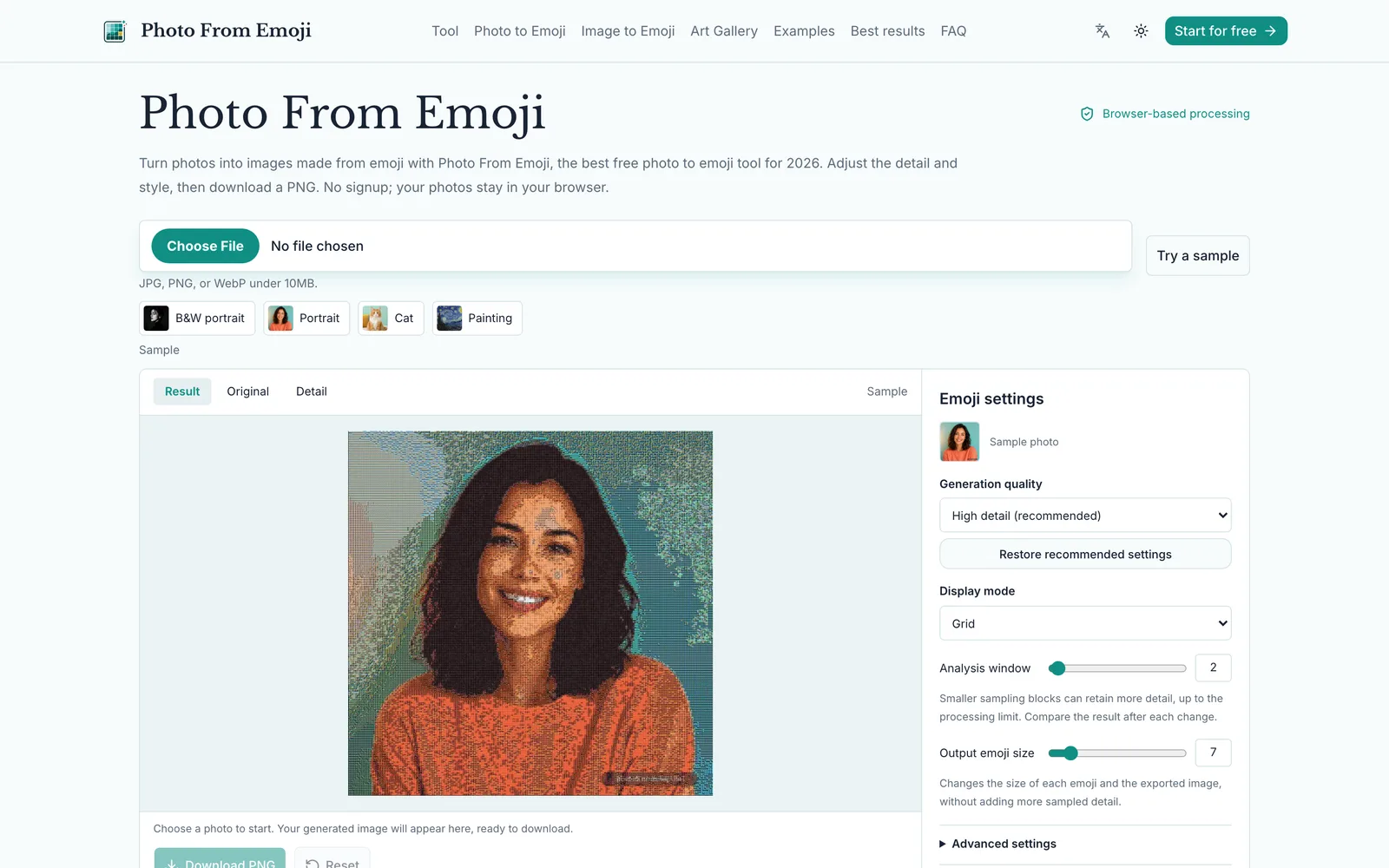
Convert photos into images made of emoji, processed locally in the browser and exported as PNG.
 1 / 7
1 / 7Product facts
- Type
- Web App / SaaS
- Category
- Creativity & Media › Image Editing
- Pricing
- Free
- Launched
- Sep 25, 2026
- Listed
- Sep 25, 2026
- Website
- photofromemoji.net
Overview
Photo From Emoji is a browser-based web app that turns ordinary photos into images composed entirely of emoji. No account is required, uploaded photos are never sent to a server, and all rendering happens locally in your browser via canvas. The tool accepts JPG, PNG, or WebP files under 10MB. You can adjust multiple parameters to control the output, including Analysis window size, Output Emoji Size, display mode (Grid, Texture, Chart), and generation quality (High detail or Quick preview). Advanced settings also offer options like preserving shadow details, matching tolerance, allowed blank ratio, and background color. The emoji palette lets you use the full emoji library or restrict it to categories such as Faces, Nature, or Food. Photo From Emoji is ideal for creating avatars, social media graphics, or creative assets. It's best to start with photos featuring a clear subject and simple background, such as portraits, pets, product shots, or basic still-life scenes. You can compare the result with the original in real time to verify that outlines and color separation remain readable, then download the final image directly as a PNG file once satisfied.
Key features
- Local browser processing: Photos are rendered inside your current browser and never uploaded to a server, protecting your privacy.
- No registration required: Use all features instantly without creating an account.
- Multi-format support: Accepts JPG, PNG, or WebP files up to 10MB.
- Display mode switching: Choose from Grid, Texture, or Chart modes, emphasizing structure, texture, or color blocks respectively.
- Analysis window adjustment: Change the sampling block size to control how much image detail is preserved.
- Output size settings: Adjust the size of each emoji and the resolution of the final exported image.
- Generation quality options: Select High detail to preserve more information, or Quick preview for faster results.
- Shadow detail preservation: Enable shadow brightening to make dark subjects easier to recognize.
- Emoji palette filtering: Use the full emoji library or limit it to subsets like Faces, Nature, or Food.
- Before-and-after comparison: Compare the original photo with the generated result to confirm the subject shape is preserved.
- PNG export: Save the generated emoji image as a downloadable PNG file.
Releases
Notify me Initial · Photo From Emoji
Q&A
- Are my photos uploaded to a server?AI-generated
- No. The current version renders everything locally using the browser canvas, so source images are never uploaded to any server.
- Which image formats and sizes are supported?AI-generated
- JPG, PNG, and WebP formats are supported, with a maximum file size of 10MB.
- Do I need to create an account to use it?AI-generated
- No. The tool is completely free and requires no registration.
- How do I save the generated result?AI-generated
- You can download the generated PNG file directly from the page.
- What if the generated image is too dark or lacks detail?AI-generated
- If it's too dark, try a brighter photo or switch to a lighter background color in advanced settings. If it lacks detail, crop closer to the subject before uploading or try a smaller Analysis Window. Increasing the Output Emoji Size only makes the exported image larger; it doesn't add sampling detail.
- What types of photos work best?AI-generated
- Photos with a clear subject and simple background work best, such as portraits with even facial lighting, pet photos with sharp eyes, product shots with clean outlines, or simple still-life scenes against bright backgrounds.
- What's the difference between Grid, Texture, and Chart modes?AI-generated
- Grid prioritizes structural readability, Texture emphasizes surface detail, and Chart produces stronger color-block effects. Switch between them to see which suits your needs.
Bookmark
This product has no owner yet
It was listed by the platform or its author left. If it is your work, prove your relationship to become the owner.
Claim this productAlternatives
PixelTokb
Compress JPEG, PNG, and WebP images online to a specific target size in KB. All processing happens locally in your browser.
Released 4 days ago2
100% Free
超级制图
科大讯飞旗下的AI专业图片编辑工具,通过描述生成和编辑图片。
Released 3 weeks ago1
Freemium

AKOOL
A generative AI platform for marketing creators to produce personalized visual marketing and advertising content.
Released 3 weeks ago3
Paid

Picser
A native macOS image viewer with fast browsing, EXIF viewing, cropping, rotation, tagging, and filtering.
Released last week1
Freemium

抠抠图
免费在线AI抠图与图片编辑工具,支持批量处理,无需专业设计技能。
Released 3 weeks ago0
Freemium

Face Photo Restorer
Use AI to restore old, blurry face photos and keep your memories alive.
Released 3 weeks ago1
Paid

稿定设计
在线设计平台,提供海量模板与AI工具,帮助用户完成海报、PPT、电商图等设计需求。
Released 3 weeks ago0
Freemium
EditTextPhoto
AI-powered image text editor to edit, replace, fix, or translate text in images while preserving the original font, color, size, and style.
Released last week8
Free trial2

PixPro Library
面向网页端的AI图片处理工具库,可将普通上传按钮升级为智能图片处理中心。
Released 3 weeks ago1
100% Free

影像之匠 PixPretty
面向摄影师的 AI 人像修图软件,支持批量处理与相机联机实时修图。
Released 3 weeks ago2
Freemium
The product content on this page was translated by AI from the author's original.