
October 16, 2026

PixelTokb
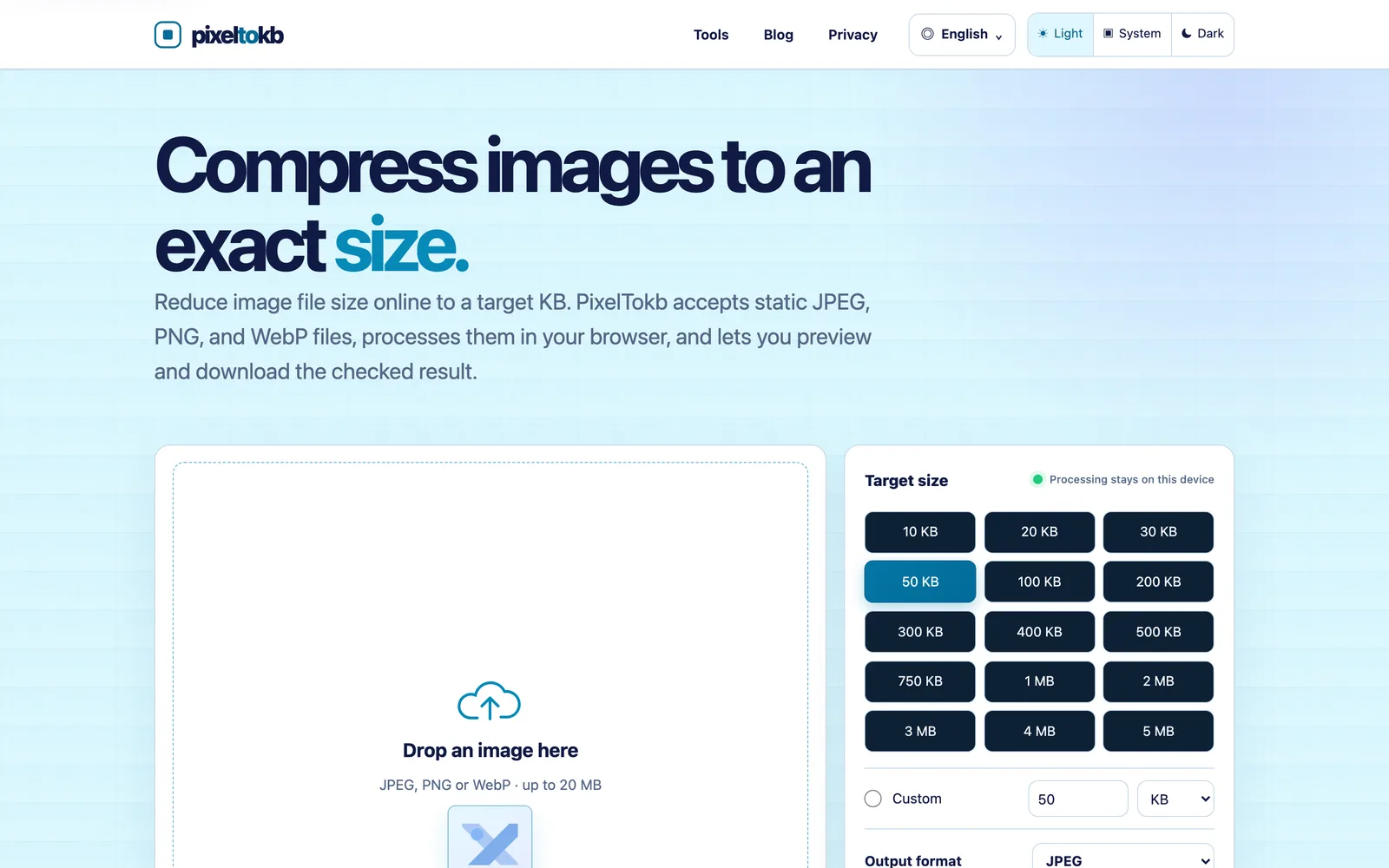
Compress JPEG, PNG, and WebP images online to a specific target size in KB. All processing happens locally in your browser.
Product facts
- Type
- Web App / SaaS
- Category
- Creativity & Media › Image Editing
- Pricing
- Free
- Launched
- Oct 16, 2026
- Listed
- Oct 16, 2026
- Website
- pixeltokb.com
Overview
PixelTokb is a web-based image compression tool that reduces static JPEG, PNG, and WebP files to a user-specified byte target. All processing happens locally in the browser—images are never uploaded to any server. ## Core Capabilities - **Precise Size Control**: Offers preset targets from 10 KB to 5 MB, plus custom values in KB, KiB, MB, or MiB. The actual byte count is verified against the target before download. - **Output Format Selection**: Export as JPEG, WebP, PNG, or Auto (preserves the alpha channel). When choosing JPEG, you can set a background color for transparent areas. - **Dimension Options**: Check "Keep dimensions" to retain the original pixel size. If unchecked, the tool will downscale the image when adjusting encoding quality alone cannot meet the target. - **Result Preview**: After compression, the final file size is displayed first; download only after confirmation. ## Formats & Compression Strategies - **JPEG**: Reduces file size by adjusting quality, then downscales pixels if necessary. Ideal for photos with broad compatibility. - **WebP**: Uses a strategy similar to JPEG. Best for websites and apps that support WebP. - **PNG**: Uses lossless encoding, reducing size only by changing pixel dimensions. Suitable for screenshots, logos, or graphics requiring transparency. ## How to Use 1. Drag and drop or select an image up to 20 MB. 2. Choose the target size, output format, and other options. 3. Click compress, verify the result, and download. This tool is perfect for scenarios where images must stay within strict file size limits, such as form uploads, email attachments, or preparing website assets.
Key features
- Local Browser Processing: All compression runs on your device. Images are never uploaded to a server.
- Target Size Control: Choose presets from 10 KB to 5 MB, or enter custom values in KB, KiB, MB, or MiB.
- Multi-Format Support: Accepts and outputs static images in JPEG, PNG, and WebP formats.
- Preview Before Download: Verifies the actual byte count matches your target before you download.
- Preserve Original Dimensions: Check Keep dimensions to maintain the original pixel size.
- Auto Mode Preserves Transparency: Selecting Auto as the output format keeps the alpha channel intact.
- JPEG Background Color: When exporting to JPEG, set a fill color for originally transparent areas.
- Up to 20 MB Input: Process image files up to 20 MB in size.
Releases
Notify me Initial · PixelTokb
Q&A
- Are my images uploaded to a server?AI-generated
- No. PixelTokb processes everything locally in your browser. Your images never leave your device.
- Which image formats are supported?AI-generated
- It supports input and output of static JPEG, PNG, and WebP files.
- How do I choose the output format?AI-generated
- Choose JPEG for photos and maximum compatibility; WebP if your site supports it; PNG when you need transparency or are working with screenshots and logos.
- Why is it harder to compress PNG files to very small sizes?AI-generated
- PNG uses lossless encoding and preserves transparency, so its size can only be reduced by changing pixel dimensions. For photos, JPEG or WebP usually works better.
- Will a photo compressed to 50 KB still look good?AI-generated
- It depends on the original dimensions and detail level. The tool adjusts encoding quality first, and only downscales pixels if allowed and the target still isn't met.
- Can I set a custom target size?AI-generated
- Yes. In addition to the presets, you can enter a custom value in KB, KiB, MB, or MiB.
- Is there a file size limit for uploads?AI-generated
- Image files up to 20 MB are supported.
Bookmark
This product has no owner yet
It was listed by the platform or its author left. If it is your work, prove your relationship to become the owner.
Claim this productAlternatives

Picser
A native macOS image viewer with fast browsing, EXIF viewing, cropping, rotation, tagging, and filtering.
Released last week2
Freemium

抠抠图
免费在线AI抠图与图片编辑工具,支持批量处理,无需专业设计技能。
Released 3 weeks ago0
Freemium

AKOOL
A generative AI platform for marketing creators to produce personalized visual marketing and advertising content.
Released 3 weeks ago3
Paid
EditTextPhoto
AI-powered image text editor to edit, replace, fix, or translate text in images while preserving the original font, color, size, and style.
Released last week8
Free trial2

超级制图
科大讯飞旗下的AI专业图片编辑工具,通过描述生成和编辑图片。
Released 3 weeks ago1
Freemium

Face Photo Restorer
Use AI to restore old, blurry face photos and keep your memories alive.
Released 3 weeks ago1
Paid

稿定设计
在线设计平台,提供海量模板与AI工具,帮助用户完成海报、PPT、电商图等设计需求。
Released 3 weeks ago0
Freemium



The product content on this page was translated by AI from the author's original.