
October 10, 2026

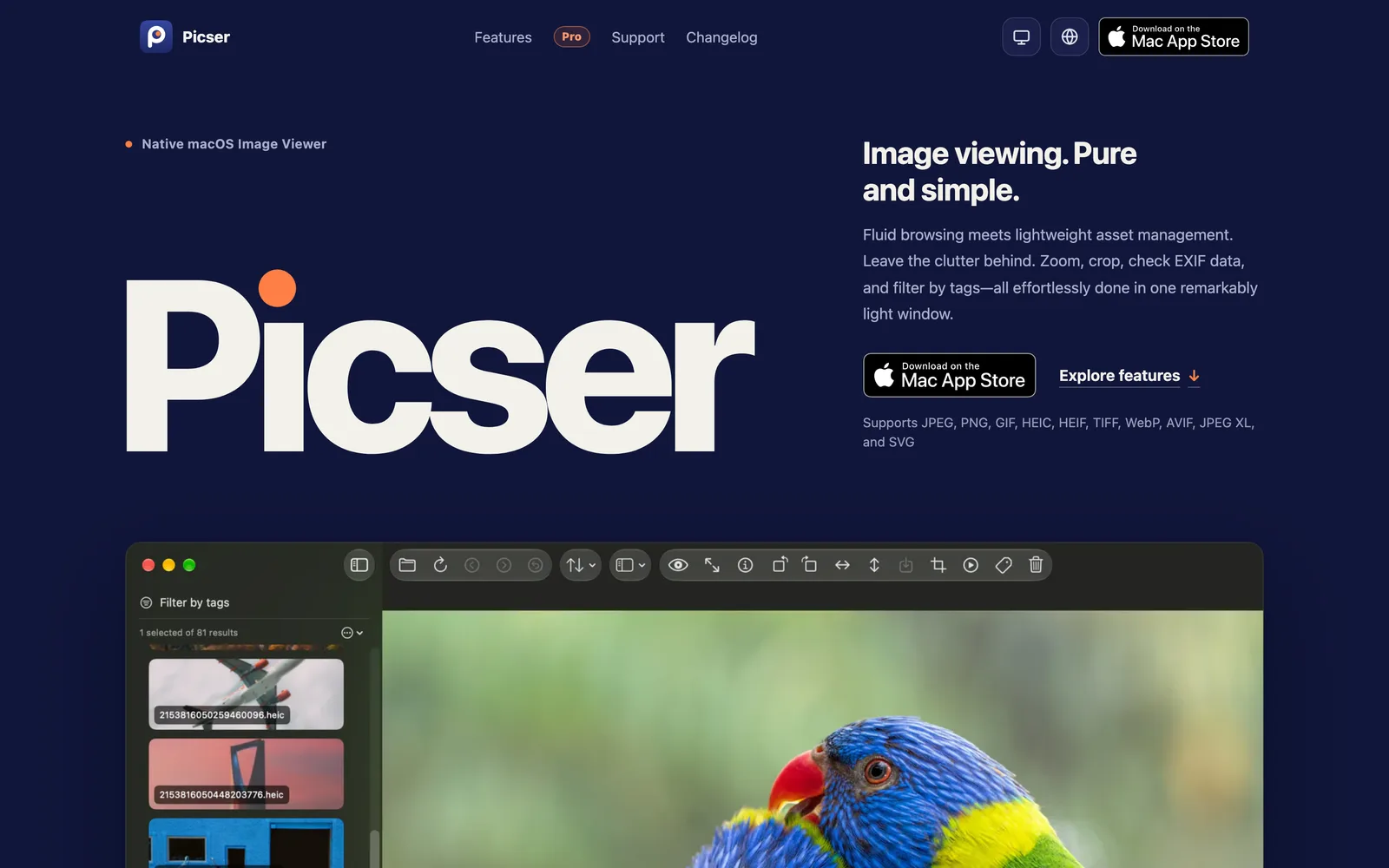
A native macOS image viewer with fast browsing, EXIF viewing, cropping, rotation, tagging, and filtering.
 1 / 5
1 / 5Product facts
- Type
- Web App / SaaS
- Category
- Creativity & Media › Image Editing
- Pricing
- Freemium
- Launched
- Oct 10, 2026
- Listed
- Oct 10, 2026
- Website
- picser.app
Overview
Picser is a native macOS image viewer developed by Eric Cai (Soyotube). It lets you open folders directly to browse and manage images without importing them into a library. **Supported Formats** Picser supports JPEG, PNG, GIF, HEIC, HEIF, TIFF, WebP, AVIF, JPEG XL, and SVG. **Browsing & Viewing** Open images via panels, drag-and-drop, Finder, or the Dock. The app builds directory context for previous/next navigation, sorting, and folder browsing. View modes include a side list, bottom filmstrip, grid layout, plus scroll-wheel zoom, drag-to-pan, pointer-anchored zoom, and a minimap. Press Space for Quick Look; full-screen mode is also supported. Temporary rotation and flipping are available while viewing. **Editing & Exporting** The Pro version adds crop mode, custom aspect ratios, exporting after transforms, exporting crops, format selection, and overwriting the original file. The free version only allows temporary rotation/flipping during viewing and cannot export transformed results. **EXIF & Slideshow** The Pro version includes an EXIF side drawer showing camera settings, file formats, and image metadata, and can play the current image set as a slideshow. **Tagging System** Tagging covers editing, color labels, number-key shortcuts, autocomplete and suggestions, include/exclude filtering, smart filters, statistics, management, and data auditing. All tagging features are Pro-only. **Pricing** - **Free**: Free, includes core browsing features. - **Yearly Subscription**: US$3.99/year with a 7-day free trial, unlocks all Pro features. - **Lifetime License**: US$8.99 one-time purchase, identical features to the yearly plan. All payments are handled securely in-app via the App Store. Picser is ideal for macOS users who need to quickly browse, filter, and lightly manage images within local folders.
Key features
- Native Folder Browsing: Open folders directly—no library import needed—to browse, zoom, crop, and tag images.
- Multi-Format Support: Supports JPEG, PNG, GIF, HEIC, HEIF, TIFF, WebP, AVIF, JPEG XL, and SVG.
- Multiple Layouts: Browse images using a side list, bottom filmstrip, or grid layout.
- Zoom & Pan: Scroll-wheel zoom, drag-to-pan, pointer-anchored zoom, and minimap.
- Quick Look & Full Screen: Press Space for Quick Look; immersive full-screen mode supported.
- Rotate & Flip: Temporary rotation and flipping while viewing; Pro exports transformed images.
- Crop & Export: Pro offers crop mode, custom aspect ratios, format selection, and overwrite original.
- EXIF Viewer: Pro shows camera settings, file format, and metadata in a side drawer.
- Slideshow: Pro plays the current image set as a slideshow.
- Tagging System: Pro supports tag editing, color labels, shortcut tags, autocomplete, and suggestions.
- Smart Filtering: Pro supports include/exclude tag filtering and saving smart filters.
- Pick/Reject Flags: Pro supports Pick/Reject flags, filtering, and moving Reject images to Trash.
Releases
Notify me Initial · Picser
Q&A
- Which image formats does Picser support?AI-generated
- It supports JPEG, PNG, GIF, HEIC, HEIF, TIFF, WebP, AVIF, JPEG XL, and SVG.
- Does Picser require importing a library?AI-generated
- No. Just open a folder to browse and manage images directly—all operations happen in the folder where the images reside.
- What's the difference between the Free and Pro versions?AI-generated
- The free version includes core browsing, zoom, pan, and full screen. Pro adds crop/export, EXIF viewing, slideshows, tagging, and Pick/Reject flags.
- Is there any feature difference between the yearly subscription and lifetime license?AI-generated
- No. Both include exactly the same Pro features; only the payment model differs.
- What platform does Picser run on?AI-generated
- Picser is a macOS app.
- How do I get started with Picser?AI-generated
- Download the app to use the free version. For Pro features, start a 7-day free trial or purchase directly in-app.
Bookmark
This product has no owner yet
It was listed by the platform or its author left. If it is your work, prove your relationship to become the owner.
Claim this productAlternatives

PixelTokb
Compress JPEG, PNG, and WebP images online to a specific target size in KB. All processing happens locally in your browser.
Released 4 days ago2
100% Free

超级制图
科大讯飞旗下的AI专业图片编辑工具,通过描述生成和编辑图片。
Released 3 weeks ago1
Freemium

Face Photo Restorer
Use AI to restore old, blurry face photos and keep your memories alive.
Released 3 weeks ago1
Paid
EditTextPhoto
AI-powered image text editor to edit, replace, fix, or translate text in images while preserving the original font, color, size, and style.
Released last week8
Free trial2

PixPro Library
面向网页端的AI图片处理工具库,可将普通上传按钮升级为智能图片处理中心。
Released 3 weeks ago1
100% Free

抠抠图
免费在线AI抠图与图片编辑工具,支持批量处理,无需专业设计技能。
Released 3 weeks ago0
Freemium

AKOOL
A generative AI platform for marketing creators to produce personalized visual marketing and advertising content.
Released 3 weeks ago3
Paid



The product content on this page was translated by AI from the author's original.