November 18, 2026
VibeOffice.work
A free browser-based office suite for .docx, .xlsx and .pptx files that runs locally without uploads.
Apache-2.0
 1 / 4
Product facts
- Type
- Web App / SaaS
- Category
- Content & Writing › Document Collaboration
- Pricing
- Open source
- License
- Apache-2.0
- Launched
- Nov 18, 2026
- Listed
- Nov 18, 2026
- Website
- vibeoffice.work
Overview
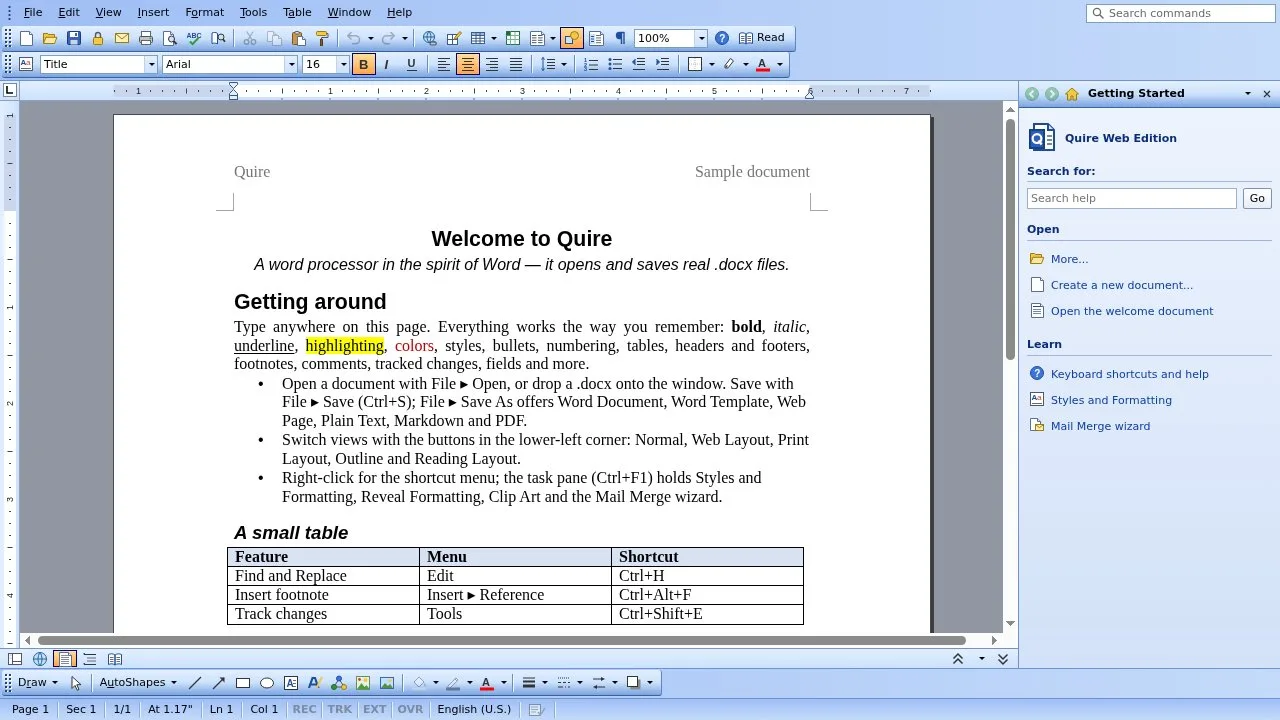
VibeOffice.work is a free office suite that operates entirely within a web browser. It includes three applications: Quire (word processor), Ledger (spreadsheet), and Lectern (presentations). The suite opens and saves standard Office Open XML formats (.docx, .xlsx, .pptx) along with several other file types.
Privacy and local execution
All processing happens on the user's computer. Files are never uploaded to a server, and no account is required. Recent files are cached in the browser so they can be reopened later; this cache can be cleared manually. The project is open source under the Apache License 2.0.
Applications
- Quire: Supports track changes, comments, footnotes, tables of contents, and mail merge. Opens and saves .docx, .rtf, Markdown, HTML, and text files. Can print to PDF.
- Ledger: Provides 519 functions, charts, PivotTable reports, and conditional formatting. Opens and saves .xlsx, .csv, XML Spreadsheet 2003, and HTML. Can print to PDF.
- Lectern: Supports transitions, animations, charts, and IntelliArt diagrams. Opens and saves .pptx. Exports to PDF, PNG, and HTML.
File integrity
When editing a document, any content or formatting that the application cannot modify is preserved as-is. This means a file can be returned to its sender intact even if some elements are not editable within VibeOffice.work.
Interface and offline use
Users can choose between classic menus/toolbars or a ribbon interface via the Themes setting. After the initial visit, the suite works offline. Chrome and Edge users can install it as a local app. UI scaling options range from 100% to 400%, and browser zoom shortcuts also apply.
Language support
Menus and dialogs are available in English, French, German, Simplified Chinese, Traditional Chinese, Japanese, and Korean. New documents use fonts and page setup appropriate to the selected language. The suite renders text using fonts installed on the user's computer, substituting open-source fonts when a specified font is unavailable.
Limitations
If the site is not served over HTTPS, certain browser features are disabled, including password-protected file saving, the Paste button (though Ctrl+V still works), and access to local fonts.
Key features
- Local file processing:Files are opened and saved on the user's computer; nothing is uploaded.
- No account required:The suite works without registration or sign-in.
- Quire word processor:Handles .docx, .rtf, Markdown, HTML, and text with track changes and mail merge.
- Ledger spreadsheet:Provides 519 functions, charts, PivotTables, and conditional formatting for .xlsx and .csv.
- Lectern presentations:Supports transitions, animations, charts, and IntelliArt diagrams for .pptx files.
- Offline capability:Works without an internet connection after the first visit.
- Installable as app:Chrome and Edge users can install the suite as a local application.
- File integrity preservation:Unmodified parts of a document are saved exactly as they were.
- Interface themes:Choose between classic menus and toolbars or a ribbon layout.
- Multi-language UI:Supports English, French, German, Chinese, Japanese, and Korean interfaces.
- UI scaling:Adjust interface size from 100% to 400% or use browser zoom shortcuts.
- Open source:Released under the Apache License 2.0.
Releases
Notify me Initial · VibeOffice.work
Q&A
- Does VibeOffice.work upload my files?AI-generated
- No. Everything runs on your computer. Files are opened and saved locally, and nothing is uploaded.
- Do I need to create an account?AI-generated
- No. VibeOffice.work does not require an account to use.
- What file formats are supported?AI-generated
- Quire handles .docx, .rtf, Markdown, HTML, and text. Ledger handles .xlsx, .csv, XML Spreadsheet 2003, and HTML. Lectern handles .pptx. All apps can output PDF.
- Does it work offline?AI-generated
- Yes. After the first visit, it opens without a connection. Chrome and Edge can also install it as an app.
- What license is VibeOffice.work under?AI-generated
- It is open source under the Apache License 2.0, provided as is without warranty.
- Can I change the interface style?AI-generated
- Yes. Under Themes, you can choose between classic menus and toolbars or a ribbon interface.
- What languages are supported?AI-generated
- English, French, German, Simplified Chinese, Traditional Chinese, Japanese, and Korean.
- Why are some features missing?AI-generated
- If the site is not served over HTTPS, the browser disables features like saving files with a password, the Paste button, and loading local fonts.
- How are recent files stored?AI-generated
- Recent files are kept in the browser only. A copy of each file is stored in the browser cache so it can be reopened. Clear Recent Documents removes them.
- Will editing a file corrupt formatting I cannot edit?AI-generated
- No. What you do not change is saved as it was, even elements the apps cannot edit yet, so files remain intact.
Bookmark
This product has no owner yet
It was listed by the platform or its author left. If it is your work, prove your relationship to become the owner.
Claim this productAlternatives

Mermaid Live Editor
A free, browser-based Mermaid diagram editor with live preview, templates, export, and link sharing.
Released 4 weeks ago22
100% Free

语雀
An online document editing and knowledge base collaboration tool for enterprises, organizations, and individuals.
Released last month10
Freemium

OnlyOffice Web Comp
A frontend-only document component built on the OnlyOffice SDK. View, edit, and convert documents directly in the browser—no backend required.
Released last month6
Open Source

飞书
An AI work platform by ByteDance offering tools for collaboration, organizational management, and business efficiency.
Released last month4
Free trial