
November 11, 2026

Describe your edits in natural language to AI-edit already-shot video clips.
 1 / 8
Product facts
- Type
- Web App / SaaS
- Category
- Creativity & Media › Video Editing
- Pricing
- Paid
- Launched
- Nov 11, 2026
- Listed
- Nov 11, 2026
- Website
- aisma.ai
Overview
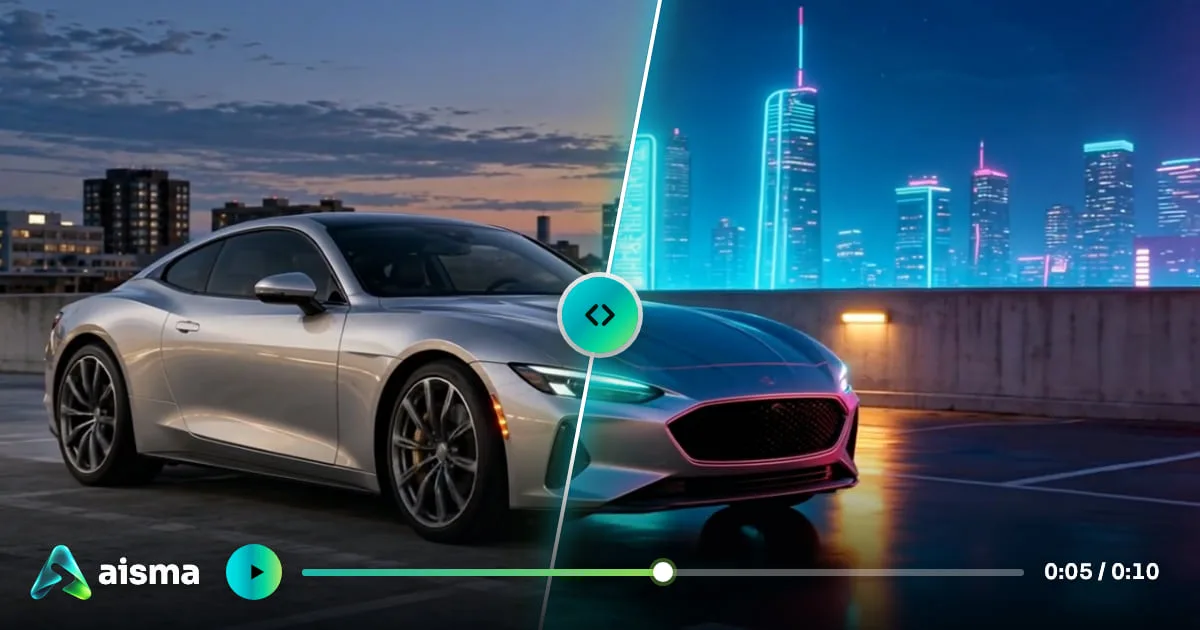
Aisma is a web-based AI video editor designed for footage you've already shot. Instead of picking specific modes, you simply describe the changes you want in a single text box using natural language, and adjust objects, people, clothing, backgrounds, or products in your video.
How It Works Upload an MP4 or MOV video between 2 and 60 seconds long (up to 500 MB) and type your editing instructions into the text box. If you need to target a specific face, outfit, or product, you can attach up to 10 reference photos. Before generation, the system displays the required number of credits for you to confirm.
What Stays and What Changes During processing, Aisma preserves the original video's composition, duration, audio, and camera movement. Only what you specify in your text prompt changes—for example, removing bystanders from the frame, replacing a hallway background with an underwater tunnel, swapping a linen jacket for a black leather one, or transforming the entire visual style into a wool texture.
Key Editing Capabilities
- Remove Objects and People: Describe the appearance and location of unwanted elements to remove them; AI fills the gap based on the surrounding scene.
- Change Clothing: Use text descriptions or reference photos to replace an entire outfit or a single garment.
- Change Backgrounds: Replace scene backgrounds without a green screen while preserving subject motion and camera movement.
- Face and Person Swapping: Provide two clear portrait photos to replace a person in the video with the target face, keeping the original gestures and camera work intact.
- Replace Products: Upload a single product photo to swap an existing item for a new one within the same shot.
- Restyle Video: Specify a material or art style (such as watercolor or clay) to change the look of the footage while preserving its motion.
- Add Effects: Describe physical effects in text, such as scattering flower petals or making a cup float.
Output Specs Processed videos are saved in MP4 format at 720p or 1080p resolution. Users get a private Library in the browser to manage their assets.
Aisma is ideal for creators, e-commerce sellers, and content producers who need to make localized edits or stylize existing video footage.
Key features
- Natural Language Editing: No mode selection needed—just describe the changes you want directly in the text box.
- Remove Objects and People: Describe the look and location of elements to remove, and AI automatically fills in the scene.
- Change Clothing: Use text descriptions or upload reference photos to replace a subject's full outfit or individual garments.
- Change Backgrounds: Replace video backgrounds without a green screen while preserving subject motion and original camera movement.
- Face and Person Swapping: Upload two portrait photos to replace a person in the video with the target face while keeping their original pose.
- Replace Products: Provide a product photo to swap the original item for a new one within the same shot.
- Restyle Video: Specify a material or art style to change the overall look while preserving motion.
- Add Effects: Describe physical effects in text, such as scattering petals or making objects float.
- Reference Photo Support: Upload up to 10 reference photos per edit to specify particular faces, outfits, or products.
- Preserve Original Audio and Video: Edits retain the original composition, duration, audio, and camera movement.
- Cost Preview Before Generation: The system shows the required credits before rendering your video.
Releases
Notify me Initial · Aisma
Q&A
- What video formats and lengths does Aisma support?AI-generated
- It supports MP4 or MOV clips between 2 and 60 seconds long, with a maximum file size of 500 MB. All aspect ratios from vertical to horizontal are supported.
- Will edited videos lose their original audio?AI-generated
- No. Aisma preserves the original video's audio, composition, duration, and camera movement during editing.
- How do I specify the exact clothing or product to replace?AI-generated
- You can upload reference photos when editing, with up to 10 photos supported per edit. Alternatively, you can simply describe the desired style in text.
- What is the resolution of the generated videos?AI-generated
- Output videos are rendered at 720p or 1080p resolution and saved in MP4 format.
- Can I see the cost before generating a video?AI-generated
- Yes. Before you click generate, the system displays the number of credits required for that edit so you can confirm.
- What assets are needed for the face swap feature?AI-generated
- You need to provide two clear reference portrait photos. Aisma places the person from the photos into the video while preserving the original gestures and camera movement. Make sure you have consent from the individuals in the photos.
Bookmark
This product has no owner yet
It was listed by the platform or its author left. If it is your work, prove your relationship to become the owner.
Claim this productAlternatives

Bitcut
Automatically edit long videos into vertical Shorts, Reels, and TikTok clips using AI
Released yesterday7
Freemium
VideoTextRemover
An online AI tool that removes burned-in subtitles, titles, and other on-screen text from MP4 and MOV videos while reconstructing the background.
Released 3 weeks ago22
Freemium

Live Photo Converter
Preview videos and GIFs in your browser, then create Live Photos with the Liveify app on iPhone.
Released 4 weeks ago31
Freemium

Video Background Changer
An online AI tool to remove and replace video backgrounds. Export transparent or solid-color background videos without signing up.
Released 2 weeks ago20
Freemium

Video To Frames
Extract frames from videos in your browser with multiple export modes—no file uploads required.
Released 3 weeks ago22
100% Free

GIF Downloader
Download videos and GIFs from social platforms online, or convert MP4 to GIF in your browser.
Released last month16
100% Free

录咖AI
An online AI audio and video processing platform offering speech-to-text, subtitle generation, video translation, and more.
Released last month4
Freemium

AdHub
AI-powered video ad creation and editing tool. Generate animated ads from a single sentence or edit talking-head videos with one click.
Released 3 weeks ago23
Paid

Online Video Editor
Edit local videos for free in your browser—no login, no file uploads.
Released 3 weeks ago16
100% Free

短影AI
An AI-powered local offline tool that helps content creators turn long videos into multiple short clips with one click.
Released last month14
Paid
The product content on this page was translated by AI from the author's original.