
November 8, 2026
AnyImg
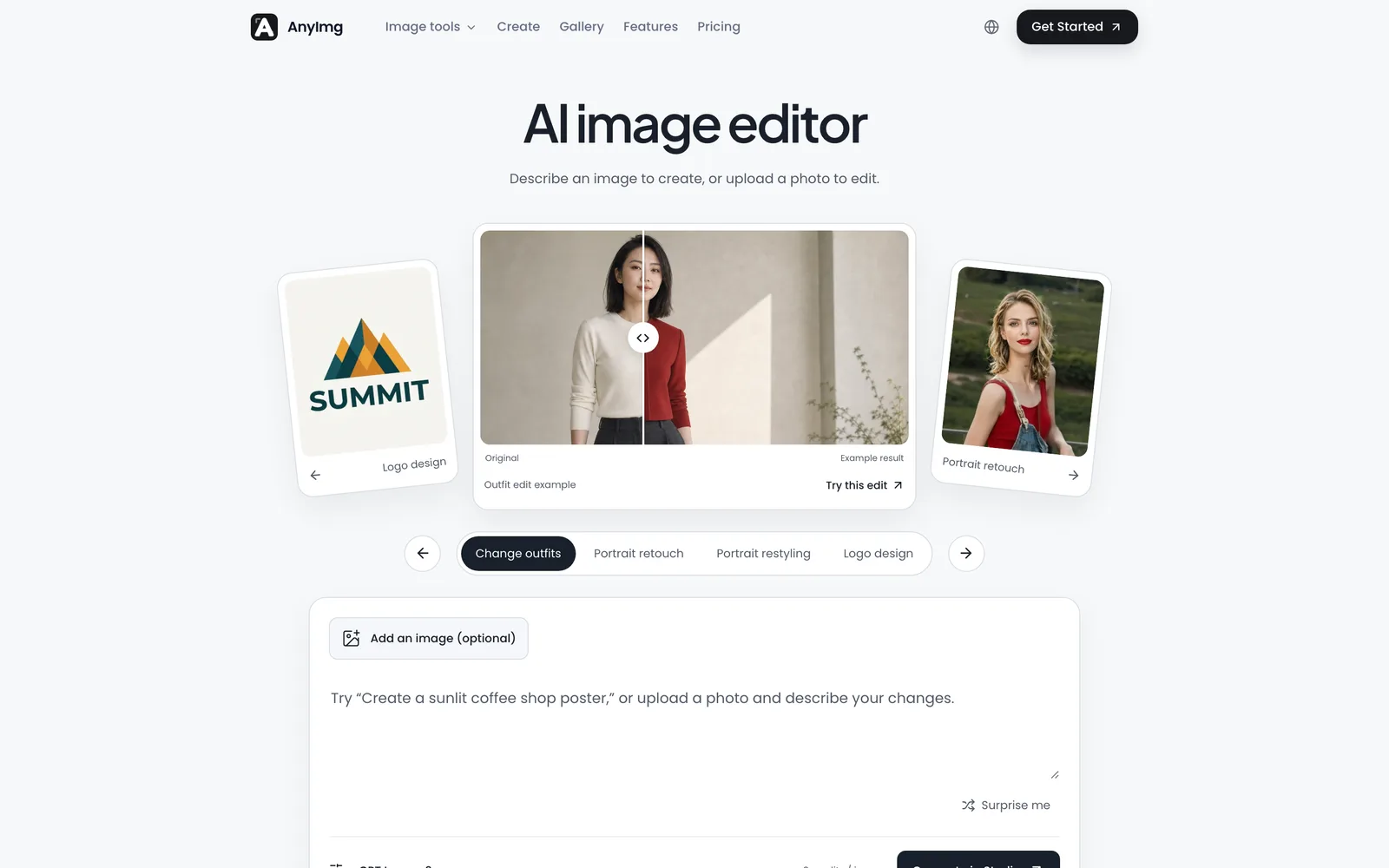
A prompt-based AI image editor that edits, retouches, and generates images through natural language descriptions.
 1 / 7
Product facts
- Type
- Web App / SaaS
- Category
- Creativity & Media › Image Editing
- Pricing
- Freemium
- Launched
- Nov 8, 2026
- Listed
- Nov 8, 2026
- Website
- anyimg.ai
Overview
AnyImg is an AI image editor and generator that runs in your web browser. Describe what you want to create or modify in natural language, or upload a photo to edit.
Core Capabilities
- Prompt Editing: Describe your needs in text—such as removing objects, replacing backgrounds, portrait retouching, or style transfer—and the system calls the appropriate model to execute it.
- Multi-Model Support: Currently supports GPT Image 2, Nano Banana Pro, and Nano Banana 2. Switch models per task or let the system choose automatically.
- Local Control: Select specific areas of an image and describe the changes in natural language. The composition, lighting, and pixels outside the selection remain untouched.
- Consistent Output: Upload reference images of people, products, or brands to maintain a unified visual language across multiple assets.
- Version Trail: Each edit creates a visible branch, allowing you to compare directions, revert to the original, or keep iterating from any point—rather than relying on a simple undo stack.
- Batch Delivery: Extend a confirmed direction into key visuals, social media graphics, website hero images, product detail shots, and more.
Settings
Supports various aspect ratios (1:1, 4:3, 16:9, 9:16, 21:9, etc.) and resolutions (Auto, 1K, 2K, 4K). Upload up to 4 images per session, each no larger than 10 MB.
Use Cases
AnyImg offers tools for AI outfit changes, white-background product photography, style transfer, and text-based image editing. Ideal for commercial applications such as brand design, product visuals, ad creatives, cover design, and spatial scene generation. Paid plans include full commercial usage rights and unlimited downloads.
Key features
- Prompt Editing: Describe your edits in natural language, and the system automatically calls the right model to execute them.
- Multi-Model Switching: Supports GPT Image 2, Nano Banana Pro, and Nano Banana 2, switchable on demand.
- Precise Local Control: Edit selected areas while preserving the composition, lighting, and pixels of the rest.
- Visual Consistency: Upload reference images to maintain unified character, product, and brand visuals across multiple assets.
- Version Trail: Each edit creates an independent branch for comparing directions, reverting to the original, or continuing iteration.
- Batch Asset Generation: Expand a confirmed direction into key visuals, social graphics, hero images, and more.
- Portrait Retouching & Outfit Changes: Supports portrait editing, makeup adjustments, and clothing swaps.
- Product Background Replacement: Swap product backgrounds or generate white-background product photos.
- Style Transfer: Convert images into specified artistic or visual styles.
- Text-Based Image Editing: Edit image content directly by typing text instructions.
- Multi-Resolution Output: Supports Auto, 1K, 2K, and 4K resolutions with various aspect ratios.
Releases
Notify me Initial · AnyImg
Q&A
- What is AnyImg?AI-generated
- AnyImg is a conversational AI image editor. Describe your edits in natural language, and the system automatically selects the best model to carry them out.
- Is AnyImg free?AI-generated
- You receive free credits upon sign-up, which work with all supported models. Paid plans offer more credits and priority generation queues.
- Which AI models are supported?AI-generated
- Currently supports GPT Image 2, Nano Banana Pro, and Nano Banana 2, with more models coming soon. You can switch models per edit or let the system choose automatically.
- Can I use edited images commercially?AI-generated
- Yes. Paid plans include full commercial usage rights and unlimited downloads.
- How are credits deducted? What happens if a task fails?AI-generated
- Credit consumption depends on the selected model and resolution. If a generation task fails, the deducted credits are automatically refunded.
- Can I cancel my subscription?AI-generated
- You can cancel anytime in your Billing settings. After cancellation, you can continue using the service until the current billing cycle ends.
- Are there limits on image uploads?AI-generated
- You can upload up to 4 images at a time, each no larger than 10 MB.
Bookmark
This product has no owner yet
It was listed by the platform or its author left. If it is your work, prove your relationship to become the owner.
Claim this productAlternatives
Picslimly Image Tools
A free, browser-based image toolkit for compressing, converting, cropping, and more—no file uploads required.
Released yesterday1
100% Free

ImagEditorAI
An online AI image editor powered by natural language prompts. Remove objects, replace backgrounds, or restore old photos—no sign-up required.
Released 3 days ago5
Freemium

photoeditor.ai
A browser-based AI image editing and generation platform offering 30+ specialized tools, free to use with no sign-up required.
Released last week17
Freemium
Edit Image Text
Edit text in images online with AI—replace content while matching the original style.
Released 3 weeks ago4
Freemium
MergePNG
Merge PNGs and images privately in your browser
Released yesterday1
100% Free

GifSmaller
Compress GIFs to any size in your browser—free, no sign-up, and files never leave your device.
Released 3 days ago12
100% Free
PixRemove
Remove image backgrounds and unwanted objects with AI. Free to use, no sign-up required, no watermarks.
Released 3 weeks ago14
Freemium

pngdeer
Open-source PNG compression tool that runs locally in the browser, finding the smallest palette that preserves visual quality.
Released 3 weeks ago7
Open Source
AI Photo Editor
An AI-powered online image editing and generation tool that creates, modifies, and restyles images using text prompts.
Released 3 days ago3
Freemium

Cleanup.pictures
An AI-powered web photo editing tool that helps users remove unwanted objects, people, text, and blemishes from photos.
Released last week19
Freemium
The product content on this page was translated by AI from the author's original.