
November 18, 2026

GifSmaller
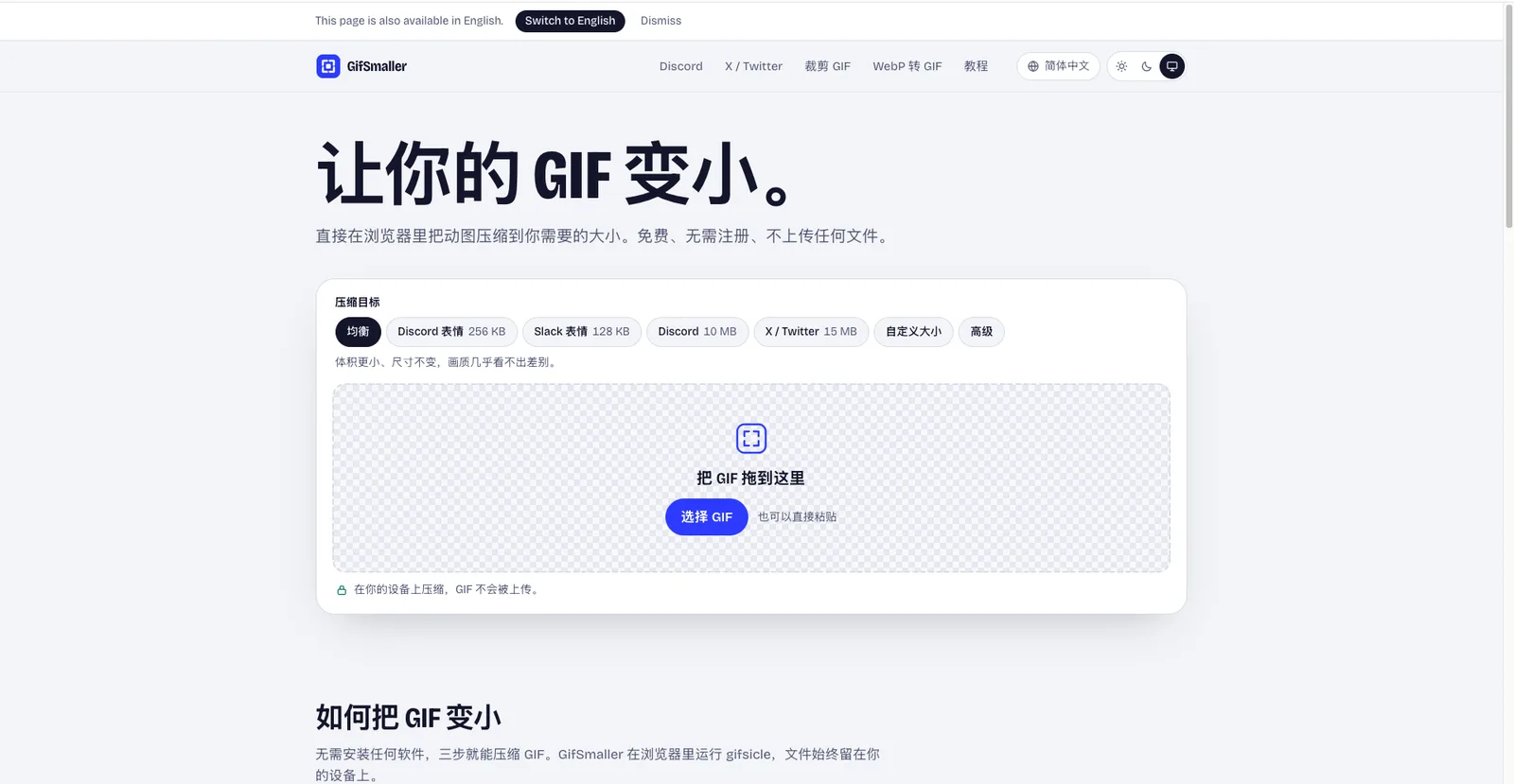
Compress GIFs to any size in your browser—free, no sign-up, and files never leave your device.
 1 / 2
Product facts
- Type
- Web App / SaaS
- Category
- Creativity & Media › Image Editing
- Pricing
- Free
- Launched
- Nov 18, 2026
- Listed
- Nov 18, 2026
- Website
- gifsmaller.com
Overview
GifSmaller is a browser-based online GIF compression tool. It runs the gifsicle engine locally via WebAssembly to compress GIF files to a user-specified target size, and files never leave your device throughout the process.
The problem it solves
Different platforms impose strict file size limits on uploaded GIFs. For example, Discord custom emojis must be under 256 KB, while X (Twitter) caps uploads at 15 MB. GifSmaller offers presets for these platforms and also accepts custom target sizes, helping you quickly resize animations to meet requirements.
Key capabilities
- Multiple compression targets: Built-in presets include "Balanced", Discord emoji (256 KB), Slack emoji (128 KB), Discord upload (10 MB), and X / Twitter (15 MB). You can also enter a custom size manually.
- Smart compression strategy: Once a target is set, the tool first tries lossless optimization to strip redundant data, then finds the lowest lossy level that meets the goal, and only resizes as a last resort.
- Batch processing: Add multiple GIFs at once to process them sequentially, then download them bundled in a .zip file.
- Multiple input methods: Drag and drop, select from your device, or paste a GIF directly.
- Privacy protection: All compression happens in your browser; no file copies are stored on any server.
Who it's for
Users who need to upload GIFs to platforms like Discord, Slack, or X but are limited by file size; privacy-conscious users who don't want to upload files to third-party servers; and anyone who prefers working directly in a desktop or mobile browser without installing extra software.
Key features
- Platform presets: Built-in file size limits for Discord, Slack, X, and more—compress with one click.
- Custom target size: Beyond presets, manually enter any target file size for compression.
- Local browser compression: Runs gifsicle in the browser via WebAssembly, so files are never uploaded to a server.
- Smart compression strategy: Tries lossless optimization, the lowest lossy level, and resizing in sequence to hit the target size.
- Batch processing & packaging: Add multiple GIFs to compress one by one, then download them as a .zip archive.
- Multiple input methods: Drag and drop, click to select, or paste GIF files directly.
- Before/after preview: Compare the original and compressed results before downloading.
- Mobile compatible: Works on iPhone, Android, and desktop in modern Safari, Chrome, Firefox, and Edge.
Releases
Notify me Initial · GifSmaller
Q&A
- How do I shrink a GIF without losing quality?AI-generated
- Choose "Balanced" mode. It first removes redundant data losslessly, then applies slight lossy compression that's barely noticeable, keeping the dimensions and frame count unchanged.
- Are my GIFs uploaded to a server?AI-generated
- No. Compression happens entirely in your browser via WebAssembly, so your files never leave your device.
- How do I compress a GIF under 256 KB for a Discord emoji?AI-generated
- Select the "Discord emoji" target. GifSmaller first scales the GIF to Discord's emoji display size of 128 px, then compresses it below 256 KB.
- How does lossy compression affect a GIF?AI-generated
- Lossy compression lets the encoder slightly alter pixels for better compression ratios. Low levels are nearly invisible; higher levels introduce grain or noise, especially in gradient areas.
- Why is my GIF still too large?AI-generated
- Long or high-resolution GIFs contain many frames and pixels. If resizing still can't hit the target, GifSmaller shows the smallest result possible. Try a larger target size or trim the GIF first.
- Is GifSmaller free? Does it add watermarks?AI-generated
- It's completely free, requires no account, adds no watermarks, and has no file count limits.
- Can I use it on iPhone and Android?AI-generated
- Yes. It works on phones, tablets, and desktops in modern Safari, Chrome, Firefox, and Edge.
- Can I compress multiple GIFs at once?AI-generated
- Yes. Add multiple files at once and they'll be compressed one by one. When finished, you can download them bundled in a .zip file.
Bookmark
This product has no owner yet
It was listed by the platform or its author left. If it is your work, prove your relationship to become the owner.
Claim this productAlternatives
Picslimly Image Tools
A free, browser-based image toolkit for compressing, converting, cropping, and more—no file uploads required.
Released yesterday3
100% Free

ImagEditorAI
An online AI image editor powered by natural language prompts. Remove objects, replace backgrounds, or restore old photos—no sign-up required.
Released 3 days ago7
Freemium

AnyImg
A prompt-based AI image editor that edits, retouches, and generates images through natural language descriptions.
Released last week12
Freemium

Edit Image Text
Edit text in images online with AI—replace content while matching the original style.
Released 3 weeks ago4
Freemium
MergePNG
Merge PNGs and images privately in your browser
Released yesterday3
100% Free

Cleanup.pictures
An AI-powered web photo editing tool that helps users remove unwanted objects, people, text, and blemishes from photos.
Released last week21
Freemium

AI Photo Editor
An AI-powered online image editing and generation tool that creates, modifies, and restyles images using text prompts.
Released 3 days ago4
Freemium

photoeditor.ai
A browser-based AI image editing and generation platform offering 30+ specialized tools, free to use with no sign-up required.
Released last week18
Freemium

PixRemove
Remove image backgrounds and unwanted objects with AI. Free to use, no sign-up required, no watermarks.
Released 3 weeks ago18
Freemium

pngdeer
Open-source PNG compression tool that runs locally in the browser, finding the smallest palette that preserves visual quality.
Released 3 weeks ago9
Open Source
The product content on this page was translated by AI from the author's original.