
November 8, 2026

photoeditor.ai
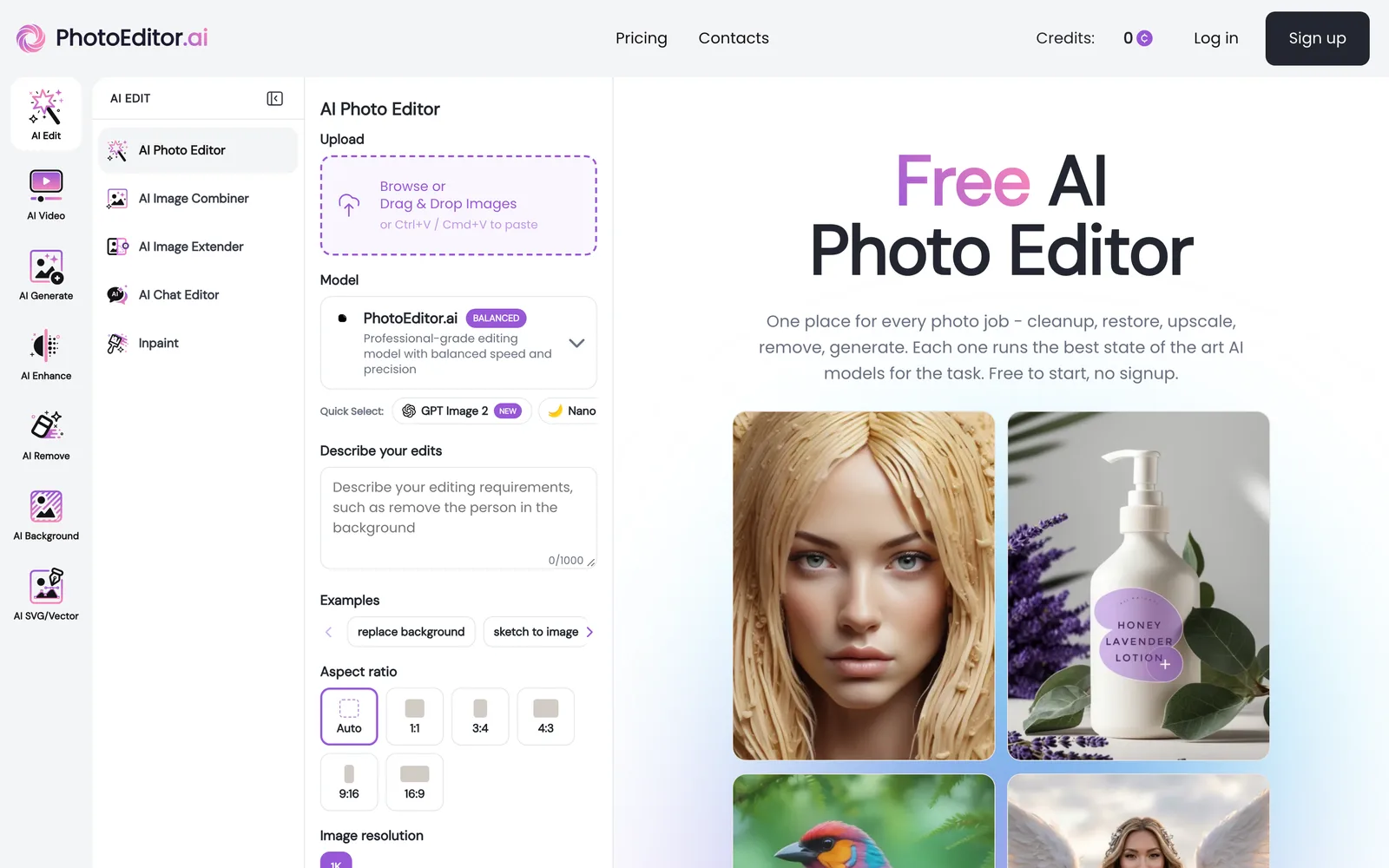
A browser-based AI image editing and generation platform offering 30+ specialized tools, free to use with no sign-up required.
 1 / 8
Product facts
- Type
- Web App / SaaS
- Category
- Creativity & Media › Image Editing
- Pricing
- Freemium
- Launched
- Nov 8, 2026
- Listed
- Nov 8, 2026
- Website
- photoeditor.ai
Overview
photoeditor.ai is a web-based AI image processing platform that integrates over 30 purpose-built tools covering categories such as image editing, generation, enhancement, removal, background processing, watermark removal, and SVG conversion.
The platform's core design philosophy is to match each specific task with a benchmarked AI model (such as Nano Banana, GPT Image, Gemini, SeeDream, Qwen, and proprietary fine-tuned models). Users can also manually switch models in the settings. Editing methods include describing changes via text prompts, painting over specific areas with a brush, or uploading reference images for the AI to follow the style.
Key capabilities include:
- Image Restoration & Enhancement: Fixes blur, low-light noise, faded scans, JPEG corruption, and more, with support for old photo restoration.
- Resolution Upscaling & Expansion: Supports 4K and 8K upscaling, plus generative outpainting to extend the canvas.
- Content Removal: Erases unwanted elements like bystanders, text, and watermarks from backgrounds, with AI automatically reconstructing occluded areas.
- Background Processing: One-click cutout that preserves edge details like hair, fur, and glass, supporting background replacement or transparent PNG export.
- Image Generation: Creates portraits, logos, product photos, vector graphics, and illustrations based on text prompts or reference images.
photoeditor.ai requires no app installation and works on desktop browsers, iPhone, and Android devices. It supports uploads in JPG, PNG, HEIC, AVIF, or WEBP formats, up to 15MB per file. All uploaded files are encrypted in transit, processed in an isolated environment, and deleted within 1 hour. They are never used for AI model training or shared with third parties. Generated images and edits are cleared for commercial use, including client deliverables, product listings, social ads, and brand assets.
Ideal for individuals, creative agencies, real estate professionals, e-commerce sellers, photographers, and designers.
Key features
- 30+ Specialized AI Tools: Covering editing, generation, enhancement, removal, background processing, watermark removal, and SVG conversion—each optimized for a single task.
- Task-Matched Best Models: Each tool defaults to a benchmarked AI model, and users can manually switch at any time in settings.
- Multiple Editing Interactions: Guide the AI by entering text prompts, brushing over areas, or uploading reference images.
- Image Restoration & Enhancement: Fixes blur, noise, fading, and JPEG corruption; supports old photo restoration for portraits and prints.
- 4K/8K Upscaling & Canvas Expansion: Supports high-resolution upscaling and extends original canvas edges via generative outpainting.
- Smart Content Removal: Erases unwanted elements like bystanders, text, and watermarks while AI automatically reconstructs occluded backgrounds.
- One-Click Cutout & Background Replacement: Precisely handles hair, fur, and glass edges; supports transparent PNG export, background replacement, or blur.
- Text & Reference Image Generation: Creates portraits, logos, product photos, vector graphics, and illustrations from prompts or reference images.
- Cross-Platform Browser Access: No app installation needed—runs directly in desktop browsers, on iPhone, and on Android devices.
- Privacy Protection: Uploads are encrypted in transit, processed in an isolated environment, deleted within 1 hour, and never used for training or shared.
- Commercial Use Allowed: AI outputs can be used for client deliverables, product listings, social ads, brand assets, and print materials.
Releases
Notify me Initial · photoeditor.ai
Q&A
- What is photoeditor.ai?AI-generated
- It is a free, browser-based AI image processing platform featuring over 30 purpose-built tools across categories like editing, generation, enhancement, removal, background processing, watermark removal, and SVG conversion.
- Is photoeditor.ai free?AI-generated
- Some features are free. Tools like Cleanup, Remove Background, and Enhance can be used without signing up, with free downloads up to 720px resolution. HD and 4K exports, along with the full set of 30+ tools, require a PRO subscription.
- Which AI models does it use?AI-generated
- The platform benchmarks Nano Banana, GPT Image 2, Gemini, SeeDream, Qwen, and proprietary fine-tuned models, assigning the best-performing one to each tool by default. Users can also switch models manually.
- What image formats and sizes are supported?AI-generated
- You can upload images in JPG, PNG, HEIC, AVIF, or WEBP format, with a maximum file size of 15MB per image.
- Are my uploaded images safe?AI-generated
- All uploaded files are encrypted in transit, processed on isolated worker nodes, and deleted within 1 hour. They are never used for AI model training, nor sold or shared with third parties.
- Can generated images be used for commercial projects?AI-generated
- Yes. AI-edited and generated results can be used commercially for product listings, client deliverables, social ads, brand assets, and print materials. However, users are responsible for the copyright of their source images.
- Do I need to download an app?AI-generated
- No. It runs directly in your browser on any device—no need to download anything from the App Store or Play Store.
Bookmark
This product has no owner yet
It was listed by the platform or its author left. If it is your work, prove your relationship to become the owner.
Claim this productAlternatives
Picslimly Image Tools
A free, browser-based image toolkit for compressing, converting, cropping, and more—no file uploads required.
Released yesterday1
100% Free

ImagEditorAI
An online AI image editor powered by natural language prompts. Remove objects, replace backgrounds, or restore old photos—no sign-up required.
Released 3 days ago6
Freemium

AnyImg
A prompt-based AI image editor that edits, retouches, and generates images through natural language descriptions.
Released last week12
Freemium

Edit Image Text
Edit text in images online with AI—replace content while matching the original style.
Released 3 weeks ago4
Freemium
MergePNG
Merge PNGs and images privately in your browser
Released yesterday1
100% Free

GifSmaller
Compress GIFs to any size in your browser—free, no sign-up, and files never leave your device.
Released 3 days ago12
100% Free
PixRemove
Remove image backgrounds and unwanted objects with AI. Free to use, no sign-up required, no watermarks.
Released 3 weeks ago16
Freemium

pngdeer
Open-source PNG compression tool that runs locally in the browser, finding the smallest palette that preserves visual quality.
Released 3 weeks ago7
Open Source
AI Photo Editor
An AI-powered online image editing and generation tool that creates, modifies, and restyles images using text prompts.
Released 3 days ago4
Freemium

Cleanup.pictures
An AI-powered web photo editing tool that helps users remove unwanted objects, people, text, and blemishes from photos.
Released last week19
Freemium
The product content on this page was translated by AI from the author's original.